FCA‐22InstructionManual
Page12
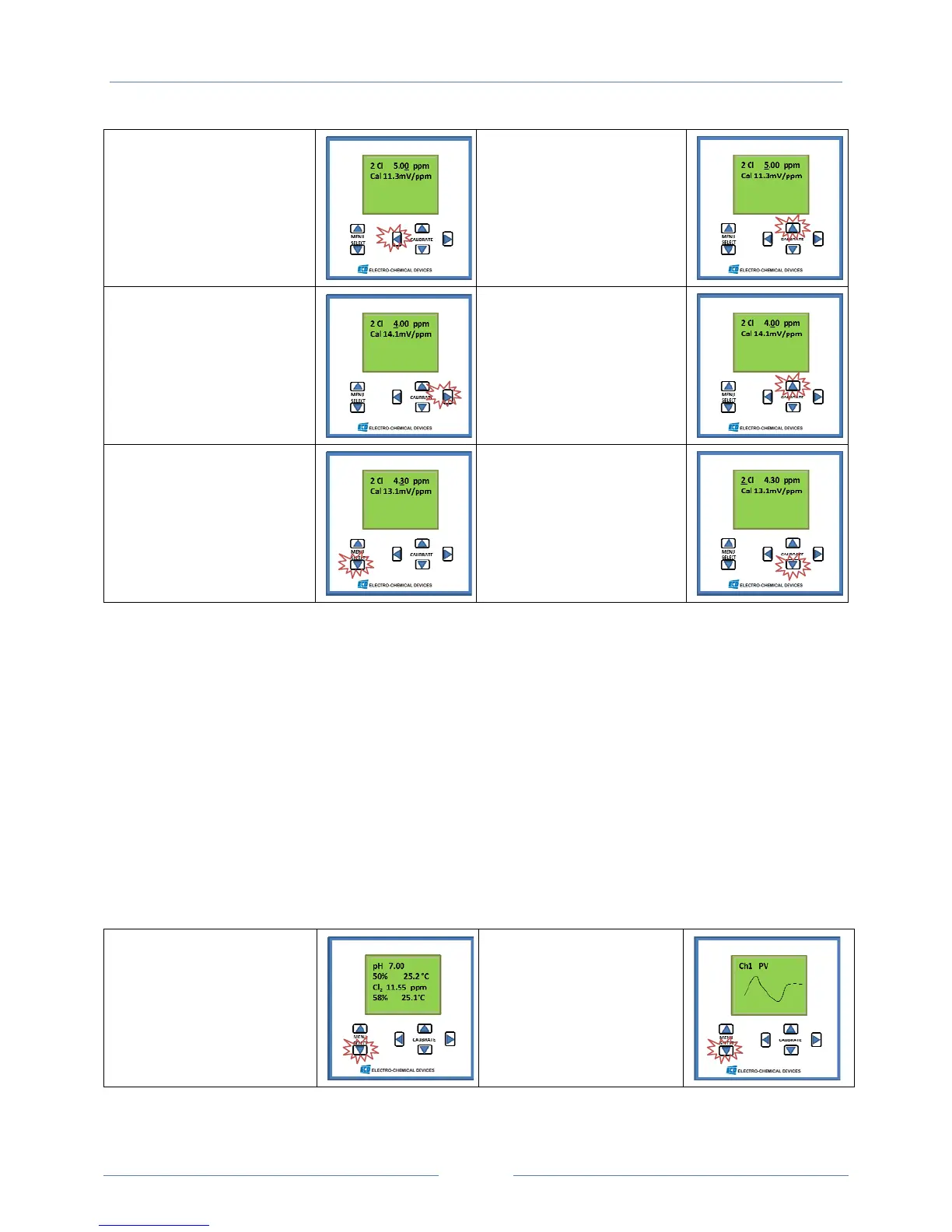
#9SettingtheChlorine
ppm
Usethehorizontal
CALIBRATEkeytoselectthe
digittobeadjusted.Setthe
screenvaluetotheDPDtest
reading.
#10AdjustingtheValue
Adjustthenumericvalue
withtheverticalCALIBRATE
keys.Adjustlargestdigit
first.
#11AdjustingtheValue
Movetothenextdigittobe
adjustedwiththehorizontal
Calibratekeys.
#12AdjustingtheValue
Adjustthenumericvalue
withtheverticalCALIBRATE
keys.
Oncethevaluehasbeen
settheanalyzerreading
willstabilize.
#13Acceptingthe
Calibration
Acceptthecalibrationby
pressingtheMenuSelect
downkey.
#14ReturntotheHome
Screen
LeavetheCalibrationScreen
andreturntotheHome
Screenbypressingthe
CALIBRATEdownkey.
CommissioningOutputs
4‐20mARange
TheFCA224‐20mAoutputisconfigured0‐20ppmFreeChlorine.TheRangecanbesettoothervalues
toaccommodatetheuser’srequirementintheSetUpMenu.To accesstheSetUpmenuscrolldown
fromtheHomeScreenusingthedownME
NUSELECTkey.Enterthemenubysimultaneouslypressing
thehorizontalCALIBRATEkeysandthenscrolldowntothe4mAscreenusingtheMENUSELECTkey.
AdjustthevaluewiththeCALIBRATEkeysandacceptthechangewiththedownMENUSELECTkey.
Repeatforthe20mAscreen.Formoredetailsseeth
eC‐22Manual.
Settingthe4‐20mARangeScreenShots
#1HomeScreen
PressMenuSelect
Downbutton
#2GraphicalDisplay
PressMenuSelect
Downbutton



 To Next Page