41
EN
The ambient temperature rises to ≥17°C, the compressor is switched on again.
Remote controller
5
6
7
8
9
0
1
2
3
4
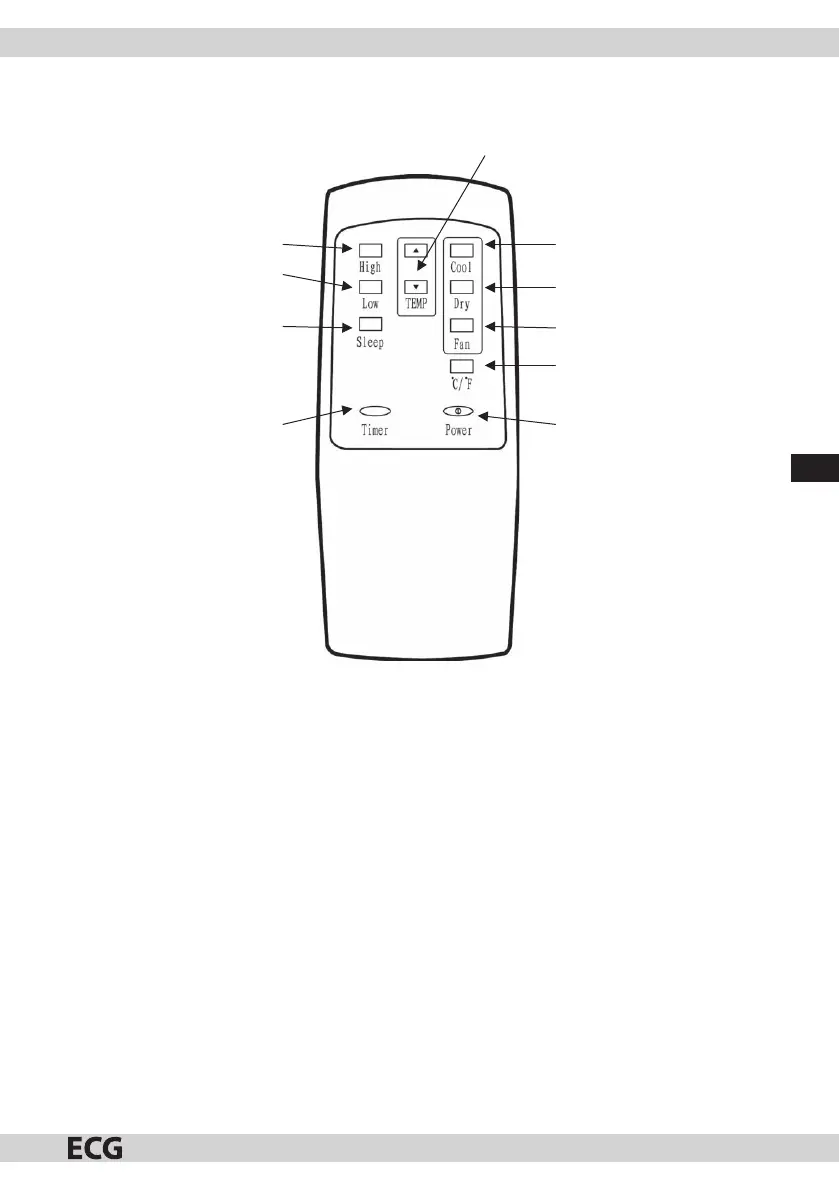
Fig. 14
1. High (High speed): switching the fan speed to high (apart from drying and sleep modes).
2. Low (Low speed): switching the fan speed to low.
3. Sleep (Sleep mode): switch the device to sleep mode.
4. Timer: if the device is o , press this button to con gure the time at which the device should switch on. if
the device son, press this button to con gure the time at which the device should switch o .
5. TEMP up/down: reducing/increasing the temperature or timer value.
6. Cool: switch to cooling mode.
7. Dry: switch to dehumidi cation mode.
8. Fan: switch to fan mode.
9. °C/ F: switch between Celsius and Fahrenheit units.
10. Power (ON/OFF): switching the device ON/OFF.
Note:
1. The remote controller only works up to adistance of 8 metres from the device and there should be no
obstacles between the device and controller.
2. Use 2 AAA/1.5 Valkaline batteries and mind the polarity when inserting them into the remote controller.
3. If you do not plan to use the remote controller for alonger period of time, remove the batteries to prevent
the air-conditioner spontaneously starting or leaking batteries that would damage the remote controller.
4. Always remove both batteries.


 To Next Page