44
EN
Cleaning the handle and the remote controller compartment
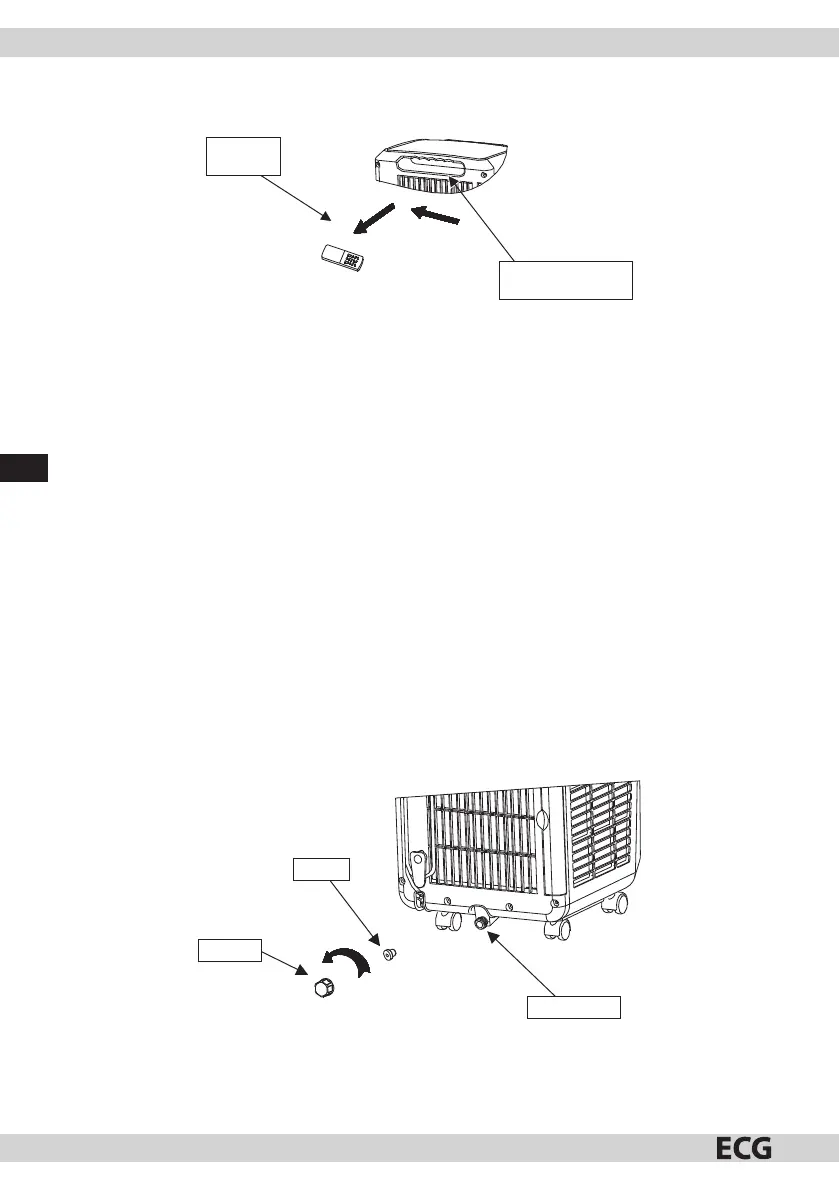
1. Remove the remote controller from its compartment in the direction indicated by the arrow (see g. 18).
Remote
controller
Remote controller
compartment
Fig. 18
2. Clean the handle and remote controller compartment with a slightly moist soft towel. Prevent water
dripping into the device.
3. If you need to place the remote controller back into its compartment for storage, insert the remote
controller in amanner opposite to the removal process.
DRAINING WATER
Manual draining: (see g. 19)
1. When the device is switched o during the water lling process, turn the power switch o and disconnect
the power cord.
Note: move the device carefully to prevent water pouring out of the container in the bottom part of the
device.
2. Place awater container under the water drain on the back side of the device.
3. Unscrew the drain lid, remove the stopper and water will be drained into the container that will
automatically retain the water.
Note: Protect the drain lid and stopper and gently tilt the device back when draining water. If the water
container cannot hold all of the water in the device, apply the stopper to the water drain to prevent
water leaking on the oor or carpet.
4. After the water is completely drained, apply the stopper and rmly close the drain lid.
Note: Turn the device on only with the stopper and drain lid properly installed; otherwise the water
condensing in the device will leak onto the oor or carpet.
Water discharge
Drain lid
Stopper
Fig. 19
Continuous draining:
1. Unscrew drain lid in the direction indicated by arrows and remove the stopper ( g. 19).


 To Next Page