22 6 INCH CHIPPER
SERVICE & MAINTENANCE
WARNING
BEFORE INSPECTING OR SERVICING ANY PART OF THIS MACHINE, SHUT OFF POWER SOURCE, DISENGAGE THE
HYDRAULICS, OPEN SHIELD AND MAKE SURE ALL MOVING PARTS HAVE COME TO A COMPLETE STOP.
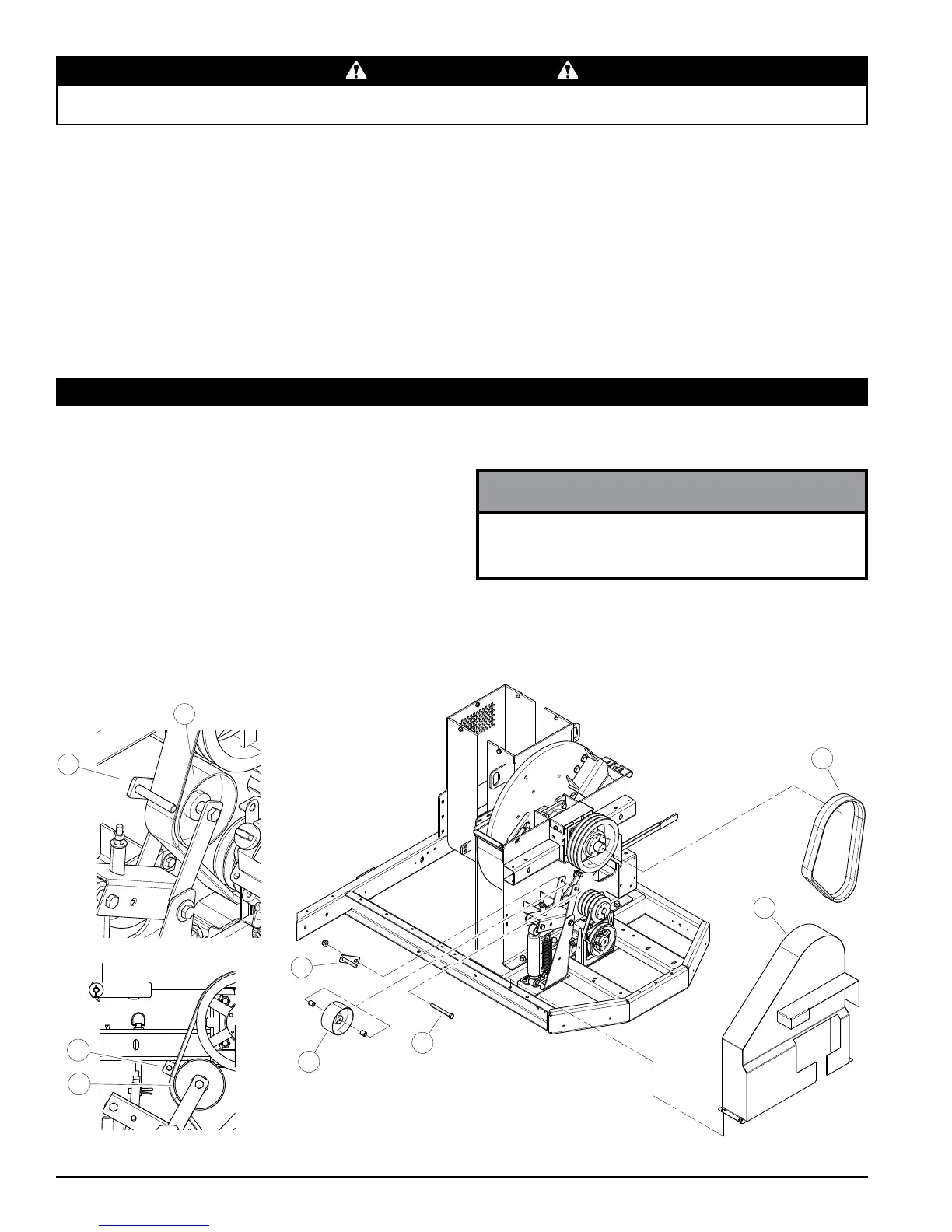
5.11.1 REPLACING ROTOR DRIVE BELT
Check the condition of the drive belt annually or after every 50 hours of operation, whichever comes rst. If the belt is
cracked, worn, frayed, or stretched, replace it.
To replace the belt:
1. Remove the belt guard (1).
2. Remove idler pulley (2) by removing its 1/2 x 4-1/2" bolt
(3), spacers, washer and nut.
3. Remove the drive belt (4) from the pulleys and discard.
4. Inspect pulleys for wear. Replace the pulleys if they are cracked or worn so that the belt contact area is not smooth
and at.
5. Install new belt on pulleys and lower belt idler.
If belt does not easily install, turn the two belt tension
bolts counterclockwise an equal number of turns and
slide engine closer to chipper until belt can be installed.
NOTE
4. Turn check valve clockwise to engage the jack pump.
5. Pump the handle to raise the feed roller until the lock
pin position aligns with one of the support bracket
holes.
6. Secure the position by putting the lock pin through the
support bracket and lock pin position.
7. Clean the debris away from the chipper rotor. Turn
the rotor by hand to be sure it is free to rotate. Be
careful to avoid the chipper blades when cleaning out
the debris.
5.11 DRIVE BELTS
1
2
3
4
5
5
2
5
2
Figure 5.7, Replacing Rotor Drive Belt
8. Remove the lock pin and put it back in storage
position. LEAVING THE LOCK PIN IN ANY OTHER
POSITION MAY INTERFERE WITH FEED ROLLER
OPERATION.
9. Turn the check valve counterclockwise to disengage
the pump and lower the jack.
10. Close access cover and replace bolts.
11. Start the engine. Follow start up procedures in
Section 4.1.




 To Next Page