39
Readout 1 : Depth
Possible to chan
it size of depth indication.
Select [5. OTHERS] → [4. READOUT 1] →
[1.DEPTH DIG] in Menu 2.
1
O
FF :OFF
S : Small digit indication
2
L : Large digit indication
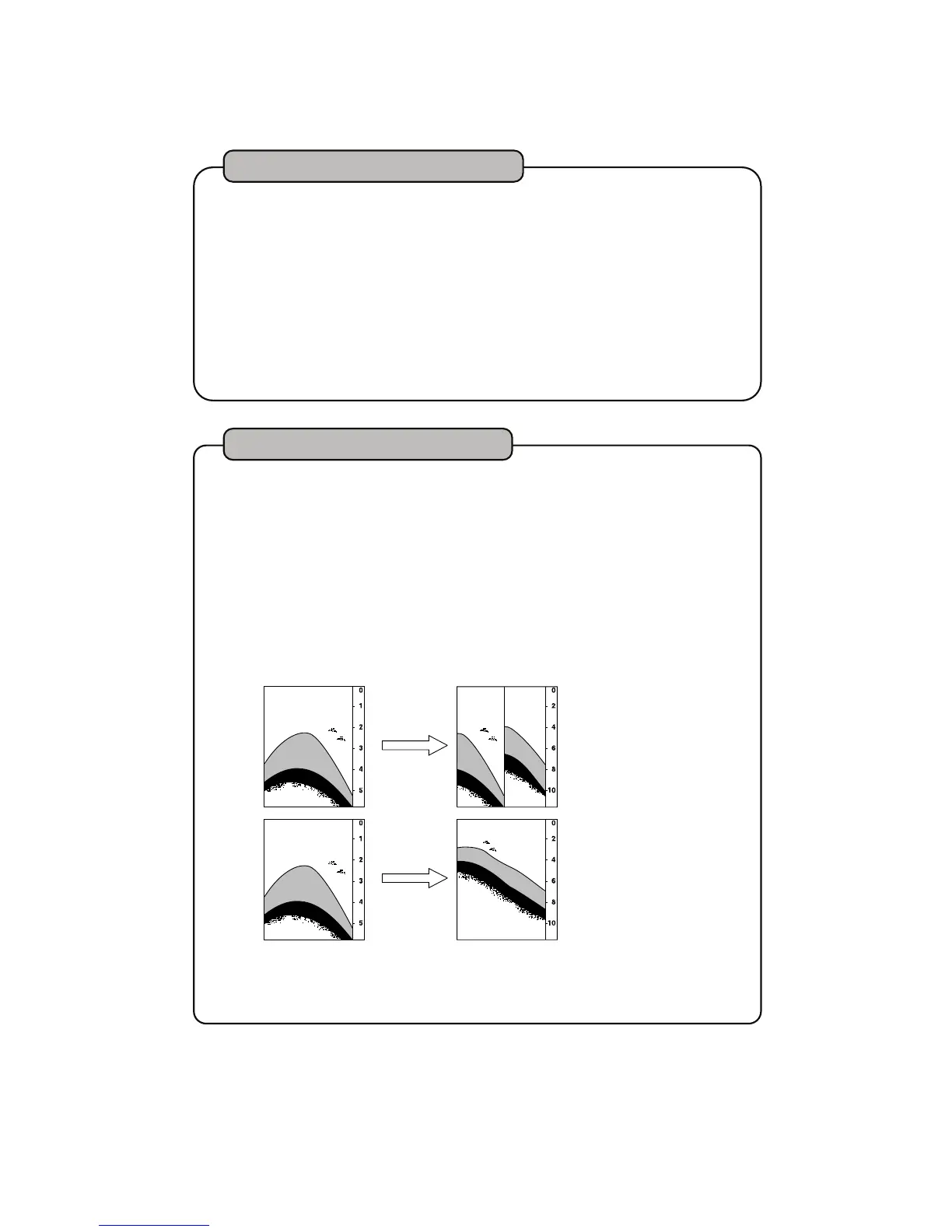
Readout 1 : Super Range
Whole picture keeps rewriting according to the changed depth (synchronized
to the current displayed range).
S
1
elect [5. OTHERS] → [4. READOUT 1] →
[2. SUPER RANGE] in Menu 2.
O
N : Rewrite the previous image.
OFF : No synchronization
2
(No rewrite of the previous image)
Change to
dee
e
OFF No rewriting of previous image
Change to
deeper range
ON Rewrite previous image
※
When moving from shallow to deep water range with super range ON, no
information will be displayed for the depth outside of previous selected range.


 To Next Page