Page 9 of 20 2/3/2010 @ 9:00 AM
Pre-Scan Label -F2 Key (supplementary data input)
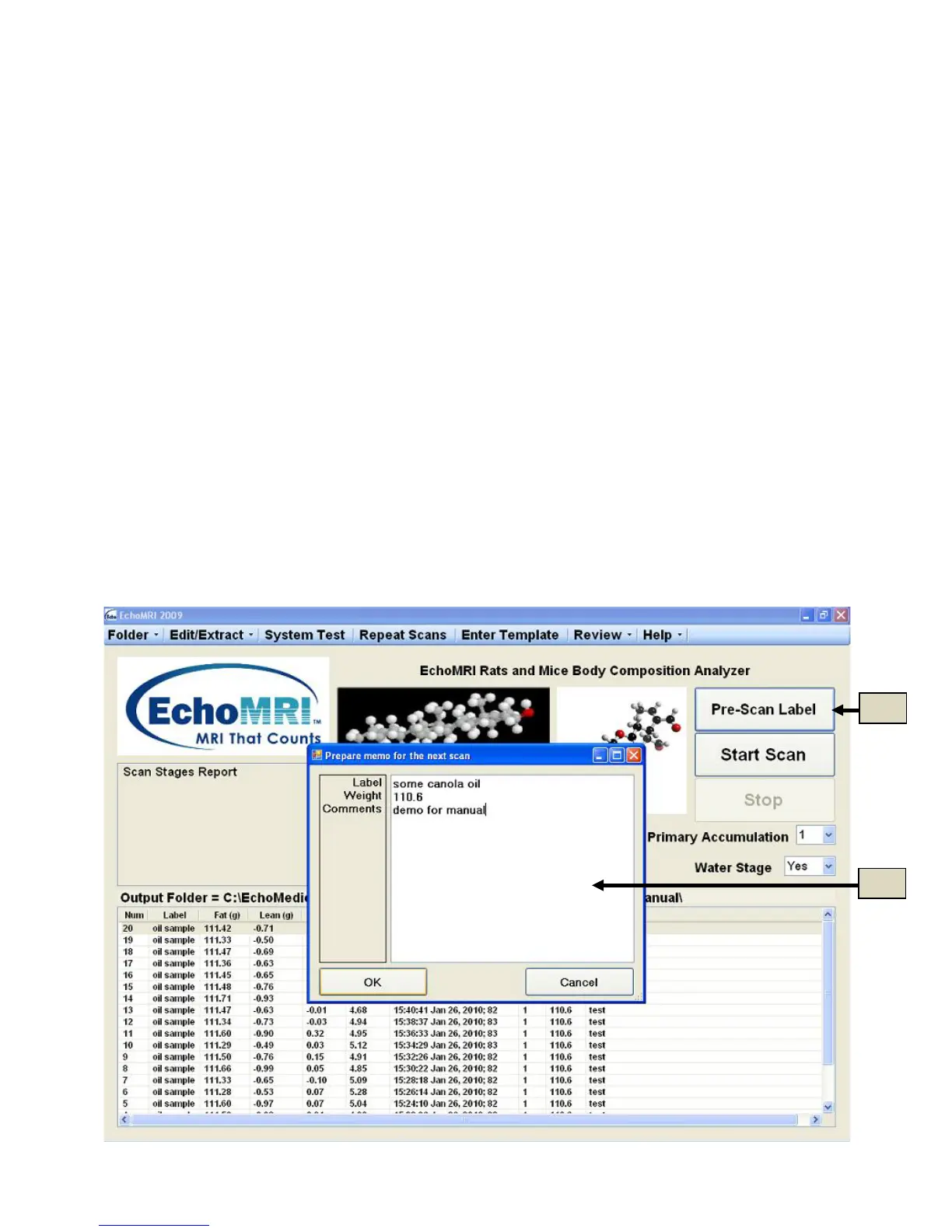
To enter supplementary data and comments on scan subjects prior to the scan, either press button "Pre-Scan
Label" (5a in Figure 5.1), or press the F2 key on the keyboard. A dialog box will open (5b in Figure 5.1) to
allow the input.
NOTE: This is the only way to label and place weight with the scan. After scan is complete one cannot edit
label and weight values.
Label and the contents of other columns (except Comments) must be entered in a single line, each.
Comments can occupy more than one line at the time of input, however in the eventual records all of the lines of
Comments will be collected into a single string.
When you complete the entry, click OK to save it and close the dialog. Pressing Cancel will cause the dialog to
discard all entries and close.
Immediately after the dialog is closed with OK, the entered supplementary data appears in a compact form in
the Scan Stages Report window.
After the scan is completed, the supplementary data appears in the Measured Results List (5c of Figure 5.2).
The supplementary data does not persist for subsequent scans unless Repeat Scans was used.
Figure 5.1



 To Next Page