EN 11
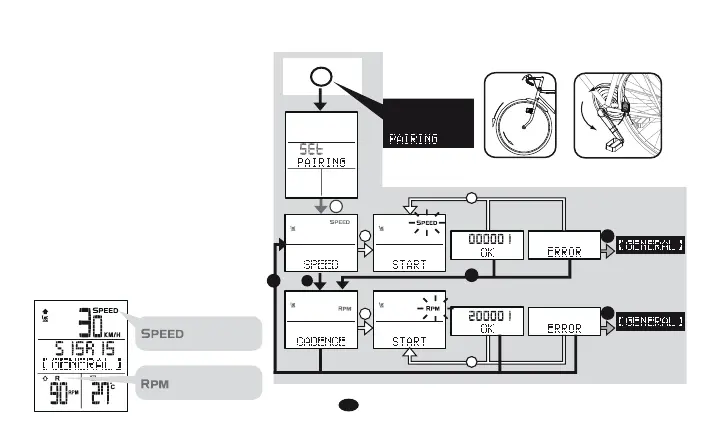
Sensor pairing
When you have all the bracket, transmitters,
and accessories installed, you need to do
the pairing and coded signal testing
between computer and transmitters.
1. Hold 1 second button D, it will enter
setting loop, press D button to find the
SENSOR PAIRING, choose bike1 or bike
2 (by pressing B) and press A to show
coded ID. If computer did not receive any
signal from transmitter over 30 seconds,
it will show TIME OUT; please check the
installation, battery power, and do the
pairing again.
2. This computer is design for 2 bikes (you
could purchase the 2nd set bike parts), it
will automatically shift to bike 1 or bike 2
after pairing separately.
RPM
SPEED
D
Press D button
to find the
D
D
C
A
A
B
Get signals from Sensors:
signal received
RPM
signal received
SPEED
A
A
B
B


 To Next Page