14
EN
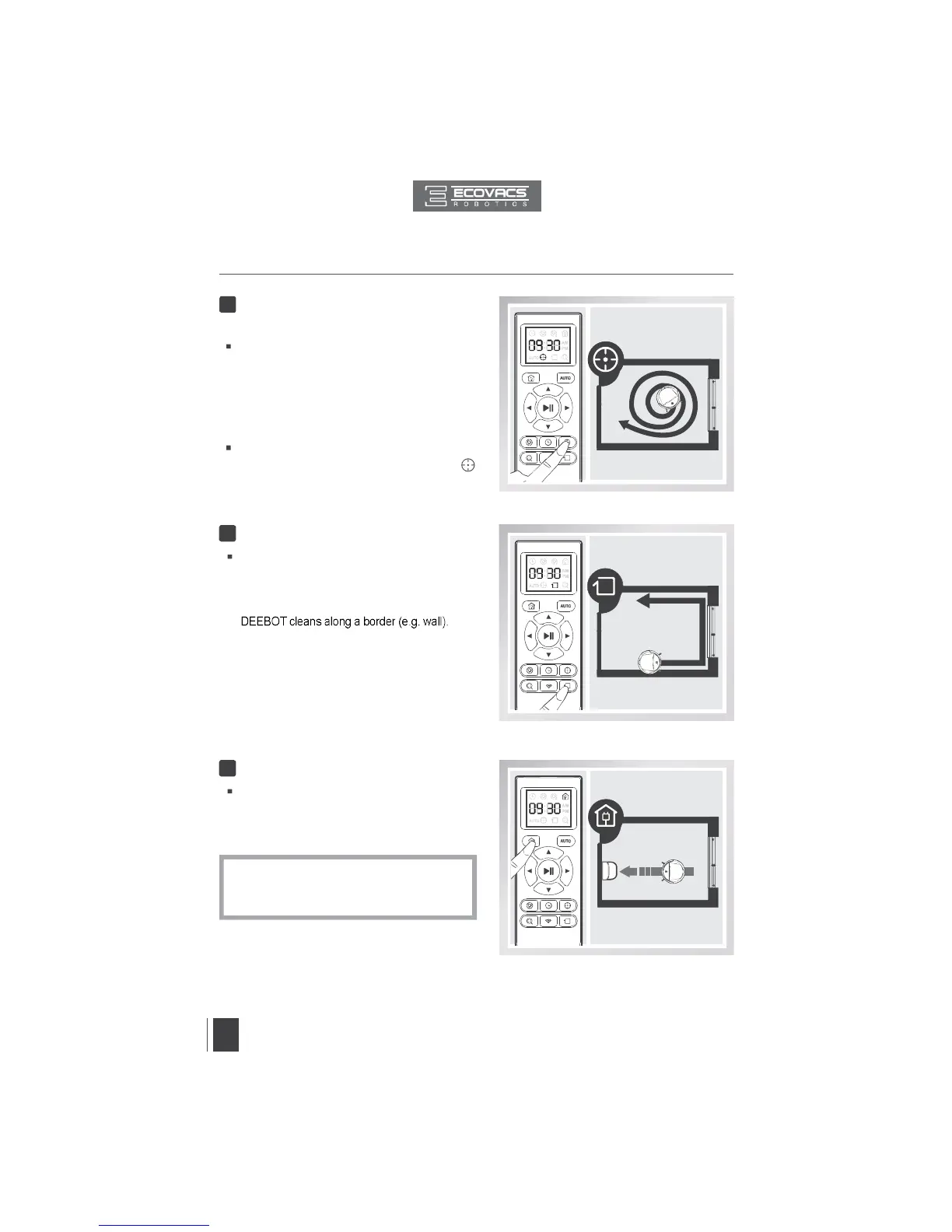
Spot Cleaning Mode
(2-5 minutes)
This mode is applicable for an area of highly
concentrated dirt or dust. In Spot Cleaning
Mode, DEEBOT focuses on a specific area
to clean. DEEBOT cleans the area in a spiral
pattern and stops when it completes Spot
Cleaning.
To start Spot Cleaning Mode, press the Spot
Mode Button on the Remote Control, or
on the App main screen.
3
This mode is good for cleaning the edges and
corners of a room. To start Edge Cleaning
Mode, press the Edge Cleaning Mode Button
on the Remote Control. In Edge Cleaning Mode,
Edge Cleaning Mode
Return to Charger Mode
4
5
When battery power gets low, DEEBOT
automatically switches to Return to Charger
Mode and returns to the Charging Dock to
recharge itself.
*
DEEBOT can also be sent back to the Charging
Dock at any time by pressing the Return to
Charger Button on the Remote Control.
3. Operating and Programming


 To Next Page