9
EN
Notes Before Cleaning
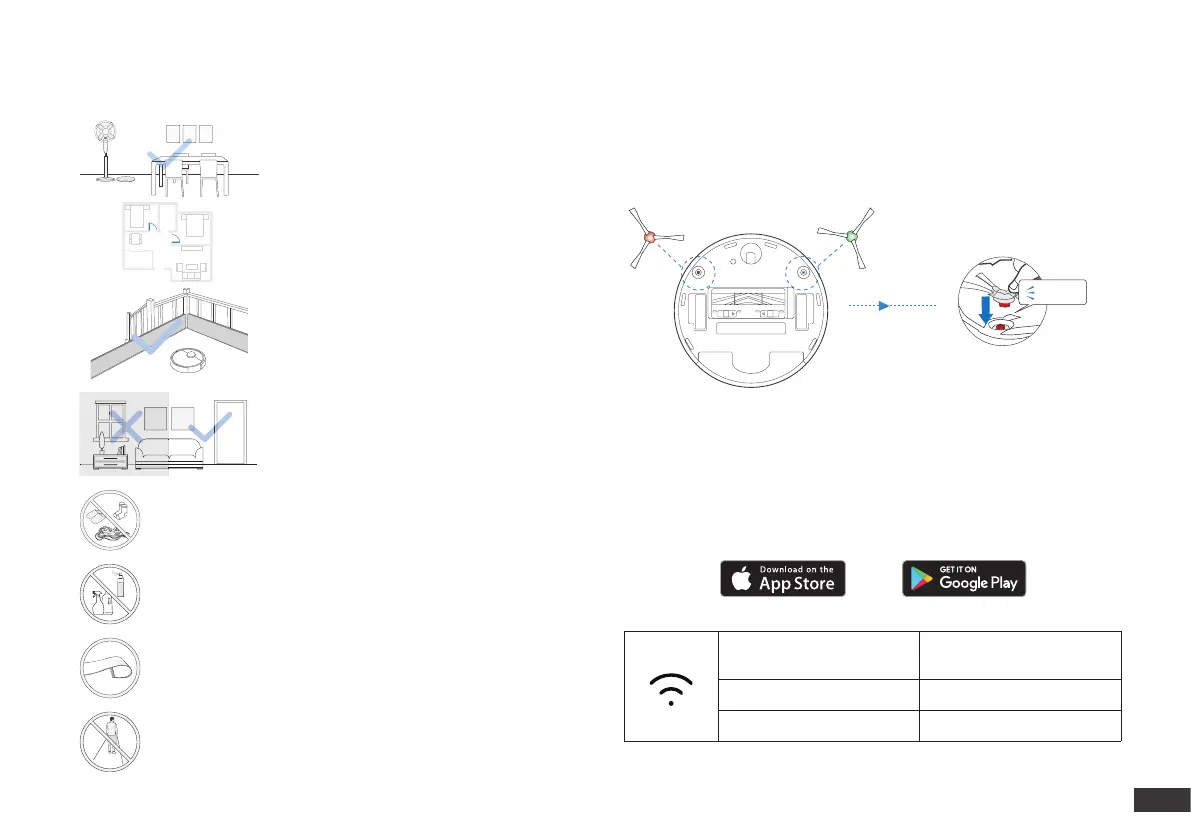
Tidy up the area to be cleaned by putting
furniture, such as chairs, in their proper
place.
During the rst use, make sure each room
door is open to help DEEBOT fully explore
your house.
It may be necessary to place a physical
barrier at the edge of a drop to stop the unit
from falling over the edge.
Put away objects including cables, cloths and slippers, etc. on
the oor to improve the cleaning efciency.
Before using the product on a rug with tasseled edges, please
fold the rug edges under.
Please do not stand in narrow spaces, such as hallways, and
make sure not to block the AIVI Camera.
Clean the AIVI Camera and TrueMapping Distance Sensor with
a clean cloth, and avoid using any detergent or cleaning spray.
Make sure areas to be cleaned are well
illuminated so AIVI Camera works properly.
Remove power cords and small objects from
the oor to ensure cleaning efciency.
ECOVACS HOME App
To enjoy all available features, it is recommended to control your DEEBOT via
the ECOVACS HOME app.
Make sure the color of Dual Side Brushes are consistent with that of mounting
slot.
Before using DEEBOT, please remove all protective lms or
protective strips on DEEBOT and Docking Station.
Wi-Fi Indicator Light
Before you start, make sure that:
Install the Dual Side Brushes
• Your mobile phone is connected to a Wi-Fi network.
• The 2.4GHz band wireless signal is enabled on your router.
• The Wi-Fi indicator light on DEEBOT is slowly ashing.
Slowly flashing
Disconnected to Wi-Fi or
waiting for Wi-Fi connection
Rapidly flashing Connecting to Wi-Fi
Solid Connected to Wi-Fi
Quick Start
Click





 To Next Page