9
ECOWATER
SYST E MS
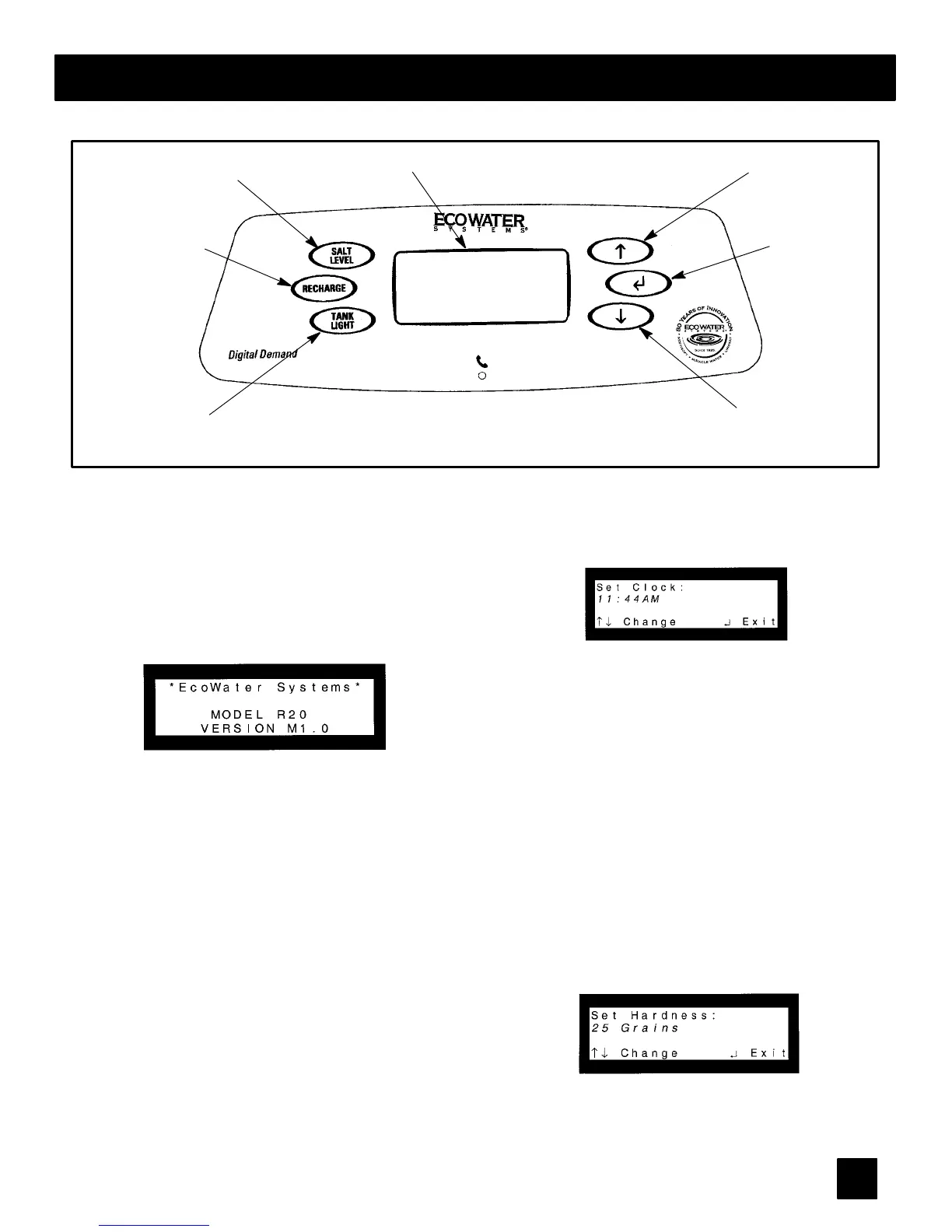
Programming the Digital Demand Faceplate Controller
display
↑ keypad
↓ keypad
RECHARGE
keypad
SALT LEVEL
keypad
SELECT/EXIT
keypad
TANK LIGHT
keypad
THE FOLLOWING STEPS ARE FOR FIRST TIME SET UP ONLY.
When the transformer is plugged in, a ‘‘beep’’ will
sound, followed by the factory set model code dis-
play and software version for a few seconds. Then,
12:00 PM present time display.
1. MODEL CODE: The controller is factory set to
the model code, which provides the shortest re-
charge times and greatest water savings. Verify the
correct model code or set if needed.
Note: To reset the model code, see page 15.
2. SET THE CLOCK: Use the (↑)or(↓) keypads
to set the present time of day, being sure AM or PM
shows, as applicable. Press (↑) to move the display
ahead; press (↓) to move the time backward. NOTE:
Each press of a keypad changes the time by 1 min-
ute. Holding a keypad in changes the time by 32
minutes each second. Pressing the SELECT/EXIT
(↵ ) keypad will set the clock.
3. SET WATER HARDNESS: The controller is
factory set to 25 grains. Set the grains per gallo n
hardness of your water supply. Water hardness is
determined by water analysis, or call your local wa-
ter department. Use the (↑) keypad to advance the
number; use the (↓) keypad to reduce the number.
Each press of a keypad changes the display by 1.
Hold down the keypad to scroll. After 25, scrolling
will be at a faster rate. NOTE: To compensate for iron
in the water, add 5 to the hardness number for each
1 ppm of iron. Pressing the SELECT/EXIT (↵)key-
pad will set the hardness level. NOTE: If using po-
tassium chloride (KCl) instead of standard sodium
chloride (NaCl) wa ter softener salt, hardness set-
ting must be increased by 25%.



 To Next Page