58
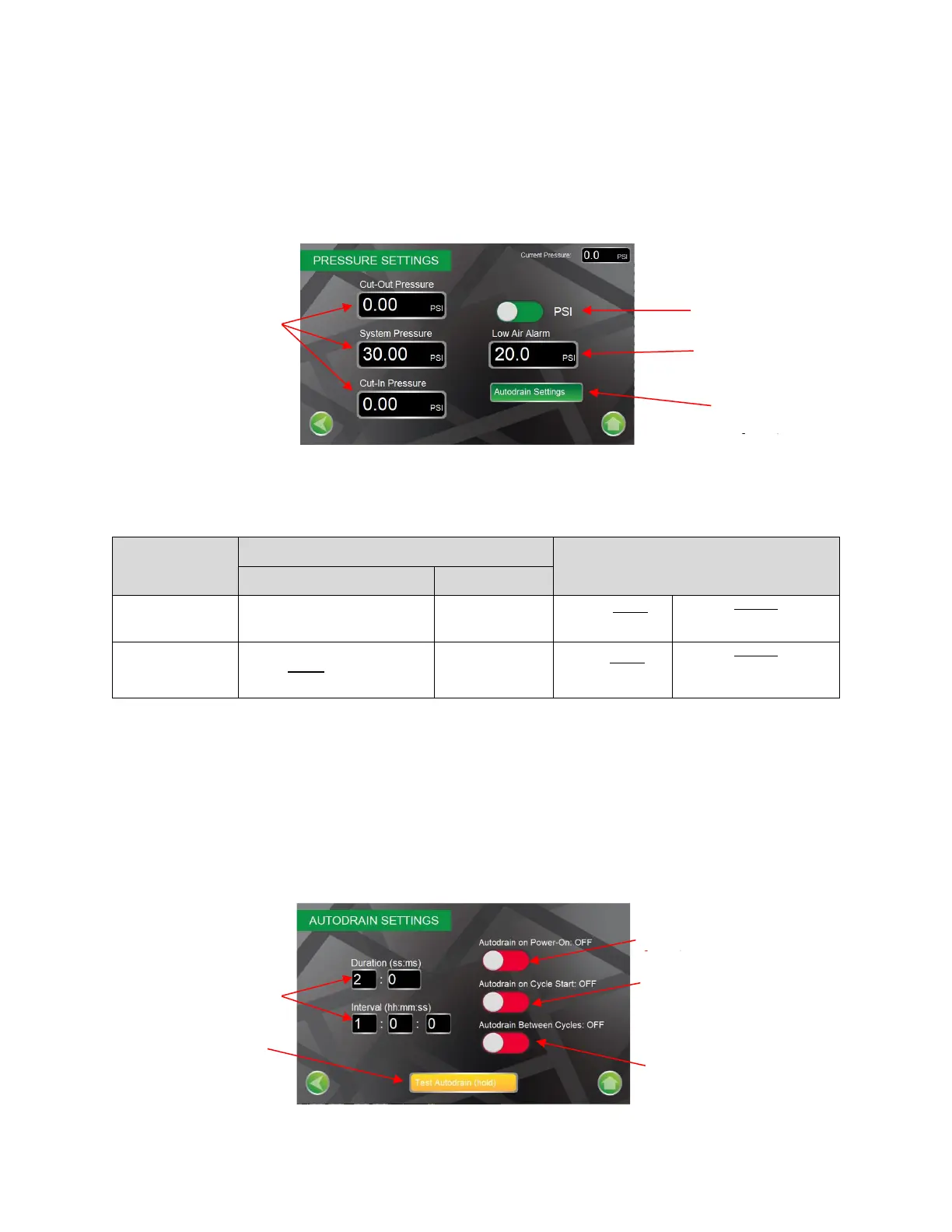
Operating Pressure Screen
The Operating Pressure Screen provides access to configure nitrogen generator to display pressure in PSI
or Bar. The screen allows for setting nitrogen generator cut-in (turn-on) and cut-out (turn-off) pressures,
sprinkler system operating pressure, and low air alarm pressures. The Operating Pressure Screen
continuously displays the nitrogen supply line pressure.
NOTE: If a pressure that is outside of the allowable operating pressures is entered, the HMI will prompt
the user to enter a valid pressure.
10 psi Below
System Pressure
Example
System Pressure 30 psi
Max - Cut-In Pressure 20 psi
20 psi Above System Pressure
2 psi Below
System Pressure
Example
System Pressure 30 psi
Min - Cut-In Pressure 28 psi
Autodrain Settings Screen
The autodrain function is programmed from the factory to momentarily drain (two (2) second duration)
upon initial start of a nitrogen generation cycle, momentarily drain upon each hour (interval) of runtime
of a nitrogen generation cycle, and momentarily drain at the completion of a nitrogen generation cycle.
The in Settings Screen adjusts the interval and duration of the autodrain function, as well as the ability to
turn on/off specific autodrain functions.
Toggle Button to Change
from PSI/Bar
Press to adjust
Autodrain Delay Timer
functions
Toggle button to turn on/off
Autodrain upon initial power
up of nitrogen generator Timer
functions
Press and Hold to test
Autodrain Function
Toggle button to turn on/off
Autodrain at the beginning of a
nitrogen generation cycle
Toggle button to turn on/off
Autodrain when nitrogen
generator is not generating
nitrogen


 To Next Page