59
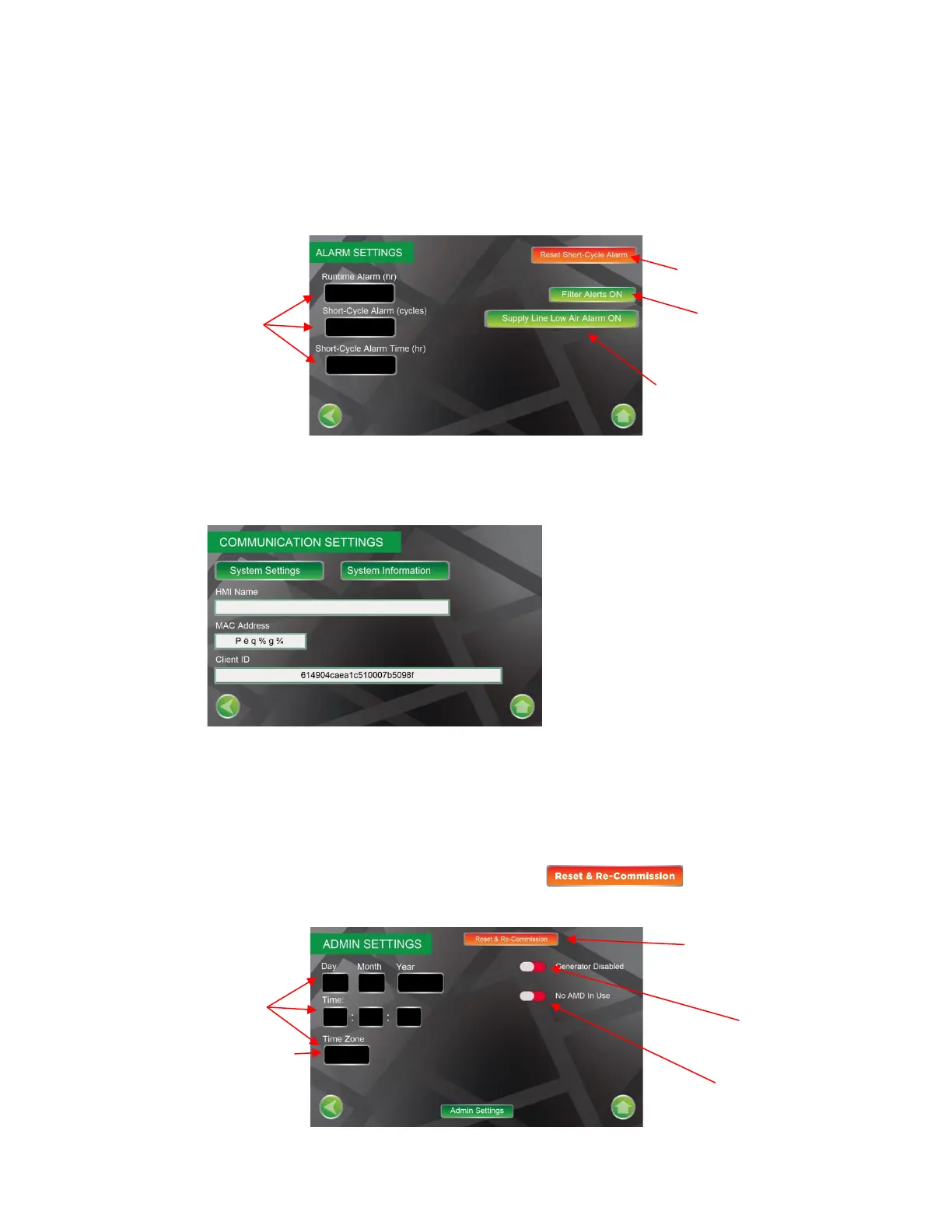
Alarm Settings Screen
The Alarm Settings Screen provides access to alarm settings on the nitrogen generator. Runtime Alarm
(default 3.5 hours), Short-Cycle Alarm (default 10 cycles), Short-Cycle Alarm Time (default 1 hour). The
alarm screen allows access to reset the short-cycle alarm signal, turn on/off the Filter Alerts function, turn
on/off the Low Air Alarm. The Filter Alerts function signals when filter replacement is needed.
Communications Settings Screen
The Communications Settings Screen provides access to configure the remote communications to the
nitrogen generator.
Admin Settings Screen
The Admin Settings Screen provides access to clock and calendar settings, identify whether the nitrogen
generator is used with or without Air Maintenance Device (AMD) and selecting whether the nitrogen
generator is disabled (Factory setting for shipping and prior to configuration) or enabled position (normal
operation).
NOTE: If the nitrogen generator needs to be recommissioned, Reset& Commission button can be pressed
which will reset the nitrogen generator to the default settings.
Contact ECS for specific procedure
when communicating with the
nitrogen generator remotely through
the internet.


 To Next Page