71
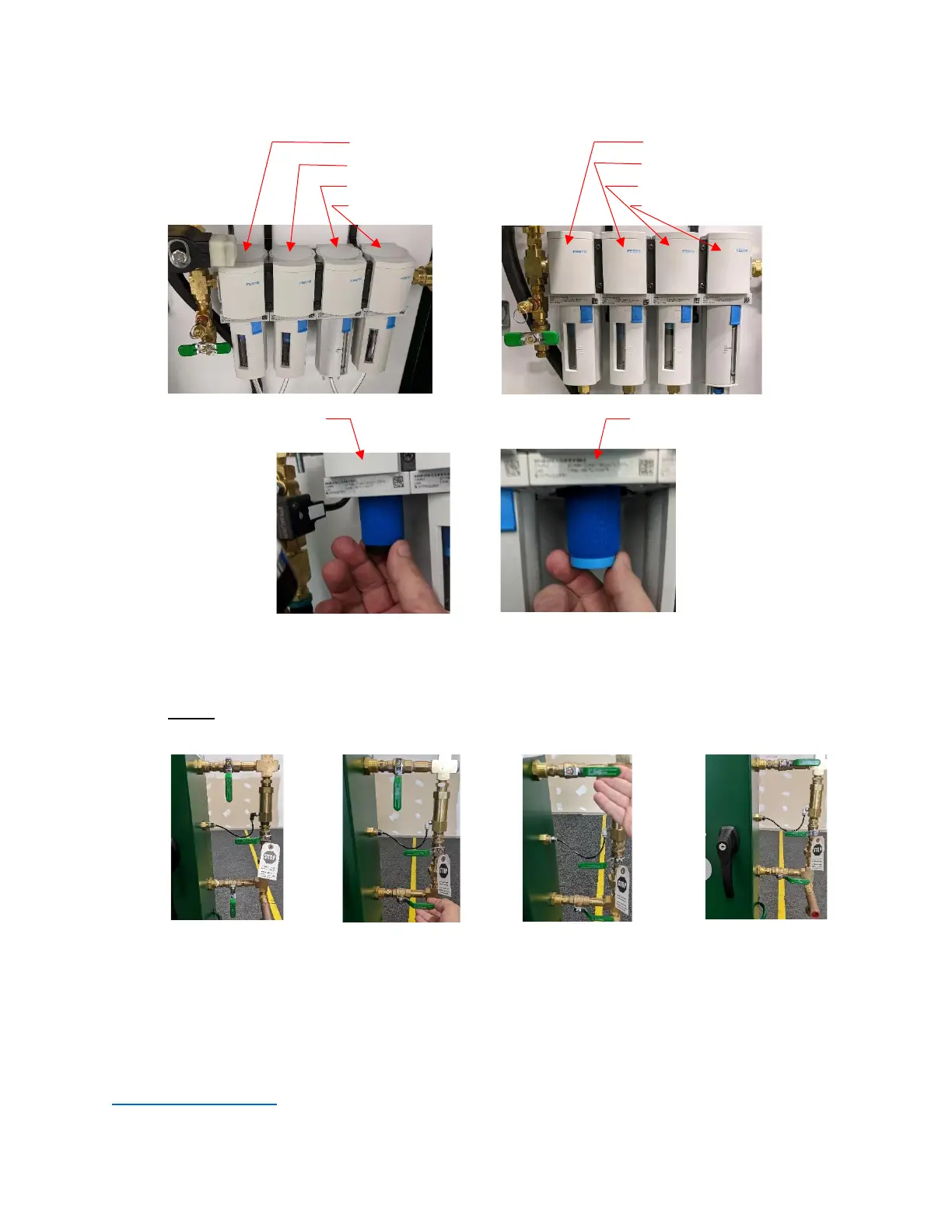
Filters with Autodrain Filters without Autodrain
.01-Micron Coalescing Filter .01-Micron Coalescing Filter
1-Micron Coalescing Filter 1-Micron Coalescing Filter
5-Micron Coalescing Filter Water Separator
Water Separator 5-Micron Coalescing Filter
.01-Micron Coalescing Filter 1-Micron Coalescing Filter
7. Inspect Water Separator and clean as necessary.
8. Once all filter cartridges have been replaced, water separator has been cleaned, verify all filter
housings are re-installed properly.
9. Slowly open inlet and outlet valves.
Once the filters have been replaced, log the filter replacement in the HMI by pressing and holding the
“Record Filter Change” button for five (5) seconds on the Maintenance screen in the Datalog/Historical
Data Section.
For further filter replacement orders, contact an ECS representative at 314-432-1377 or
info@ecscorrosion.com.


 To Next Page