17
Installing the Motherboard
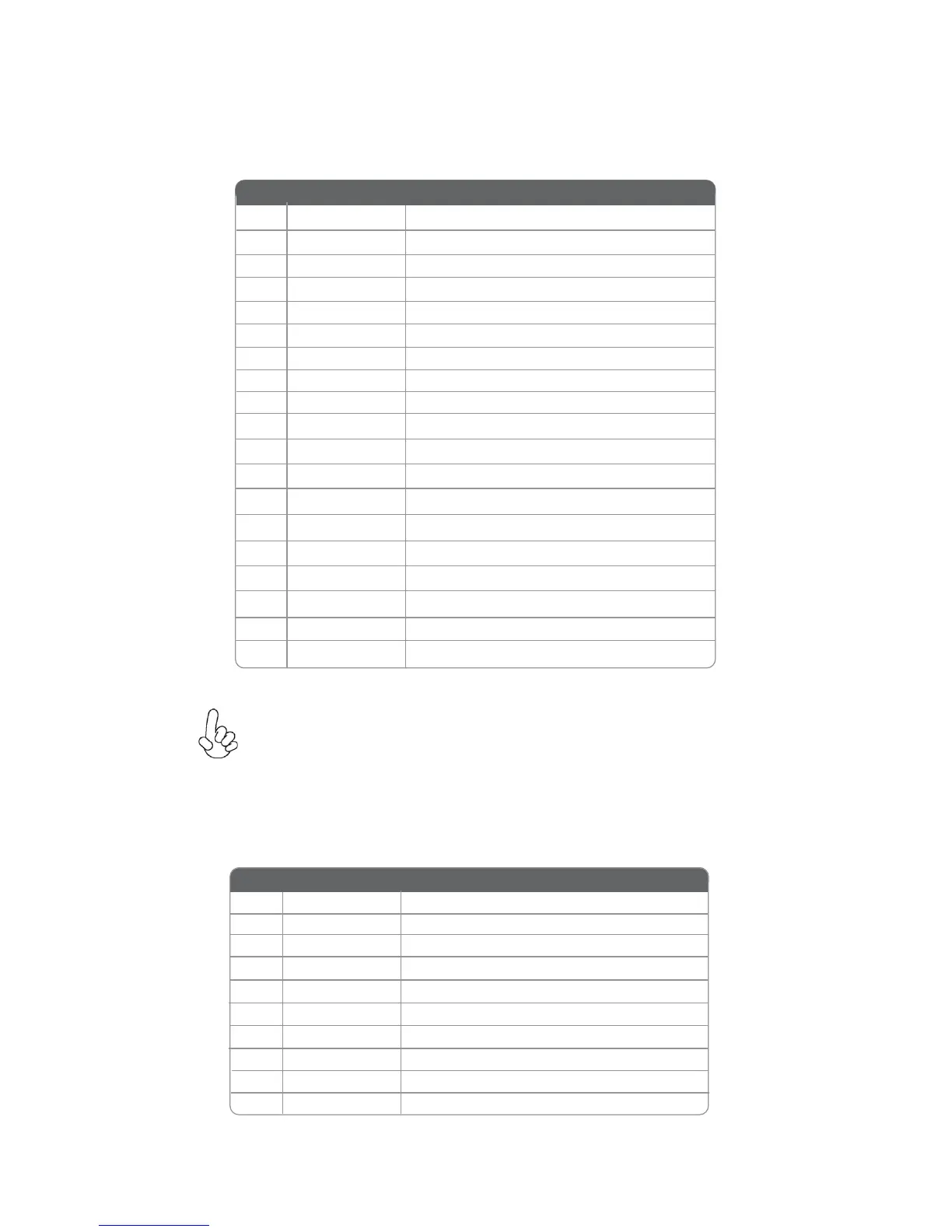
1 Vbus Front Panel USB Power
2 IntA_P1_SSRX- USB3 ICC Port1 SuperSpeed Rx-
3 IntA_P2_SSRX+ USB3 ICC Port1 SuperSpeed Rx+
4
GND GND
5 IntA_P1_SSTX- USB3 ICC Port1 SuperSpeed Tx-
6 IntA_P1_SSTX+ USB3 ICC Port1 SuperSpeed Tx+
7 GND GND
8 IntA_P1_D- USB3 ICC Port1 D-
9 IntA_P1_D+ USB3 ICC Port1 D+
10 ID USBOC- Over Current Protection
Pin Signal Name Function
USB3F: Front Panel USB 3.0 header
This Motherboard implements one USB 3.0 header supporting 2 extra front USB 3.0
ports, which delivers 5Gb/s transfer rate.
11 IntA_P2_D+ USB3 ICC Port2 D+
12 IntA_P2_D- USB3 ICC Port2 D-
13 GND GND
Please make sure that the USB cable has the same pin assignment as
indicated above. A different pin assignment may cause damage or system
hang-up.
15 IntA_P2_SSTX- USB3 ICC Port2 SuperSpeed Tx-
16 GND GND
17 IntA_P2_SSRX+ USB3 ICC Port2 SuperSpeed Rx+
18 IntA_P2_SSRX- USB3 ICC Port2 SuperSpeed Rx-
19 Vbus Front Panel USB Power
14 IntA_P2_SSTX+ USB3 ICC Port2 SuperSpeed Tx+
COM: Onboard serial port header
Connect a serial port extension bracket to this header to add a serial port to your
system.
1 DCDB Data Carrier Detect
2 SINB Serial Input
3 SOUTB UART B Serial Output
4 DTRB UART B Data Ter minal Ready
5 GND Ground
6 DSRB Data Set Ready
7 RTSB RART B Request to Send
8 CTSB Clear to Send
9 RI Ring Indicator
10 Key No pin
Pin Signal Name Function


 To Next Page