80
Intel
®
Matrix Storage Manager RAID Configurations
Resetting disks to Non-RAID
An HDD that has been previously configured as part of another RAID set
in another platform is called a broken RAID HDD. When you install a
broken RAID HDD, you cannot select this disk when configuring a RAID
set through the Intel
®
Matrix Storage Manager option. If you still want to
use this broken RAID HDD as part of the RAID set configured through
the Intel
®
Matrix Storage Manager, you may do so by resetting the disk to
Non-RAID. You will, however, lose all data and previous RAID configu-
rations.
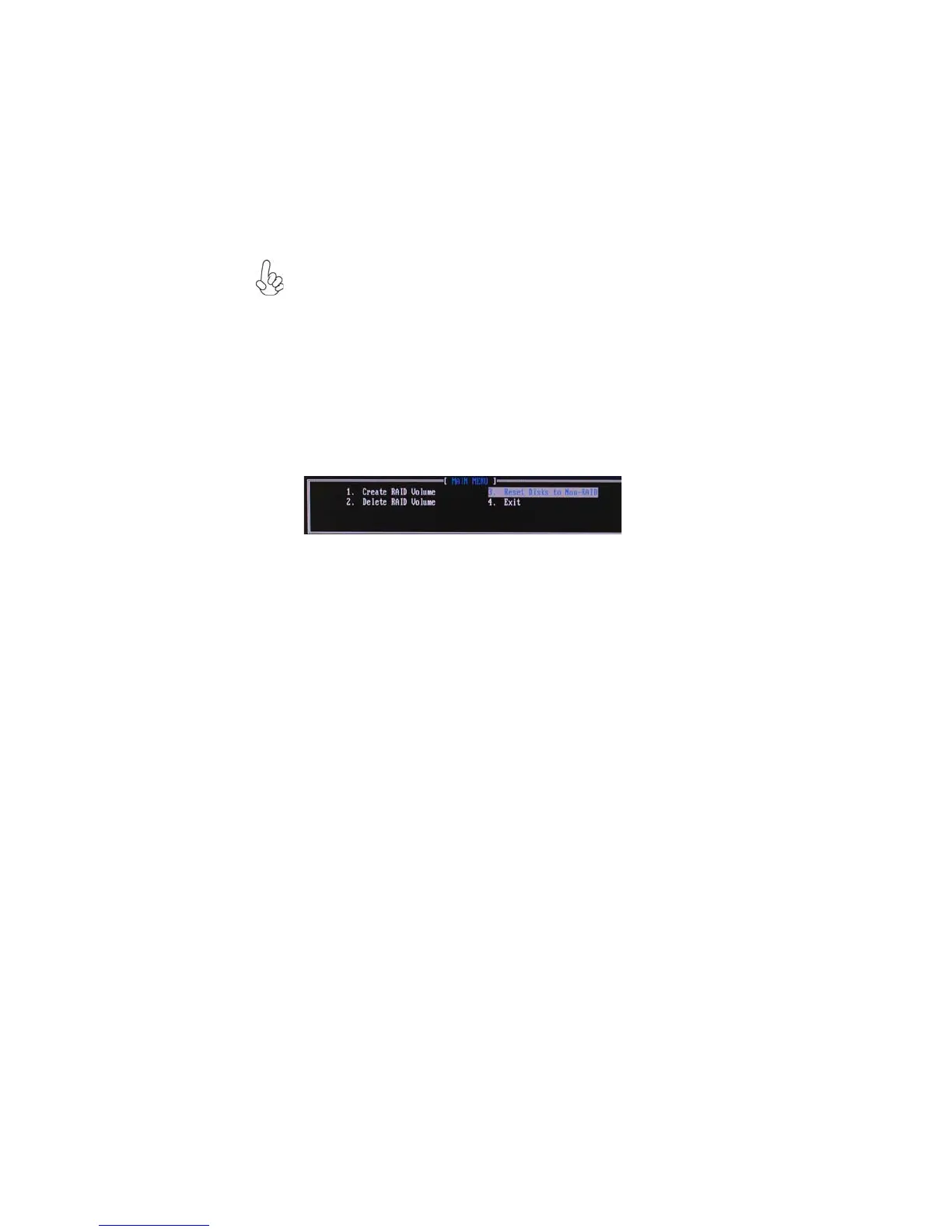
To reset disks to Non-RAID:
1. In the main Intel
®
Matrix Storage Manager RAID BIOS menu, highlight
Reset Disks to Non-RAID using the up/down arrow key then press <En-
ter>.
2. Use the space bar to select the HDD to reset to Non-RAID.
3. A dialogue box appears to confirm the action. Press <Y> to confirm;
otherwise, press <N>.
Pressing <Y> deletes all the data in the HDDs.
Exiting Setup
When you have finished, highlight Exit using the up/down arrow key then press
<Enter> to exit the Intel
®
Matrix Storage Manager RAID BIOS utility.
A dialogue box appears to confirm the action. Press <Y> to confirm; otherwise, press
<N> to return to the Intel
®
Matrix Storage Manager RAID BIOS menu.


 To Next Page