28
Entering the Setup Utility
When you power on the system, BIOS enters the Power-On Self Test (POST)
routines. POST is a series of built-in diagnostics performed by the BIOS. After
the POST routines are completed, the following message appears:
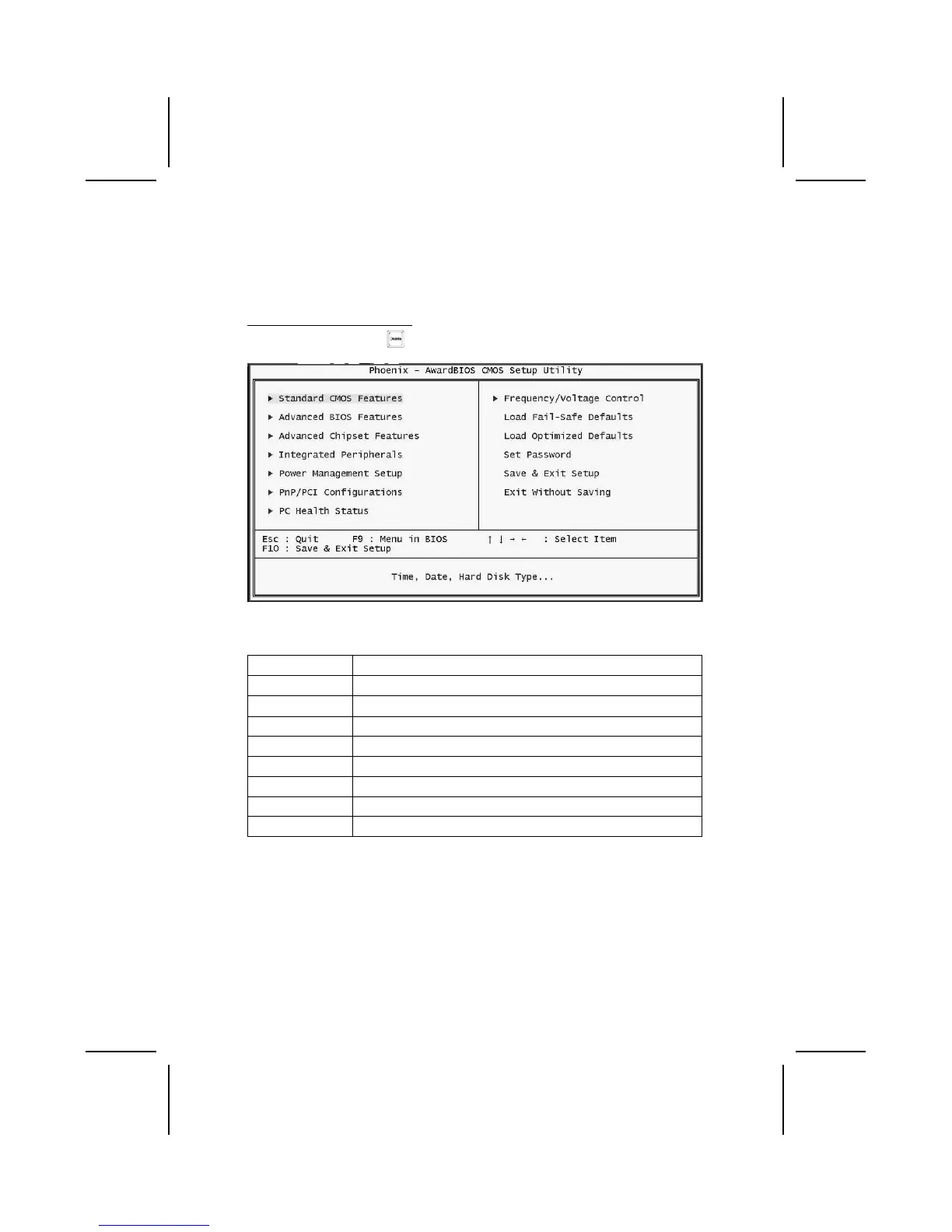
Press DEL to enter SETUP
Pressing the delete key
accesses the BIOS Setup Utility:
BIOS Navigation Keys
The BIOS navigation keys are listed below:
Key Function
Esc Exits the current menu
←↑↓→
Scrolls through the items on a menu
+/–/PU/PD Modifies the selected field's values
F10 Saves the current configuration and exits setup
F1 Displays a screen that describes all key functions
F5 Loads previously saved values to CMOS
F6 Loads a minimum configuration for troubleshooting.
F7 Loads an optimum set of values for peak performance



 To Next Page