21
Before you begin using the FA-66 with your Macintosh (Mac OS X users)
1
Open the
Applications
folder of your Macintosh hard
disk. In the
Utilities
folder, double-click
Audio MIDI
Setup
to open the
Audio MIDI Setup
.
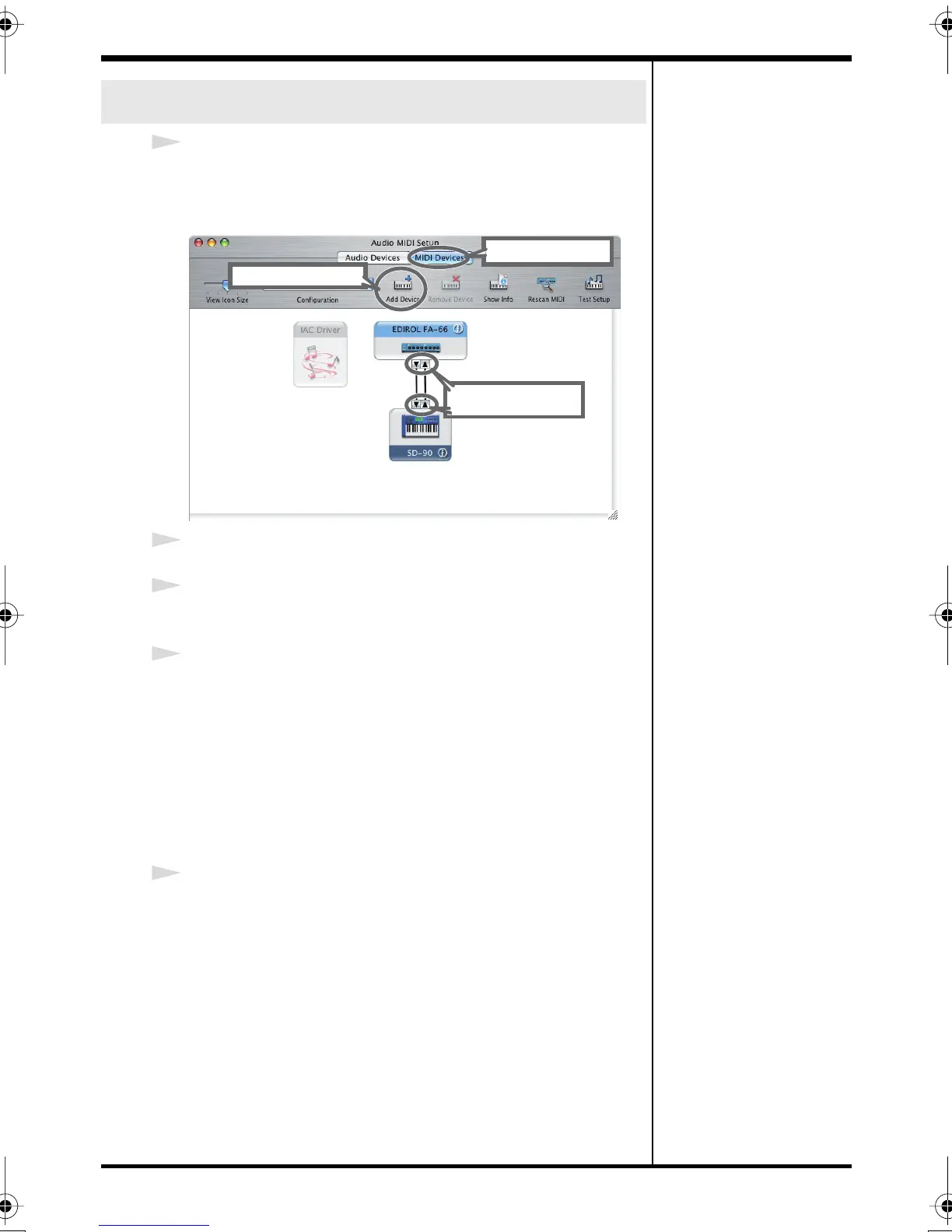
fig.audio-midi.eps
2
Click the
MIDI Devices
tab.
3
Click
Add Device
.
New external device will appear.
4
Connect the t and s symbols (which signify the outputs
and inputs) of the EDIROL FA-66 icon to those of the New
External Device icon by using the mouse to drag between
them.
* Change icons and set other items according to the MIDI
devices that are connected to the FA-66’s MIDI connectors.
If you double-click new external device, the new external
device Properties dialog box will appear, allowing you to
specify a variety of things, such as the device name.
5
Close the
Audio MIDI Setup
dialog box to complete the
procedure.
MIDI settings
Use the mouse to
drag a connection
4
Click MIDI Devices
2
3
Click Add Device
FA-66_e.book 21 ページ 2006年1月12日 木曜日 午前11時32分


 To Next Page