20 Version of July 30th, 2021
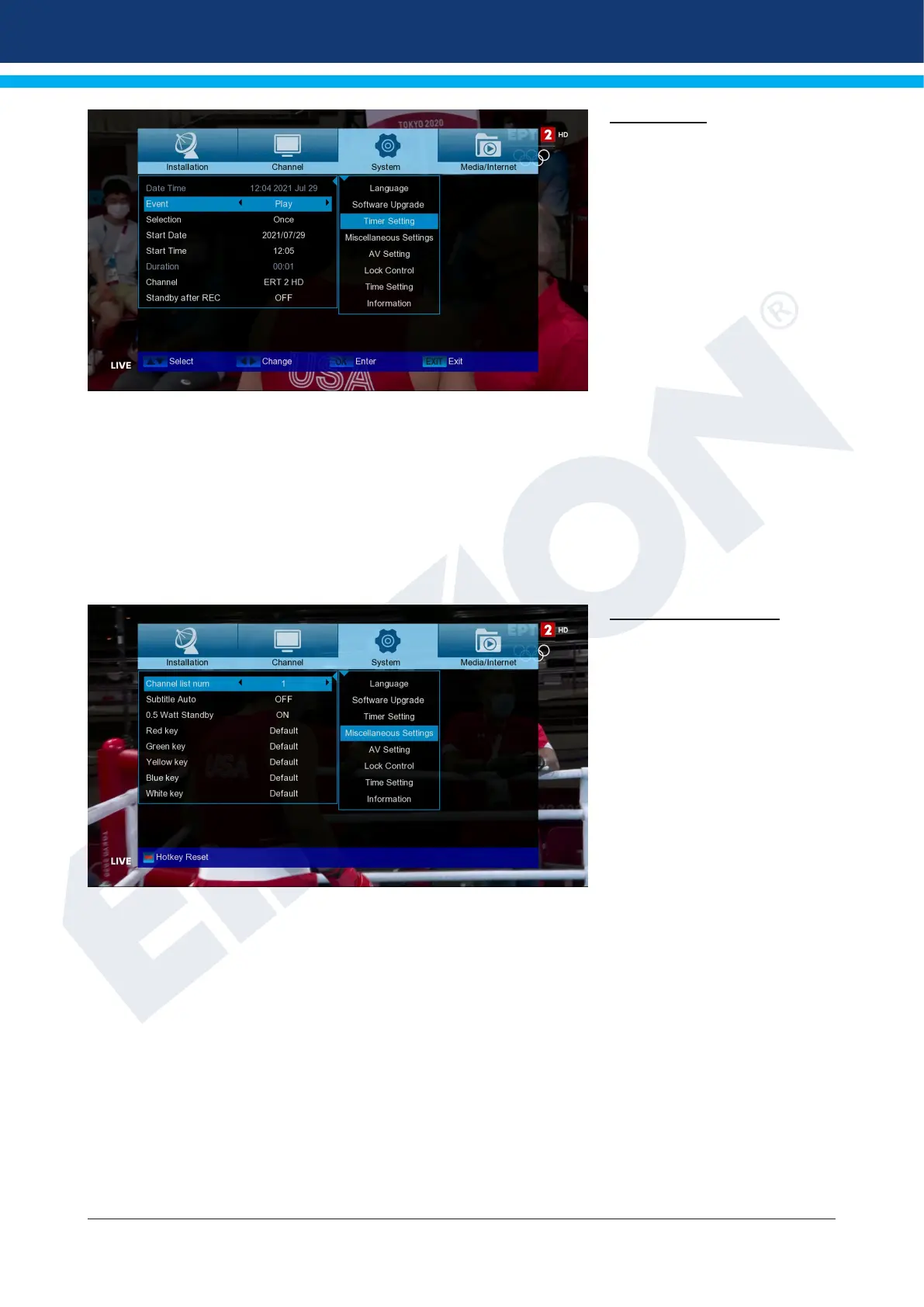
Timer setting
In this menu you can make up to
8 time-supported entries (Timer).
You will also nd a lot of informa-
tion in the EDIVISION section.
Menu functions and settings:
Timer number: Opening the
“Timer” menu automatically
switches to the next one (avail-
able) adjustable timer. You can
move between the (set) timers
with the left/right arrows or the
OK key and the up/down arrows.
Selection: Specify how the recording works here. You can choose if the registration will be done once,
or if it will be done on a daily basis, per week or per month.
Event: Specify the type of recording program here (TV / radio channel).
Channel: Select the channel here.
Start Date: Select the (start) date of the registration here.
Start Time: Select here the start time of the recording.
Duration: Here you specify the recording duration (recording duration). Waiting Stand by after.
REC: Here you can specify whether the receiver will switch to Standby mode after the
end of the recording.
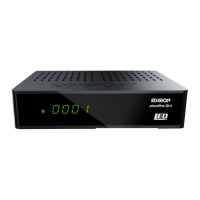
Miscellaneous settings
Channel list num: Set channel
list number
Subtitle Auto: Here you can set
subtitle display options.
0.5 Watt Standby: Setting
‘ON’ or ‘OFF’














 To Next Page