Version of 14 June 2016 21
Parental Control
You can set a password for “Installation” menu conguration. You can also set a password for channel
locking. (For lock channel settings, please refer to LOCK section) Here in ‘Parental Control’ you can nd out
how to set and/or change the password.
1 In “Parental Lock” function, press [OK] key, there will pop a dialogue for you to input the password.
When you input the correct password, you will see a screen like below:
2 Menu Lock determines whether or not a user has to enter a password for the “Installation” menu.
If the setting of “Menu Lock” is “On”, it means that the user has to key-in the password,
if set to “Off” it means unlocked.
3 Channel Lock determines whether or not a user has to enter a password in order to play the locked
channels. If the setting is “On”, play the channels with lock mark will show up a dialogue
on the screen and ask for the password. If the setting of “Channel Lock ”is “Off”,
the Lock function is invalid.
4 New Password is used for revising password; you can input the new password in this item by using
number keys directly. After you lled in 4 digital numbers, the highlight will auto skip to Conrm
Password and ask you to input the new password again. If the password is correct, the screen will
show up a message of “Saving Data, Please Wait…” After nish saving and drawback to “System
Setup” menu, the revising is complete.
5 Press [Menu] key to draw back from the “Parental Lock” menu.
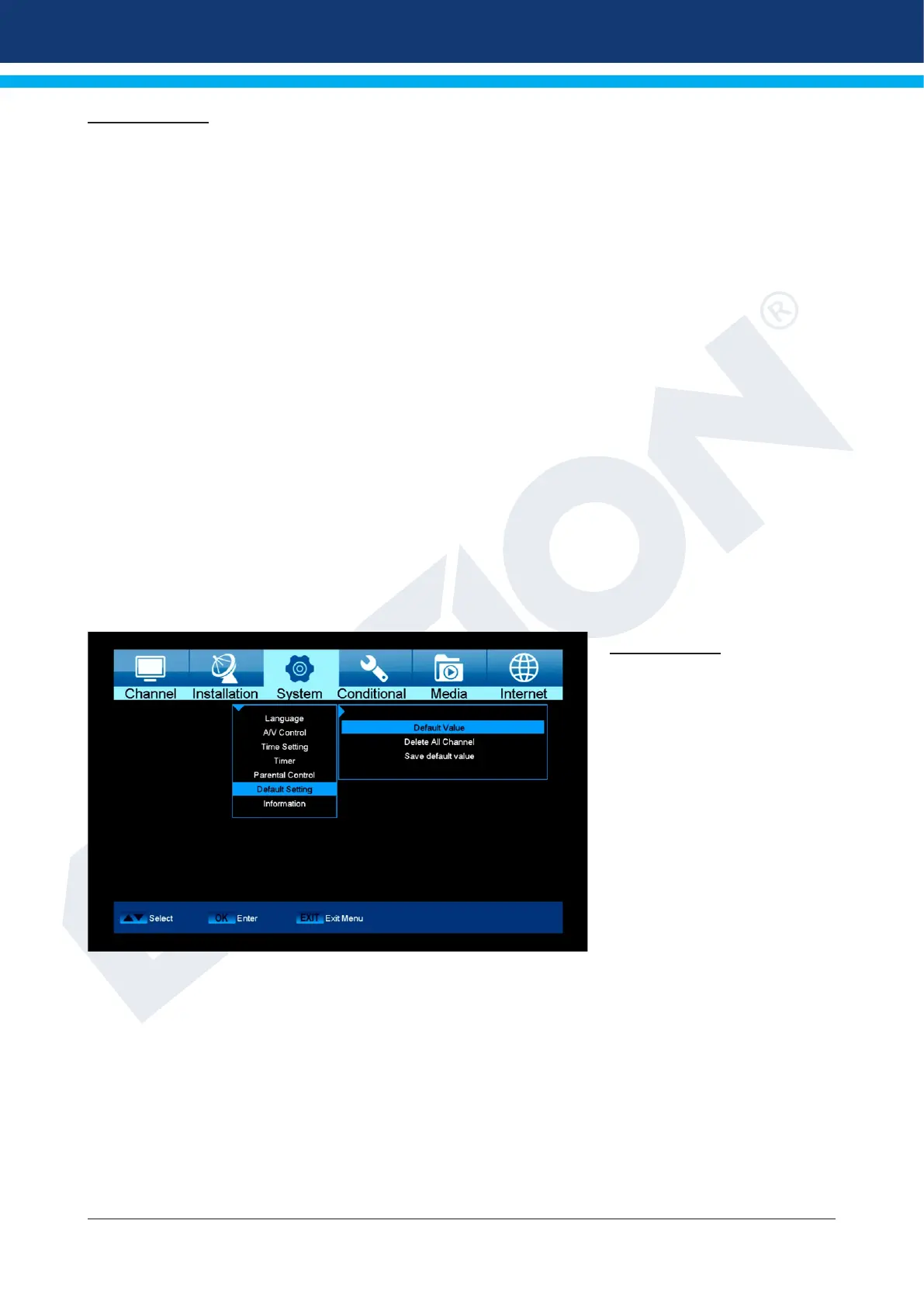
Factory setting
Use the up/down arrow buttons
to select one of the following
menu items and press the OK
button.
Functions and settings in the menu:
Factory setting: Use of this function deletes ALL user programmed values and reinstalls factory
settings. After selecting with the OK button, enter the PIN code (as a rule 0000).
A warning window appears afterwards.
Delete all channels: The channel lists are deleted here.
Save as factory setting:
The current conguration can be specied here as factory setting.
Exit the ‘Factory Setting’ menu by pressing the EXIT button.
Note: The ‘USB’ menu is only accessible if a suitable USB memory device is plugged in and recognised by
the receiver.


 To Next Page