⑨ Solid red light: Not communicating with aircraft
⑩ Flashing yellow and red light : Level 1 alarm of remote control temperature
Flashing yellow and twice red light : Level 2 alarm of remote control temperature
Flashing yellow and triple red light : Level 3 alarm of remote control temperature
⑪ Flashing green and red light : Level 1 alarm of receiver temperature
Flashing green and twice red light : Level 2 alarm of receiver temperature
Flashing green and triple red light : Level 3 alarm of receiver temperature
⑫ Solid green light : Signal is stable, information accepted 100%
Flashing green light : The faster the flash, the worse the signal
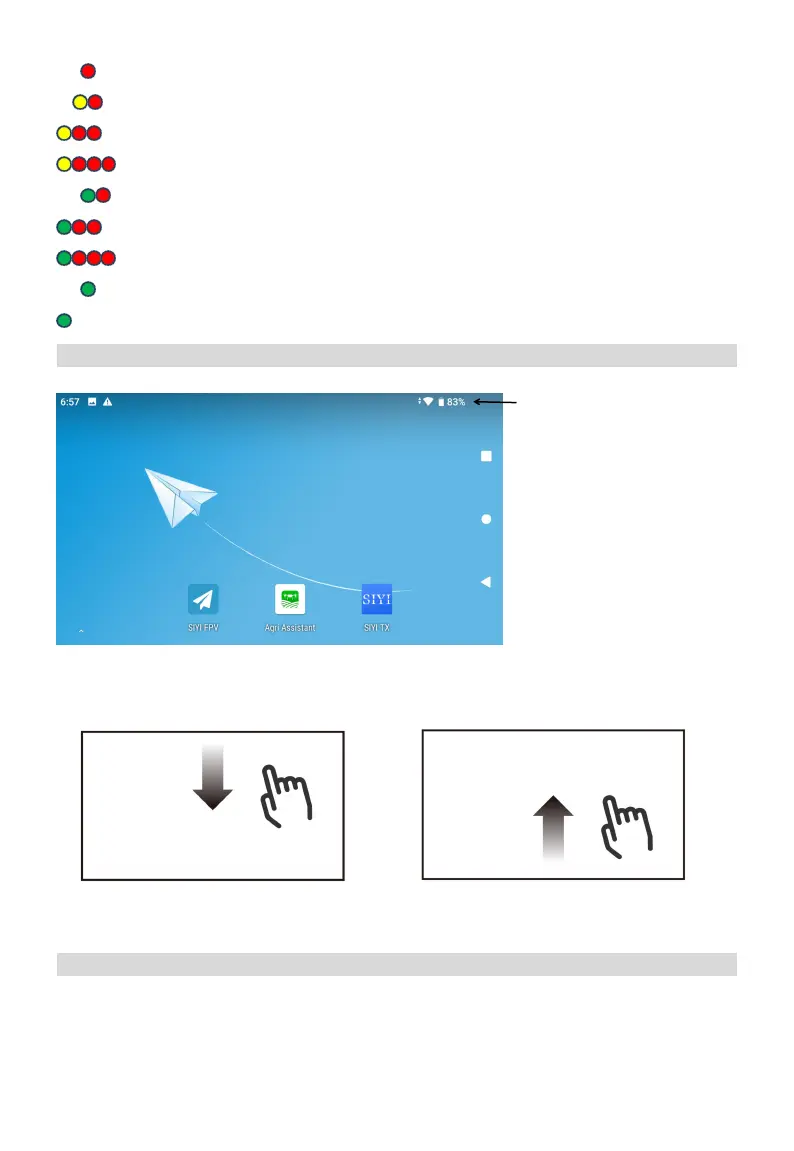
Touchscreen Introduction
Home Screen
Operations
Charging the Remote
The remote control needs to be charged with the original PD fast charger (Do not charge during
operation).
① Use Type-C fast charging cable with PD adapter.
Enter the Quick Setting: Slide up from the bottom of the
screen, reverse operation to exit this interface
Enter the Multitask Center: Slide down from the top of
the screen, reverse operation to exit this interface
*The top bar displays the
time, network status, as
well as battery levels of the
internal and external
batteries of the remote
controller.



 To Next Page