② Manual
:
Keep the left lever in the middle.
③ Attitude
:
Move the left lever to the rear position.
④ AB
:
The middle position of the right lever is point A, and the front position is point B.
(*With RTK, the aircraft can hover precisely, achieve centimeter-level positioning. Without RTK,
the aircraft is positioned by GPS)
Manual Operation Mode
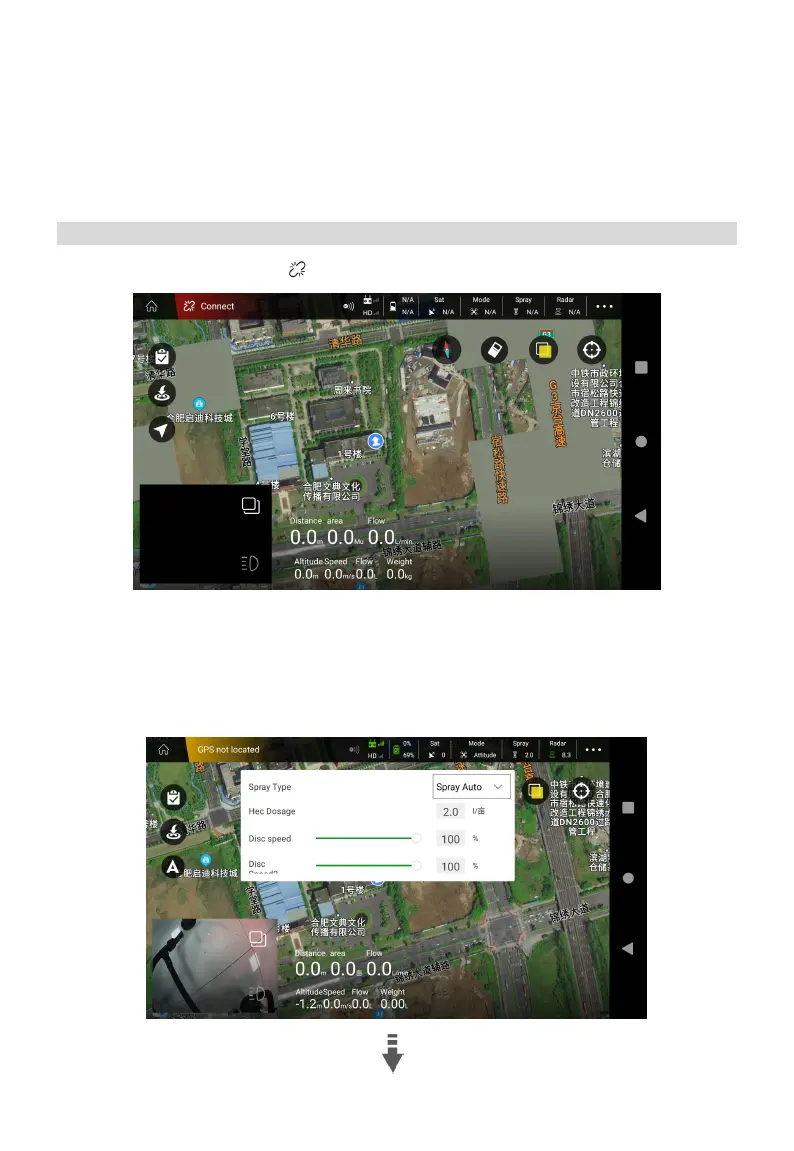
1. Click Agri Assistant >Connect > H12/MK15 >Start
2. Tap “Spray” in the top information bar, set Spray Type to “Spray Auto” , set the Hec Dosage as
needed, then adjust the Disc speed and Disc speed 2 to 100%, then switch Spray type to “Spray
Manual”, tap screen to confirm. Take off the aircraft in the Attitude Mode, fly to the field, switch to
the Manual Operation Mode, then operate the aircraft by sticks, press C and D to spray.



 To Next Page