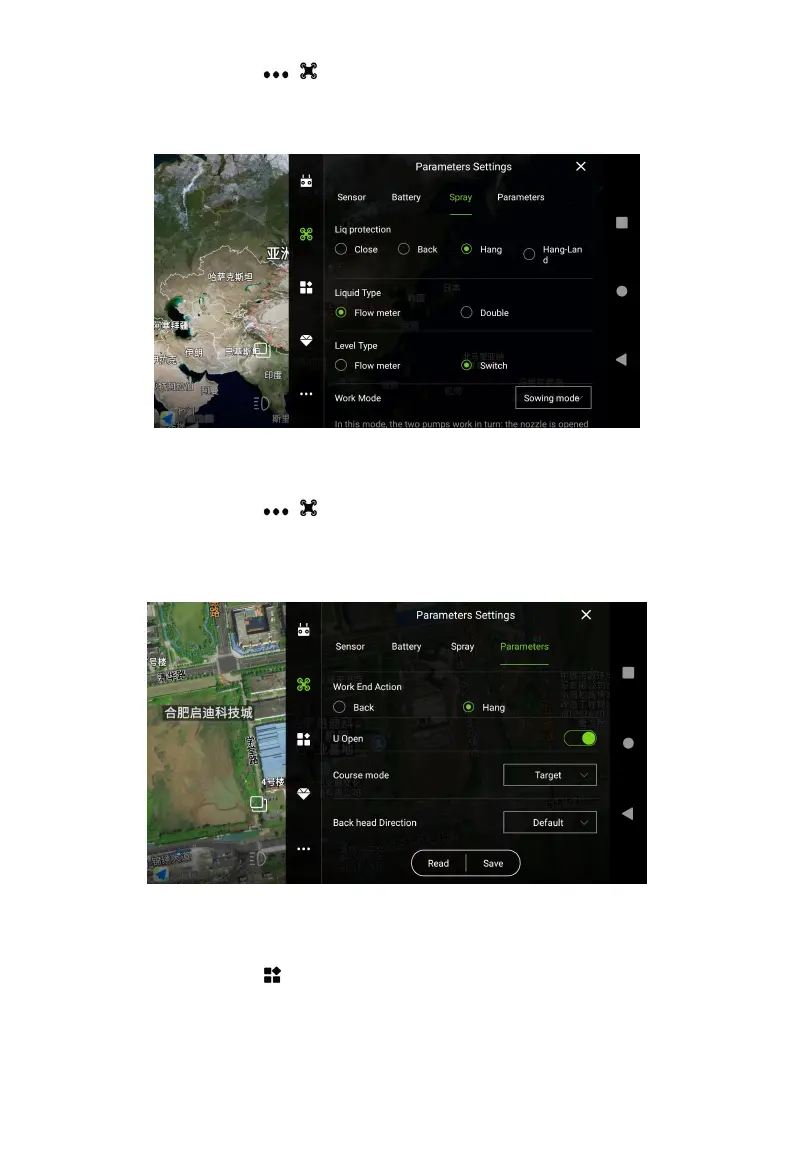
Enter Agri Assistant > Start > > >Spay. It is recommended to set Liq protection to Back,
Liquid Type to Flow meter, Level Type to Switch. If the liquid level gauge going wrong, it can be
adjusted to the flow meter mode. Select the Work mode accordingly and save it.
2. Flight Parameters
Enter Agri Assistant > Start > > >Parameters, slide to the bottom and click to read, and the
default parameters will appear automatically (If there is no special requirement, please keep the
default). Then set Course mode to Target, Back head Direction to “Tail to home”, and Save it.
3. Extro Mode
Enter Agri Assistant > Start >
,
check each module in turn, slide to the bottom, Read the data
and Save it, check whether the parameters can be read normally. Please note: RTK trust is
selected by default, if there is no RTK service, RTK trust set as “Low” and use GPS for



 To Next Page