Using the Delivery Modes 150
Patient Controlled Analgesia (PCA) Mode
The following sections will be reviewed:
Infusion Parameters: PCA Mode ............................................................................ 151
Starting a PCA Infusion ......................................................................................... 152
PCA Mode: Mid-infusion Actions ........................................................................... 158
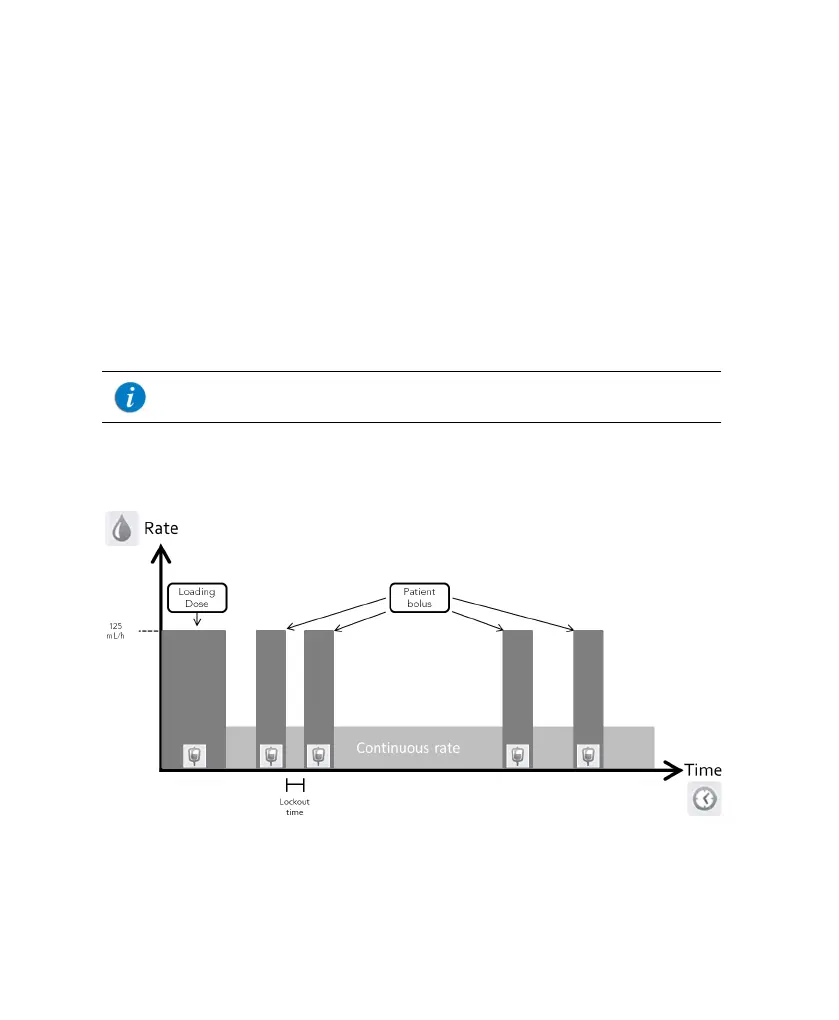
The Patient Controlled Analgesia (PCA) mode allows the pump to deliver medication at
a continuous rate (optional) and limited boluses activated by the patient (via screen key
or bolus handle). Additional boluses can be provided by a clinician, using the
appropriate authorization code.
Figure 5.6. PCA Flow Profile
For more information about the bolus handle, refer to PCA/PCEA/
PIEB Bolus Handle on page 50.



 To Next Page