13
Chapter1Introduction
●
Functions
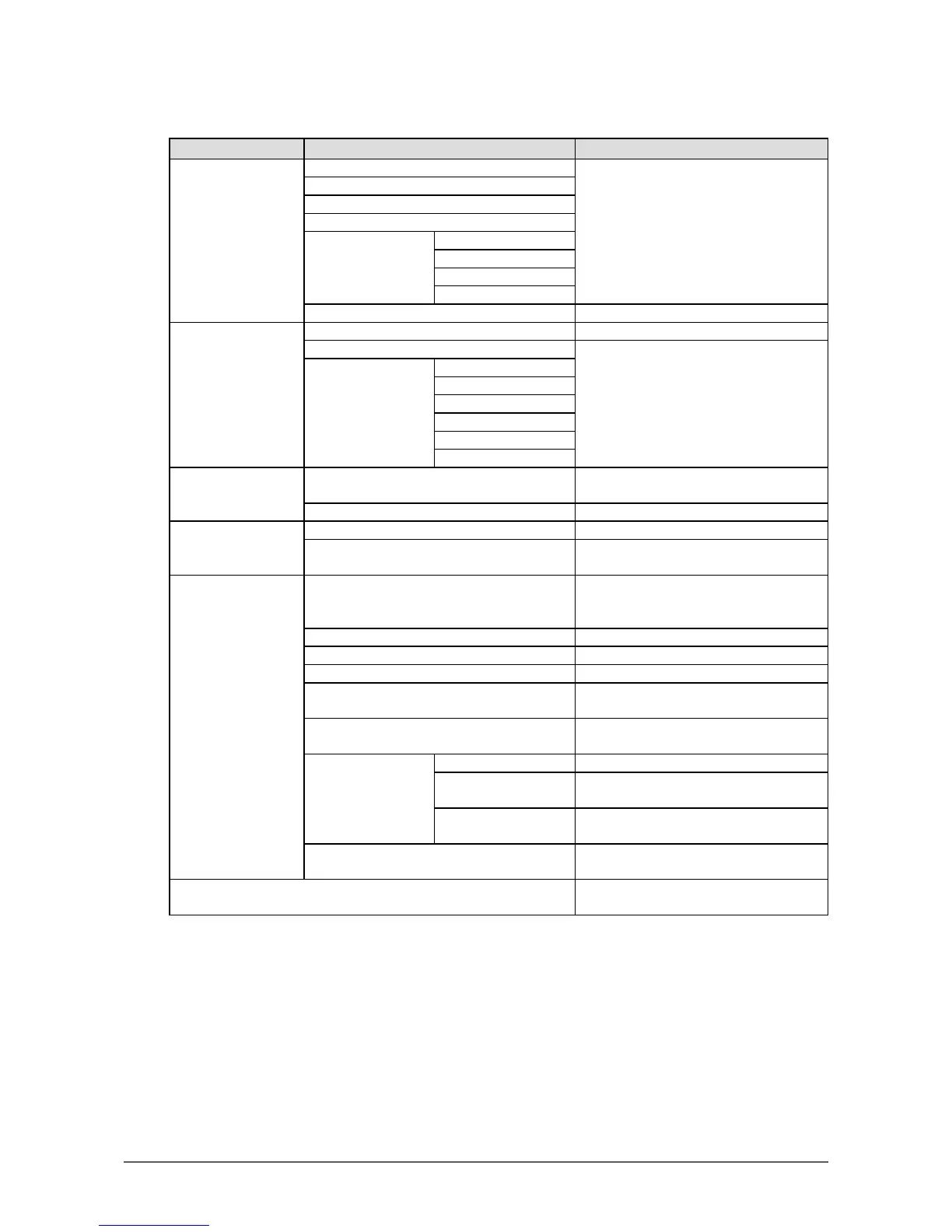
The following table shows the Setting menu and setting items of each menu.
Main menu Setting Reference
Color
*1
Brightness “2-3.AdjustingColor”(page19)
Contrast
Temperature
Gamma
AdvancedSettings Saturation
Hue
Overdrive
*2
Gain
ColorReset “Toresetthecoloradjustments”(page35)
Screen ScreenSize “ScreenSizeChanging”(page29)
Smoothing “2-4.ScreenAdjustment”(page25)
AnalogAdjustment
*3
AutoScreenAdjust
AutoRangeAdjust
Clock
Phase
Hor.Position
Ver.Position
Sound Source “3-2.Selectingsoundsourcewhileusing
theDisplayPortsignalinput”(page31)
PowerSave “AudioOutput”(page37)
PowerManager PowerSave “4-1.SettingPowerSaving”(page36)
EcoTimer “4-6.Enabling/DisablingAutoPower-
OFF”(page40)
MonitorSettings UpView
*4
“3-3.Compensatingviewingangle
deciency(EV2316W/EV2416Wonly)”
(page32)
InputSignal “Tosetinputsignalselection”(page53)
PowerIndicator “4-2.SettingPowerIndicator”(page37)
Language “3-9.SettingLanguage”(page34)
DDC/CI “3-4.Enabling/DisablingDDC/CI
communication”(page32)
BorderIntensity “Toadjustbrightnessofnon-displayarea”
(page30)
MenuSettings Orientation “3-6.SettingOrientation”(page33)
Logo “3-7.ShowingandhidingtheEIZOlogo”
(page33)
MenuPosition “3-8.ChangingSettingMenuDisplay
Position”(page34)
Reset “Toresetalladjustmentstothedefault
settings”(page35)
Information “6-6.DisplayingMonitorInformation”
(page54)
*1 The adjustment / settings available on the “Color” menu depend on the selected Color mode (see “Adjustable
settings in each mode” (page 20)).
*2 EV2336W / EV2436W only
*3 These functions can be adjusted with analog input.
*4 EV2316W / EV2416W only









 To Next Page