15
Chapter 2 Adjusting Screens
●
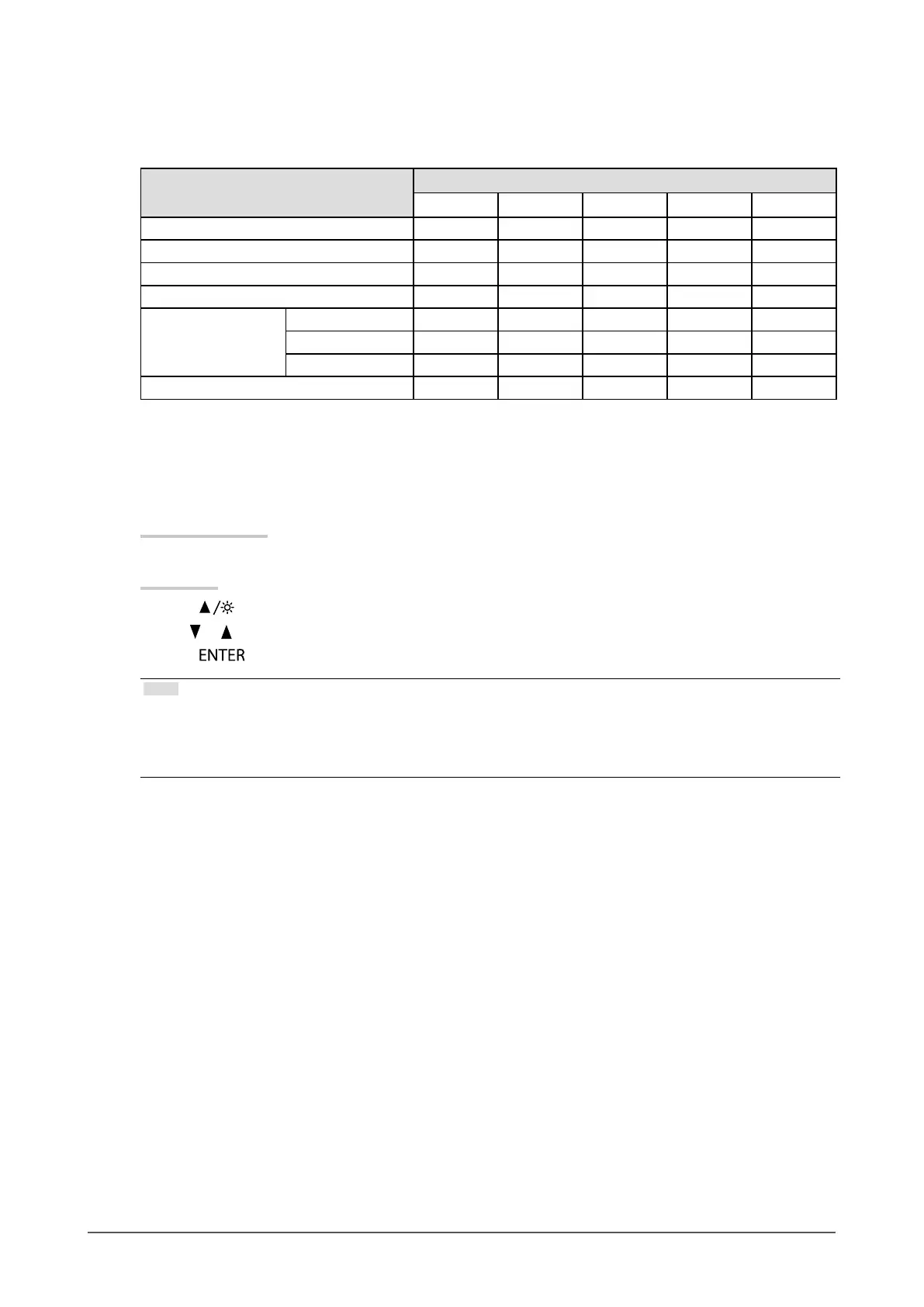
Adjustable settings in each mode
The adjustable settings depend on the mode. (Non-adjustable or non-settable function cannot be selected.)
√: Adjustable -: Not adjustable
Function
Color Mode
User1 User2 sRGB Paper Movie
Brightness √ √ √ √ √
Contrast √ √ - - √
Temperature √ √ - √ √
Gamma √ √ - - -
Advanced Settings Saturation √ √ - - √
Hue √ √ - - √
Gain √ √ - - -
Color Reset √ √ √ √ √
●
To adjust brightness
The screen brightness is adjusted by changing the brightness of the backlight (light source from the LCD back
panel).
Adjustable range
0 to 100
Procedure
1. Press
.
2. Use
or for adjustment.
3. Press
to exit.
Note
• If you feel that the image is too dark even if the brightness is set to 100, adjust the contrast.
• Alternatively, you can use “Brightness” under “Color” in the Adjustment menu to adjust it.
• To adjust the screen brightness automatically and comfortably, see “4-3. Enabling / Disabling Automatic Brightness
Adjustment” (page 28).










 To Next Page