28
Chapter2AdjustingScreens
●
Digital Input (HDMI: video signal)
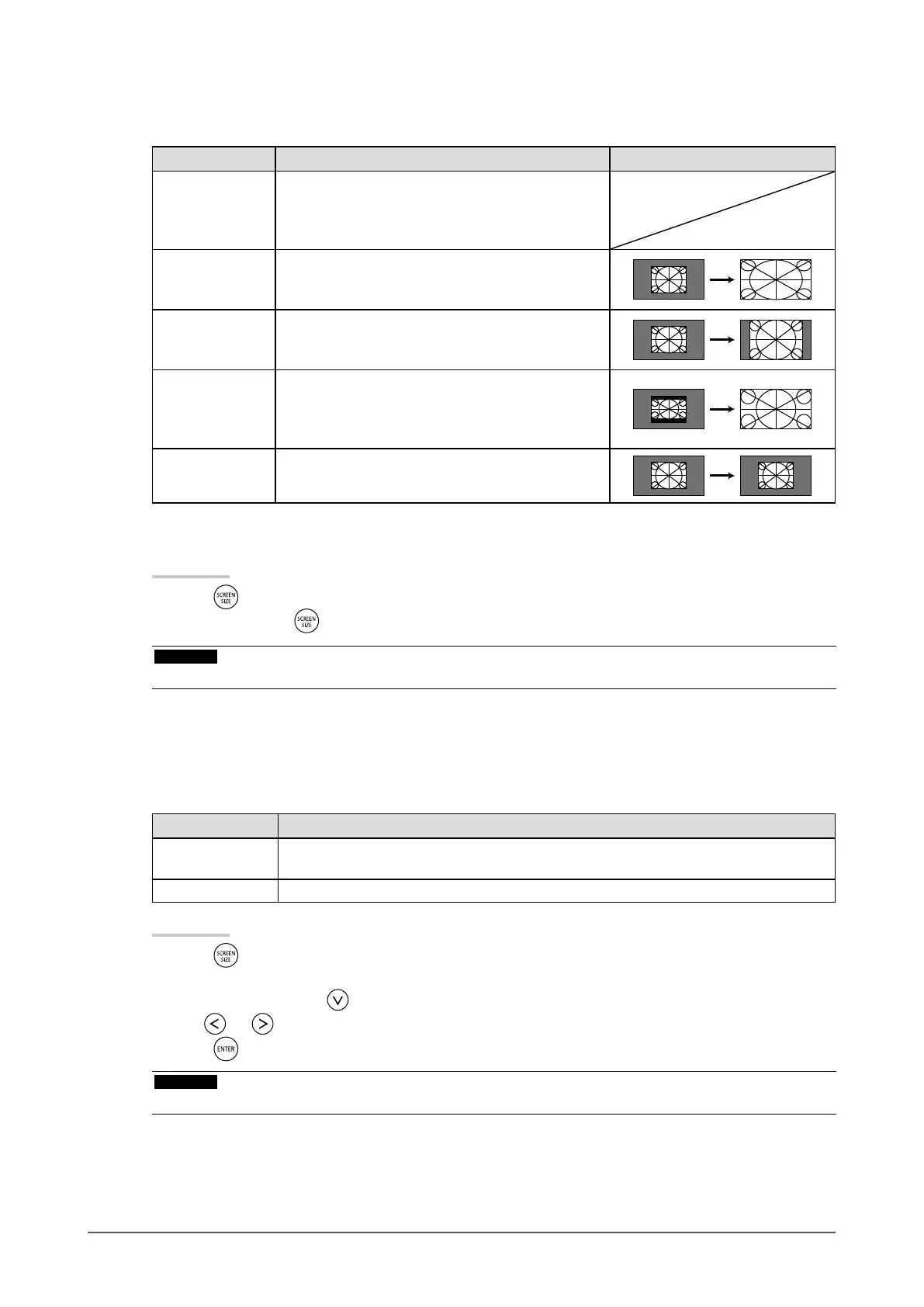
The screen size can be changed with the “Screen Size” function.
Setting Function Screen Display
Auto Themonitorautomaticallychangesthescreen
sizeaccordingtotheaspectratio
*1
andresolution
informationfromtheexternaldevice.Thiscanbeset
onlyforHDMI(SDSignal)input.
FullScreen Displaysanimageinfullscreen.Imagesare
distortedinsomecasesbecausetheverticalrateis
notequaltothehorizontalrate.
Enlarged Displaysanimageinfullscreen.Insomecases,
ablankhorizontalorverticalborderappearsto
equalizetheverticalrateandthehorizontalrate.
Letterbox DisplaysLetterboxof16:9infullscreen.Exceptfor
Letterbox,theupperandlowerpartsoftheprojected
imagearecut.ThiscanbesetonlyforHDMI(SD
Signal)input.
Normal
*2
Theimageisdisplayedwithoutscalingtheinput
signals.
*1
Theaspectratioinformationofletterboxcannotbeidentiedautomatically.
*2
When“ScreenSize”is“Normal”,“Overscan”isxedat“Off”.
Procedure
1. Press
on the remote control.
Each time you press , the size changes.
Attention
• Selecting “Normal” may make some color gradations unavailable for display.
To set the screen ratio “Overscan”
In order to hide distortion or noise at the image’s edge, the display area of the input image can be changed so
that peripheral images are not displayed.
Setting Function
On Displaysaninputimageinthescreenbytrimmingtheverticalandhorizontalpartsofthe
image.
Off Displaysmostoftheinputimage.
Procedure
1. Press
on the remote control.
The “Screen Size” menu appears.
2. Select “Overscan” with .
3. Use
or for adjustment.
4. Press
to exit the adjustment.
Attention
• When “Screen Size” is “Normal”, “Overscan” is xed at “Off”.










 To Next Page