8
Chapter1Introduction
1-2. Controls and Functions
Monitor
PowerManager
Menu
Color
Sound
Screen
Monitor Settings
Information
14
12
13
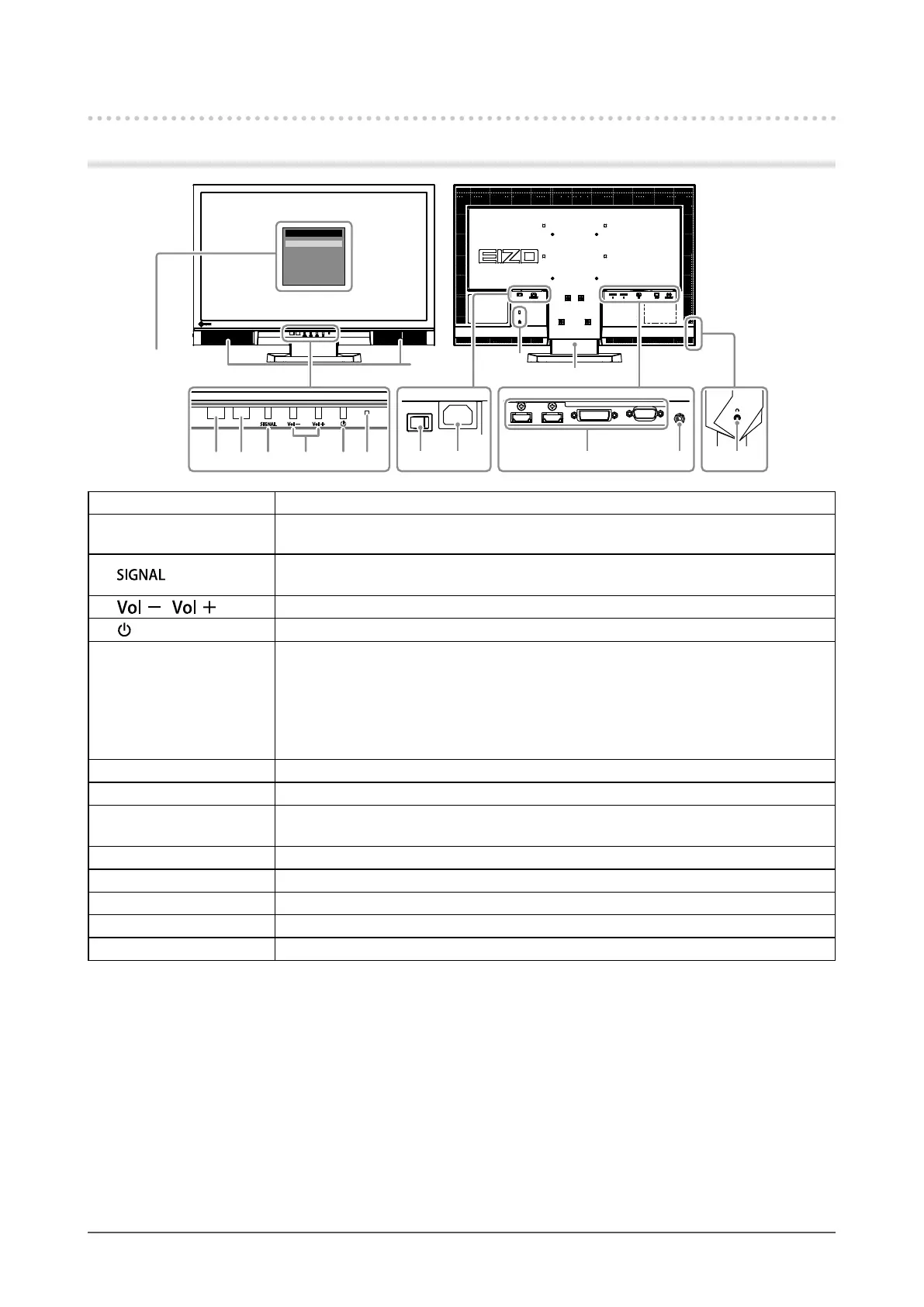
1 2 3 4 5 6 107 8 9 11
1. Auto EcoView sensor Detectsambientbrightness.AutoEcoViewfunction(page35).
2. Remote control
detector
Receivesthesignalfromtheremotecontrol.
3.
button
Switchesinputsignalsfordisplay(page37).
PC1(DVI)→PC2(D-SUB)→HDMI1→HDMI2
4.
/ button Displaysthevolumeadjustmentmenutovolumeupordown.
5.
button Turnsthepoweronoroff.
6. Power indicator
Indicatesthemonitor’soperationstatus.
Blue: Operating
Orange: Powersavingmode
Red Poweroff
OFF: Mainpoweroff
7. Main power switch Turnsthemainpoweronoroff.
8. Power connector Connectsthepowercord.
9. Input signal connector
Left:HDMIconnector×2(HDMI1,HDMI2)/Center:DVI-Dconnector/
Right:D-Submini15-pinconnector
10. Stereo mini jack Connectsthestereominijackcable.
11. Headphone jack Connectstheheadphones.
12. Security lock slot ComplieswithKensington’sMicroSaversecuritysystem.
13. Stand
*2
Usedtoadjusttheangleofthemonitorscreen.
14. Speaker Outputsaudiosource.
*1
See“BasicoperationoftheSettingmenu”(page11)forhowtouse.
*2
Anoptionalarm(oranoptionalstand)canbeattachedbyremovingthestand(see“7-1.HowtoAttachtheOptional
Arm”(page42)).
Settingmenu
*1












 To Next Page