- 9 -
STEP 2
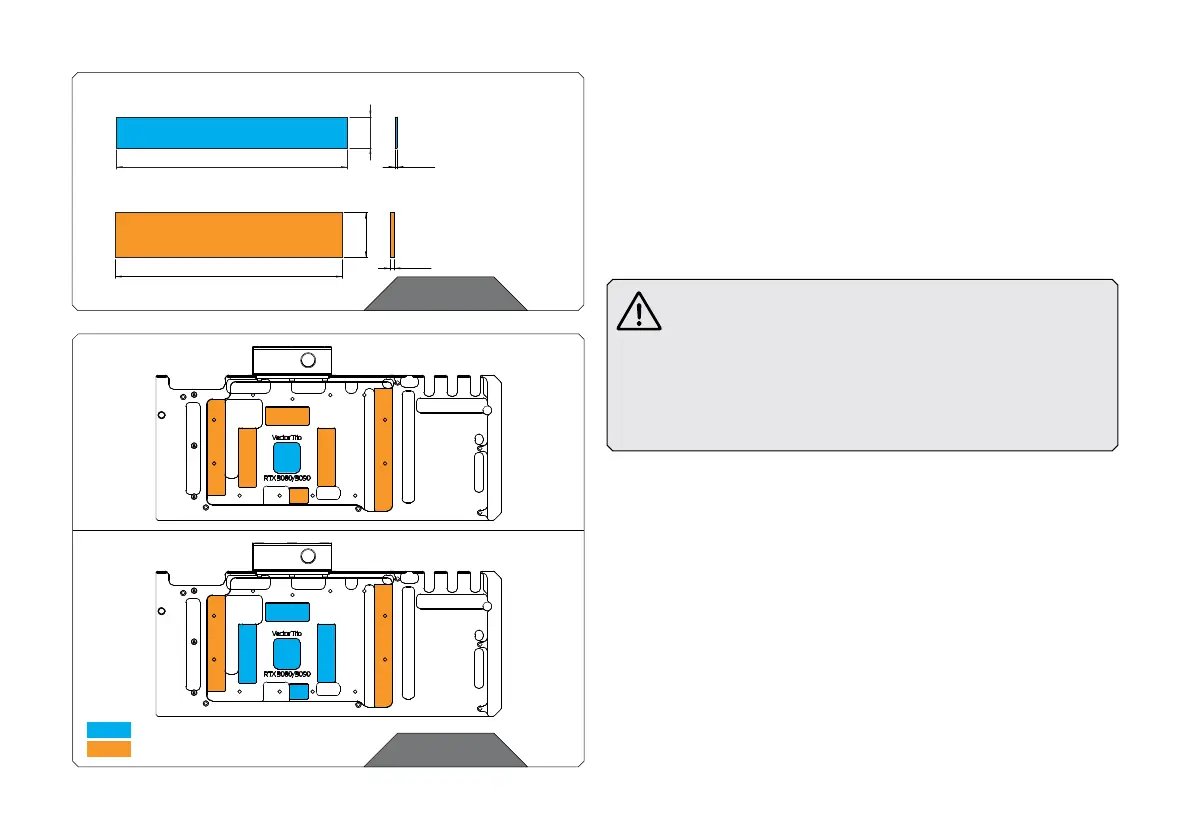
120 mm
24 mm
2 mm
Thermal PAD G 2.0 mm (120 x 24 mm)
1 mm
120 mm
16 mm
Thermal PAD F 1.0 mm (120 x 16 mm)
STEP 2
CUTTING AND PLACING THERMAL PADS
Your backplate comes with thermal pads that have to be cut into
smaller pieces to cover all the VRM components. EK made sure to
provide you with more than an adequate quantity of thermal pads to
complete these steps.
Replacement thermal pads:
Thermal PAD F 1.0 mm – (120 x 16 mm) – EAN: 3830046996732
Thermal PAD G 2.0 mm – (120 x 24 mm) – EAN: 3830046996794
EK only guarantees compatibility with included EK-brand
thermal pads. Installation process, cooling performance
and block contacts are tested exclusively with EK-brand
thermal pads. Listed thermal pad thicknesses apply only
to thermal pads included in the package.
EK does not guarantee compatibility with aftermarket
alternatives for thermal interface material.
STEP 3
Once cut to size, thermal pads should be placed on the backplate/
PCB, as illustrated below.
STEP 3
Thermal Pad F 1 mm
Thermal Pad G 2 mm
F1
F1
G2
F1
G2
F1
G2
F1
F1
3090
3080
F1
G2
G2
G2
G2
G2
G2




 To Next Page