- 7 -
INSTALLATION GUIDE
STEP 1
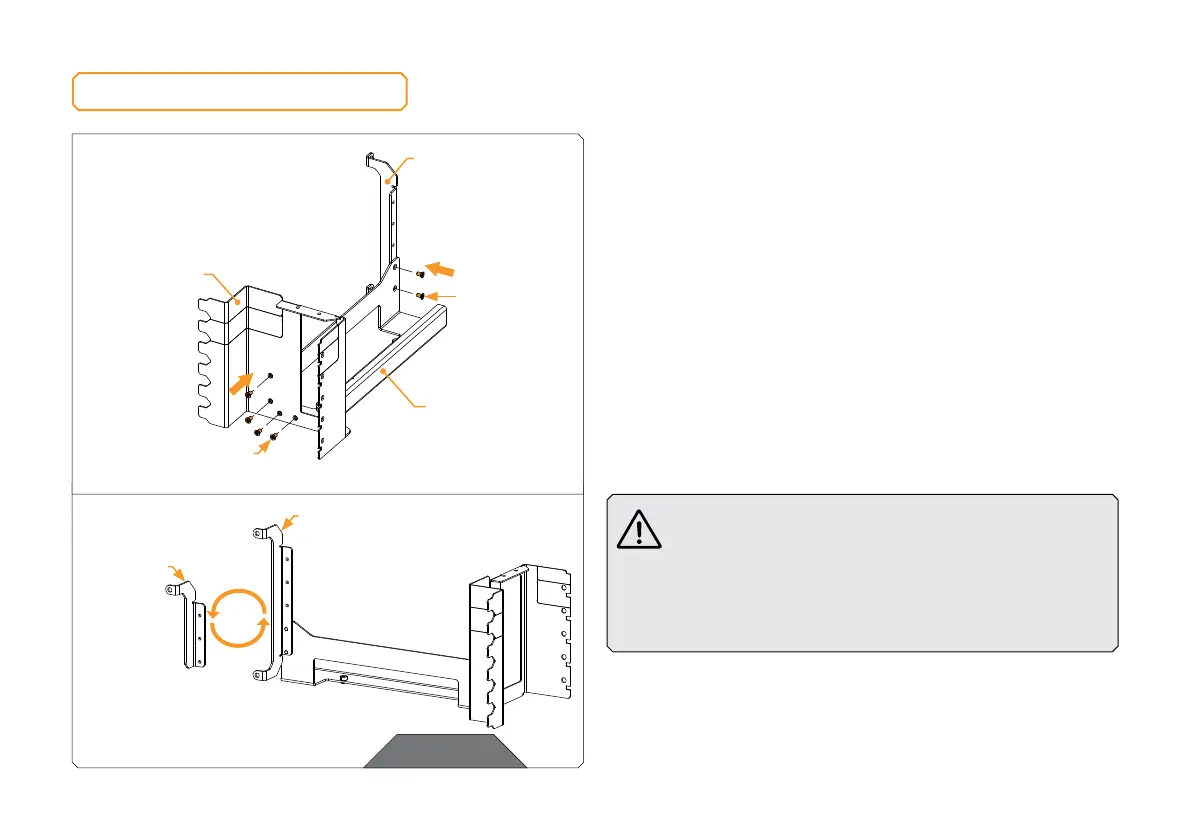
Assemble the three steel brackets with the six M3x5 countersunk
screws. Depending on how you want to position the GPU holder
inside your PC, you may choose between two options.
STEP 1
BRACKET 1
BRACKET 2
BRACKET 3
M3x5 COUNTERSUNK
SCREW
OPTION 1
OPTION 2
M3x5
COUNTERSUNK
SCREW
In some cases, you may skip the installation of the
»Bracket 3« if it interferes with other components inside
your PC. You should check this before proceeding with
the installation. In most cases, the assembly of »Bracket
1« and »Bracket 2« should provide sufficient load-bearing
capacity, while the »Bracket 3« will provide additional
stiffness and stability for the whole GPU Holder.




 To Next Page