87
NOTIFICATIONS
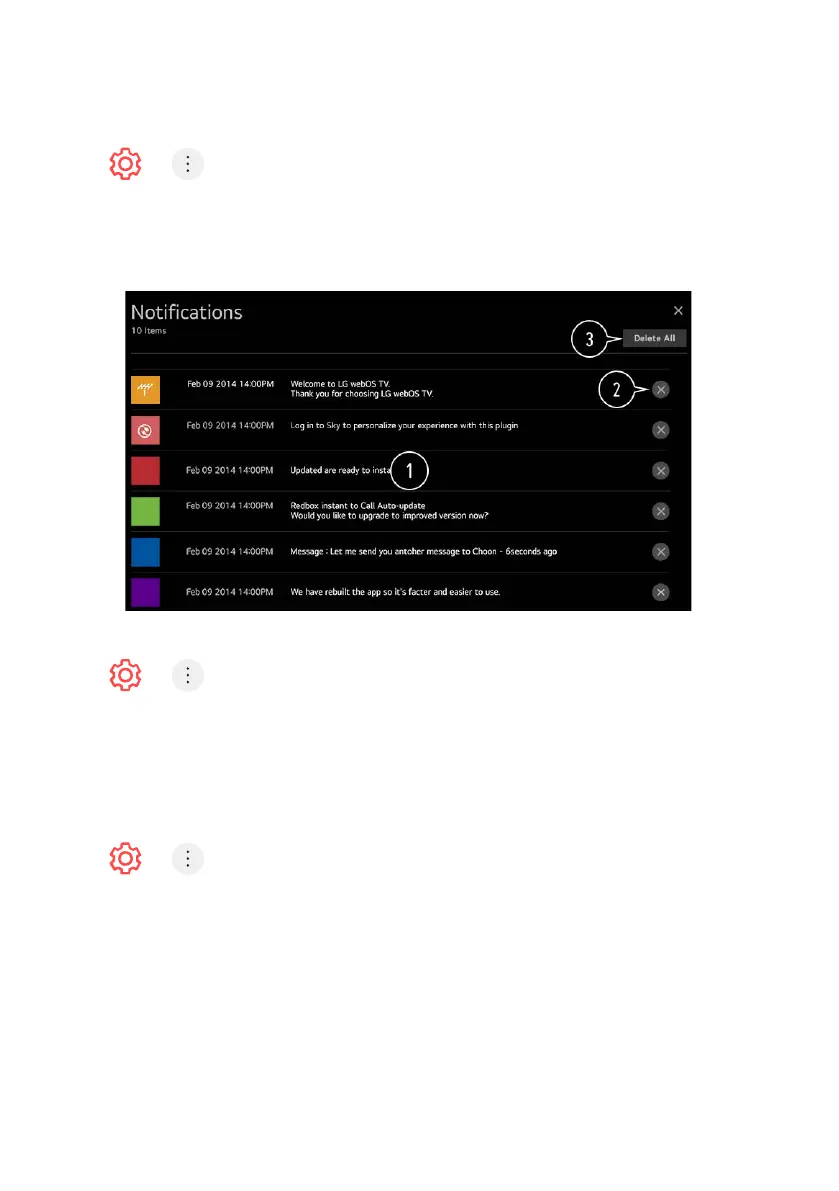
Press > > Support > Notifications
You can view all notifications from TV apps and service at the same time. You
can view and delete each notification message.
- For notifications that support shortcuts, you can go directly to that app
or website.
ADDITIONAL SETTINGS
Press > > Support > Additional Settings
User Agreements - These are the terms and conditions for privacy for the
use of Smart TV-related services.
Legal Notice - It’s a legal notice for services provided via TV.
Open Source Software Notice - You can view the instructions for each item.
RESTORING THE DEFAULT SETTINGS
Press > > Support > Reset to Initial Settings
Reset TV to its initial settings - This will revert all settings to their default values.
- After reset, the TV will automatically turn o and on.
- If Safety is set to On, you should type the password to Reset to
Initial Settings.
- Do not turn o the power during initialization.
- We recommend that you reset the TV to Reset to Initial Settings before
you sell it or transfer it to a third party.
SUPPORT (Cont.)



 To Next Page