EasyManua.ls Logo

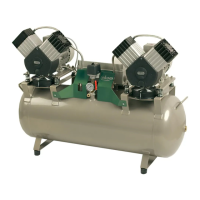
EKOM DK50 DE - User Manual

EKOM DK50 DE
56 pages
Print Icon
To Next Page IconTo Next Page
Loading...

Table of Contents

Other manuals for EKOM DK50 DE

Questions and Answers

  • A
    Ashley GreenSep 4, 2025
    How to improve the performance of my EKOM DK50 DE?
    • Z
      zhicksSep 4, 2025
      To address low performance in your EKOM Air Compressor, start by inspecting the pneumatic distribution system for air leakage and seal any loose connections. Ensure that your consumption of compressed air does not exceed the maximum flow specified in the technical data. Also, check for worn out piston rings or a dirty air suction filter. Replace the worn out piston rings or clean/replace the dirty air suction filter as needed.
  • A
    Ann SantanaSep 18, 2025
    Why is water leaking from the outlet of my EKOM DK50 DE?
    • K
      Kimberly KellerSep 18, 2025
      If water is leaking from the outlet of your EKOM Air Compressor, it might be because the hose from the equipment is too long or on the ground; shorten the hose. Also, check and adjust the working or output pressure settings to the correct levels. Ensure that you are not exceeding the maximum flow specified in the Technical Data. You can also try to clean or replace the float system.
  • C
    Carlos HarperSep 16, 2025
    How to fix a noisy (knocking, metal noises) EKOM Air Compressor?
    • P
      perezjaniceSep 16, 2025
      If your EKOM Air Compressor is making knocking or metal noises, it could be due to damaged components. Start by checking the piston bearing, piston rod, and motor bearing, and replace any damaged bearings. Also, you may need to replace the damaged hanger.
  • D
    Dominique NealSep 14, 2025
    Why did the thermal motor protection trip on my EKOM Air Compressor?
    • A
      Adrian MillerSep 15, 2025
      If the thermal motor protection has tripped on your EKOM Air Compressor, it could be due to a few reasons. Check if the ventilation openings are covered and uncover them. Ensure the cooling fans are working; if not, replace the defective fan. Also, make sure the equipment is in a well-ventilated space to secure suitable conditions. If these steps don't resolve the issue, consider replacing any damaged parts.
  • D
    Douglas NelsonSep 13, 2025
    What to do if my EKOM Air Compressor has low performance?
    • A
      Ashley GuerreroSep 13, 2025
      If your EKOM Air Compressor's performance is low, start by checking the working and output pressure settings and adjust them as needed. Look for air leaks in the compressed air distribution system and seal any loose joints. Ensure that you are not exceeding the maximum flow specified in the Technical Data. If the problem persists, you might need to replace worn piston rings or a contaminated element.
  • L
    Lisa WallsSep 12, 2025
    Why is the output pressure low on my EKOM Air Compressor?
    • C
      Christopher CampbellSep 12, 2025
      Low output pressure in your EKOM Air Compressor can stem from several causes. First, check and adjust the working or output pressure settings to the correct levels. Also, inspect the compressed air distribution system for leaks and seal any loose joints. Avoid exceeding the maximum flow specified in the Technical Data. If these steps don't help, you may need to replace the piston assembly or a contaminated element.
  • E
    Edward BurkeSep 9, 2025
    How to troubleshoot an EKOM DK50 DE Air Compressor that won't start?
    • E
      erica90Sep 9, 2025
      If your EKOM Air Compressor isn't starting, there could be a few reasons related to the electrical power source. First, ensure the main breaker is on. Then, check the voltage in the socket and inspect the fuses, replacing any that are faulty. Also, make sure the terminal is tightened and the electrical cord isn't defective; replace it if necessary. If these steps don't resolve the issue, consider replacing the motor or capacitor, or replacing any other damaged parts.
  • D
    Daniel MorganSep 7, 2025
    Why is water coming out of my EKOM Air Compressor?
    • M
      Michael ReeseSep 7, 2025
      If water is coming out of the outlets of your EKOM Air Compressor, the water trap in the filter and filter regulator is likely dirty. You should clean or replace the water trap.
  • A
    Andre PalmerSep 5, 2025
    Why is my EKOM DK50 DE Air Compressor so noisy?
    • P
      Paul BarberSep 5, 2025
      If your EKOM Air Compressor is making unusual noises like knocking or metal sounds, it might be due to a damaged piston bearing or a bearing in the motor, or a loose/cracked belt of the air pump hanger. In such cases, you should replace the damaged bearing or the damaged hanger.
  • P
    Phillip KingAug 21, 2025
    How to troubleshoot EKOM Medical Equipment when compressor does not start?
    • J
      James WilliamsAug 21, 2025
      If your EKOM Medical Equipment compressor doesn't start, there might be an issue with the electrical power source. First, ensure the main breaker is on. Check the voltage in the socket and inspect the fuses, replacing any that are faulty. Also, tighten any loose terminals and check the electrical cord for defects, replacing it if necessary. If these steps don't resolve the issue, the motor or capacitor might need replacement, or there could be damaged parts that need attention.

Summary

General Information and Safety

Intended Use of Medical Air Compressor

Defines the medical air compressor's specific application.

Contraindications and Side-Effects

Information on any known negative effects or usage restrictions.

Operators Responsibility for Patient Safety

Stresses the operator's role in ensuring safe operation and patient well-being.

Product Markings Explained

Explanation of product markings, such as the CE mark.

General Safety Warnings and Precautions

General warnings about using original parts, accessories, and manufacturer liability.

General Safety and Operational Guidelines

General Safety Warnings

Essential safety measures to prevent injury and equipment damage.

Electrical System Safety Warnings

Critical warnings concerning electrical connections and power supply safety.

Understanding Warning Notices and Symbols

Warning Notices and Symbols Identification

Identifies and explains important warning symbols used in the manual.

Usage, Storage, and Transport

Equipment Usage Guidelines

Guidelines for the proper installation and operating environment.

Storage and Transport Procedures

Instructions for safely storing and transporting the compressor.

Equipment Description

Compressor Components and Operation

Details the compressor's parts, filtration system, and operational modes.

Technical Data and Specifications

Technical Specifications Overview

Covers output flow, voltage, filtration, dimensions, and weight.

Environmental and Operational Data

Includes climatic conditions, IP rating, and noise level.

FAD Efficiency Correction

FAD Efficiency Correction for Elevation

Explains how altitude affects FAD efficiency with a correction table.

Operation and Setup

Installation and First Operation

Initial setup, including removing stabilizers and first use procedures.

Removal of Transport Stabilizers

Step-by-step guide to removing transport stabilization screws.

Connecting and Operating the Compressor

Wheel Installation Guide

Instructions for attaching the compressor's wheels.

Compressed Air Connection

Guidance on connecting the compressed air supply to the unit.

Electrical Connection Procedures

Procedures for safely connecting the compressor to the mains power.

Initial Compressor Operation

First Operation Procedures

Steps for initial startup and checking connections.

Compressor Operation Modes

Explains STANDBY and active modes, especially with external air supply.

Operation Details and Accessories

Optional Accessories Information

Details on accessories like trolleys and humidifier holders.

Switching the Compressor On

Step-by-step instructions to power on the compressor.

Compressor Running and Maintenance

Running the Compressor

Describes automatic operation, idle run, and condensed water drainage.

Cleaning and Replacing Filters

Maintenance guide for cleaning and replacing suction filters.

Cleaning the Compressor Unit

Instructions for cleaning the exterior of the compressor.

Maintenance Procedures

Repairs and Service Procedures

Guidelines for authorized repairs, modifications, and spare parts.

Cover Removal for Maintenance

Steps to remove the compressor's covers for access to internal components.

Maintenance Schedule Overview

Outlines periodic maintenance tasks, pages, intervals, and responsibilities.

Safety Valve Maintenance

Safety Valve Check Procedure

How to perform a safety valve check and warnings against misuse.

Equipment Inspection and Filter Replacement

Joint Tightness and Equipment Inspection

Steps for checking for leaks and visually inspecting the compressor.

Replacing Filter Elements Safely

Procedure for replacing filter elements, including depressurizing the system.

Pressure Regulation and Filter Replacement

Setting the Output Air Pressure

Instructions on adjusting the output pressure using the regulator.

Cleaning the Pressure Regulator

Detailed steps for disassembling and cleaning the pressure regulator.

Replacing the Suction Filter

Guide to replacing the suction filter (item 18).

Shipping, Shutdown, and Disposal

Stabilizing Compressor for Shipping

Steps to secure the compressor for transport to prevent movement.

Shutdown Procedure

Instructions for safely powering down and depressurizing the unit.

Equipment Disposal Guidelines

Recommendations for environmentally responsible disposal of the equipment.

Troubleshooting Guide

Troubleshooting Common Problems

A guide to identifying and resolving issues with the compressor.

Spare Parts Information

List of Available Spare Parts

Catalog of spare parts with corresponding item numbers for ordering.

Electric and Pneumatic Diagrams

Wiring Diagram

Electrical schematic showing component connections and layout.

Pneumatic Diagram

Pneumatic Diagram

Pneumatic schematic illustrating the air flow and system components.

Electromagnetic Compatibility Declaration

Electromagnetic Emissions Guidance

Information on RF emissions, compliance, and environmental guidance.

Electromagnetic Immunity

Electromagnetic Immunity Guidance

Details on immunity tests and recommended environments for mains power.

RF Immunity and Separation

RF Immunity and Separation Distances

Guidance on RF immunity, proximity fields, and recommended separation distances.

EKOM DK50 DE Specifications

General IconGeneral
Number of outputs1
Air flow50 l/min
Power0.55 kW
Max Pressure8 bar
Voltage230 V
Weight26 kg
TypeOil-free compressor

Related product manuals