- 9 -
STEP 3
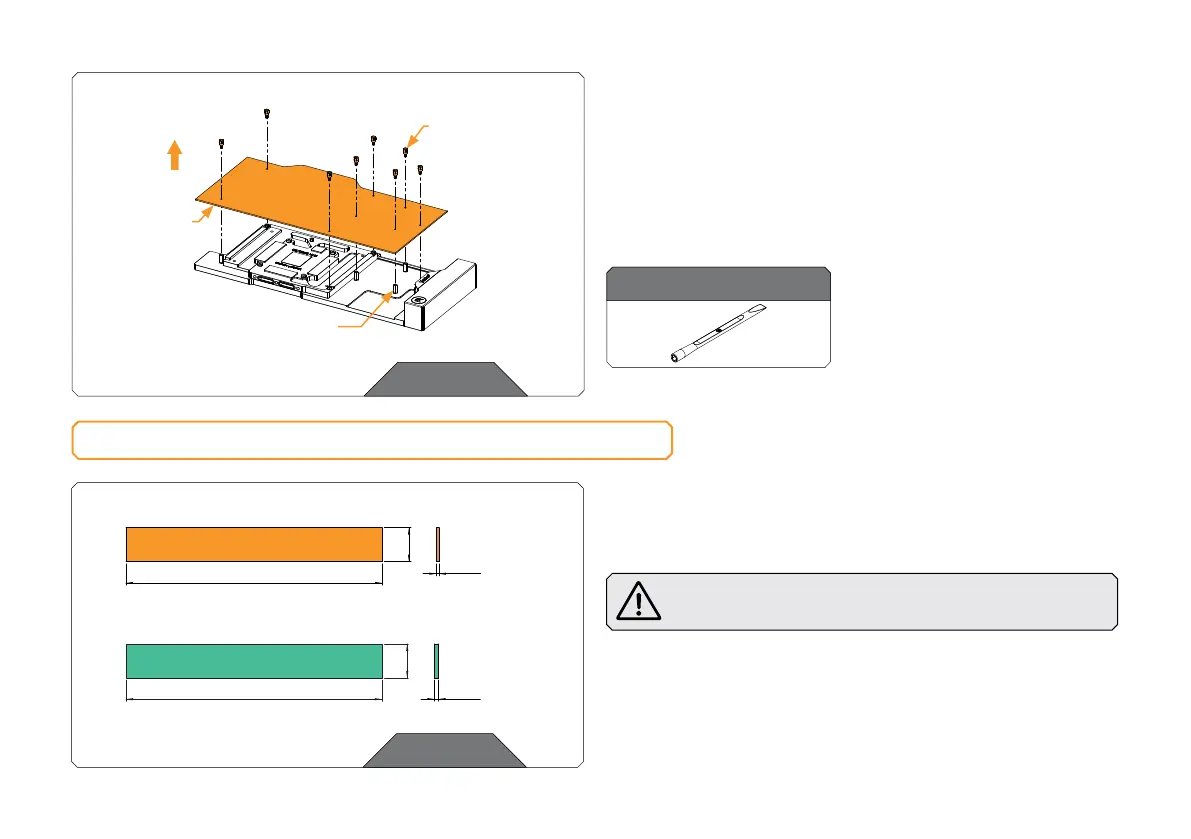
Unscrew eight (8) M2.5-M3 x 6.6 standoff with the included
tool (EK-Plug out Spludger Tool). Make sure not to unscrew the
M3.5-M2.5 x 11.3 standoff! In case the M3.5-M2.5 x 11.3 standoff
unscrews, carefully tighten it back with the 4 mm wrench.
After removing the standoffs, the PCB cardboard needs to be
removed.
STEP 3
M3.5-M2.5x11.3
STAN DO FF
PCB
CARDBOARD
M2.5-M3 x 6.6
STAN DO FF
CUTTING AND PLACING THERMAL PADS
STEP 1
Your GPU water block comes with thermal pads that have to be cut
into smaller pieces to cover all the VRM components, such as COILs,
MOSFETs, and drivers.
You must remove the protective foil from both sides of the
thermal pad before installation.
Replacement thermal pads:
Thermal Pad F 1.0 mm – (120 x 16 mm) EAN: 3830046996732
Thermal Pad F 2.0 mm – (120 x 16 mm) EAN: 3830046996756
Thermal Pad F – 1.0 mm (120 x 16 mm)
120 mm
16 mm
1 mm
Thermal Pad F – 2.0 mm (120 x 16 mm)
2 mm
120 mm
16 mm
STEP 1
For this step, you will need:
EK-Plug Out Spludger Tool





 To Next Page