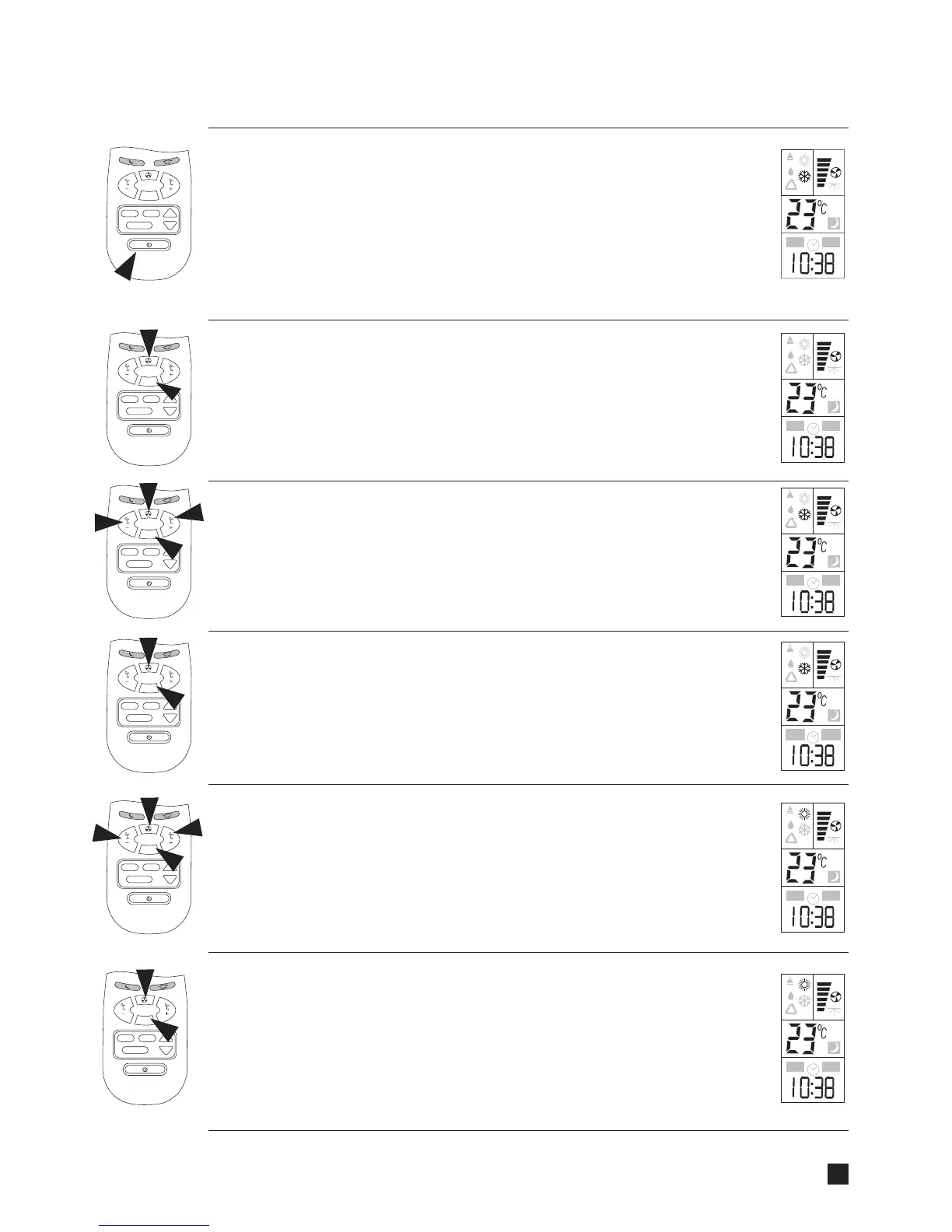
OPERATION PROCEDURE
MODE
+
-
TIMER
SE
T
CL
EAR
MODE
+
-
TIM
ER
S
ET
C
LEA
R
MODE
+
-
T
IMER
SET
CL
EAR
MODE
+
-
TIM
ER
S
E
T
CLEA
R
AUTO
ON
OFF
AUTO
ON
OFF
AUTO
ON
OFF
AUTO
ON
OFF
AUTO
ON
OFF
MODE
+
-
TIM
ER
S
E
T
CLEA
R
TURNING ON THE AIR CONDITIONER
Press START/STOP button (1) to turn the air conditioner. After connecting to the
power supply, The indicator (B) on the air conditioner light up, indicating that the air
conditioner is in the standby status. Please note that LCD operation display (13) will
always show the last mode of operation and the function used. If you
want to change the contr ol settings, proceed according to the following instructions.
Otherwise, the air conditioner will start and operate in the same mode
and functions prior to
being turned off.
VENTILATING OPERATION
Select the ventilating mode by pressing MODE button (2). Switch to the desired
fan speed by pressing FAN speed button (3).
COOLING OPERATION
Select the COOLING mode by pressing MODE button (2). Switch to the desired
FAN SPEED or to AUTO FAN by pressing button (3). Select suitable temperature
setting. By selecting the COOLING mode, the air flap will move automatically to air
delivery position, optimal for cooling.
COOLING OPERATION WITH AUTO FAN MODE
This operation starts with the hig
hest air flow in order to quickly lower the room
temperature. It will then automatically switch to the low air flow to quietly maintain
the selected temperature.
HEATING OPERATION
Select the HEATING mode by pressing MODE button (2). Switch to the
desired FAN SPEED or to AUTO FAN by pressing FAN button (3). Select
suitable temperature setting. By selecting the HEATING mode, the air flap will
m
ove automatically to air delivery position, optimal for heating.
previous
HEATING OPERATION WITH AUTO FAN MODE
This operation starts with the highest air flow in order to quickly raise the room
temperature. It will then automatically switch to a lower air flow to quietly maintain
the selected temperature. HEATING with AUTO FAN will automatically provide
the user with the HOT KEEP function. The fan
will be turned off when the indoor
coil temperature is not sufficiently hot to prevent uncomfortable cold air drafts.
AUTO
ON
OFF
MODE
+
-
TIMER
SE
T
CLEAR
8



 To Next Page