WIFI CONTROL
18
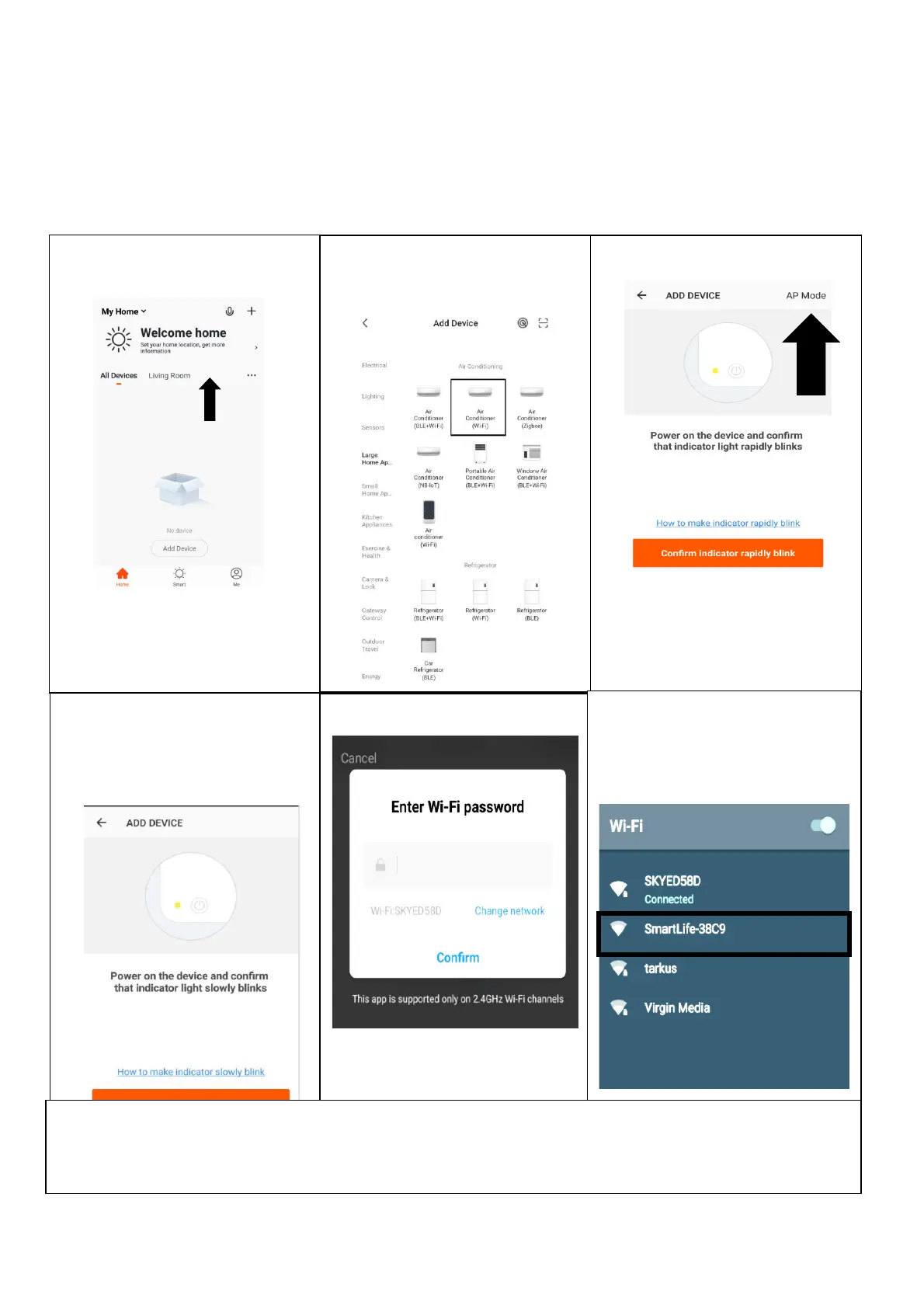
CONNECTING USING AP MODE (ALTERNATIVE METHOD)
Before initiating the connection, make sure the unit is in standby mode, with the WiFi Indicator
flashing once per second. If not follow the instructions for changing the WiFi connection mode.
Also ensure your phone is connected to the WiFi network. (We advise turning mobile data off
during setup)
1. Open app and press “+” to
add device, or use the add
device button
2. . Select the type of device
as “Air Conditioner (WiFi)”
within the Large Home
Appliance tab
3. Press on the AP mode button in
the top right of the screen.
4. Ensure the WiFi indicator on
the air conditioner is slowly
flashing (once per second),
then press on the orange
button at the bottom of the
screen to confirm
5. Enter your WiFi password and
press confirm.
6. Go to network settings in your
phone and connect to the
“SmartLife xxx” connection.
There is no password to enter.
Then return back to the app to
complete setup.
This will then transfer the settings to the air conditioner.
Once the connection process has completed, go back to the network settings on your phone to ensure your phone
has reconnected to your WiFi router.





 To Next Page