- 6 -
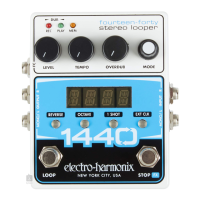
Selecting/Adjusting Modes The selectable modes are toggled by pressing the
currently selected mode. Turn the MODE knob to cycle through the possible
modes:
LOOP = Loop Select
SWFX = STOP [FX] Footswitch Function
EXTC = External MIDI Clock
FADE = Fadeout time upon stopping a loop
TM.KN = Tempo Knob Fine/Coarse
When you arrive at the mode you would like to adjust, press the MODE knob
the selected mode's value or option. The selected mode can now be adjusted
by turning the MODE knob. See page 10 for more on each Mode.
For example, to change loops, ensure LOOP is selected and then turn the
MODE knob to the loop number that you want to use. The range is 1-20.
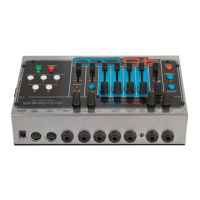
10. Digital Display Displays the current mode, value, loop numbers and tempo.
A dot in the lower right corner indicates the current tempo setting is a loop’s
original tempo.
11. REVERSE Button Press the REVERSE button to play the loop in reverse.
The REVERSE button glows green when enabled. Reverse can be initiated at
any time: during playback, overdub or even before recording a new loop. If
REVERSE is enabled upon ending a new loop recording, the loop will immedi-
ately playback or overdub in reverse.
12. OCTAVE Button Pressing the OCTAVE button causes the speed of the loop
to drop by half so that the pitch of the loop goes down one octave and the
tempo is halved. If a loop is overdubbed during half-speed mode, returning to
normal speed playback causes the pitch of the overdub to go up one octave
and the tempo is doubled. The OCTAVE button glows green when enabled.
OCTAVE can be used at any time during playback or while overdubbing a loop.
If OCTAVE is enabled prior to new loop recording, the loop will immediately
playback or overdub at half-speed.
13. 1 SHOT Button Pressing the 1 SHOT button enables or disables 1 SHOT
mode. When 1 SHOT is enabled and its button is lit, the loop plays back once
and then stops. You may overdub in 1 SHOT mode as well.
14. EXT CLK Button When this button is lit, the 1440 will operate at a tempo
set by external MIDI clock. The number of beats per bar are set in EXTC Mode.
15. MONO/L INPUT ¼" Left Instrument/Line Input Jack. Plug the output of your
instrument or another effects pedal into this jack. If you use just one input we
recommend you use the MONO/L input. The input impedance presented at
The input is unbalanced.
16. R INPUT ¼" Right Instrument/Line Input Jack. Plug the output of your
instrument or another effects pedal into this jack. Use this jack for stereo


 To Next Page