EasyManua.ls Logo

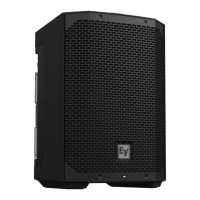
Electro-Voice ETX-10P - User Manual

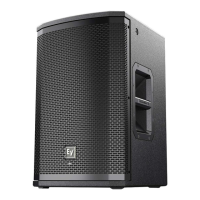
Electro-Voice ETX-10P
44 pages
Print Icon
To Next Page IconTo Next Page
Loading...
ETX Powered Loudspeakers
ETX-10P, ETX-12P, ETX-15P, ETX-35P, ETX-15SP, and ETX-18SP
en | User Manual

Questions and Answers

  • S
    Sarah WilliamsAug 16, 2025
    What to do if Electro-Voice Speakers produce acoustic feedback?
    • L
      Lori DiazAug 17, 2025
      Acoustic feedback in Electro-Voice Speakers can occur due to several reasons: * **Incorrect gain structure:** Reduce the microphone levels at the mixing console or input source. If the microphone is directly connected to the speaker, lower the input level on the speaker. Positioning the microphone closer to the sound source increases gain before feedback. * **Function setting:** Change the LOCATION setting to LIVE or SPEECH, if it is set to MUSIC. * **Microphone position:** Reposition the loudspeakers so the microphone is behind them whenever possible. If using the loudspeaker in a monitor position, aim the loudspeaker to the back of the microphone.
  • J
    jamessalazarAug 20, 2025
    How to fix constant noise (buzzing, hissing, humming) in Electro-Voice ETX-10P Speakers?
    • M
      Melvin HernandezAug 20, 2025
      Constant noise like buzzing, hissing, or humming in your Electro-Voice Speakers can be caused by a few things. First, if noise is present without any program material playing, evaluate each component to isolate the problem, as there is most likely a break in the signal path. It could also be due to poor system grounding or a ground loop, so check and correct the system grounding as necessary. Also, ensure the input gain knob is in the MIC position, slowly increasing the input gain knob level to engage the microphone pre-amp.
  • J
    Jason WattsAug 25, 2025
    What to do if Electro-Voice ETX-10P sound distorted and the limit light is on?
    • B
      Brian FoxAug 25, 2025
      If your Electro-Voice Speakers are producing distorted sound, the front LED is off, and the LCD screen shows 'LIMIT' is ON, it indicates an excessive input level. Reduce the input level or loudspeaker level knobs to prevent limiting.
  • G
    gbeckAug 28, 2025
    What to do if Electro-Voice ETX-10P have intermittent output?
    • R
      Robert WagnerAug 28, 2025
      If your Electro-Voice Speakers experience intermittent output such as cracking or distortion, start by checking all connections at the amplifier and loudspeakers to ensure they are clean and tight. If the problem persists, inspect the wiring.
  • L
    Laurie RossAug 31, 2025
    How to unlock the DSP menu on Electro-Voice ETX-10P Speakers?
    • J
      Jennifer WardSep 1, 2025
      If the DSP menu on your Electro-Voice Speakers is locked (indicated by a lock symbol on the LCD screen), it means the Menu Lock function is enabled. To unlock it, press and hold the MASTER VOL knob for 5 seconds.
  • B
    Barbara DoyleSep 5, 2025
    What to do if the microphone connected to Electro-Voice INPUT 1 or 2 produces no sound?
    • D
      Darren SmithSep 5, 2025
      If you're not getting any sound from a microphone connected to INPUT 1 or INPUT 2 on your Electro-Voice system, it could be due to a couple of reasons. If your microphone requires phantom power, use a dynamic microphone that does not require it. If you must use a microphone needing phantom power, an external phantom power source is necessary. Also, make sure the input gain knob is in the MIC position, slowly increasing the input gain knob level to engage the microphone pre-amp.
  • T
    Tricia MendezSep 8, 2025
    Why do Electro-Voice Speakers have poor low-frequency response?
    • J
      Jenny Chavez MDSep 8, 2025
      If your Electro-Voice Speakers exhibit poor low-frequency response, and the SUB menu cross-over frequency is activated, but no subwoofers are used with the system, select the OFF position.
  • C
    Cynthia WoodNov 12, 2025
    Why do my Electro-Voice ETX-10P have no sound?
    • K
      Kristen JohnsonNov 12, 2025
      If your Electro-Voice Speakers aren't producing sound, the issue might stem from either the amplifier or the wiring. * **Amplifier:** To check, connect a known working test loudspeaker to the amplifier outputs. If there's still no sound, ensure all electronics are on, the signal routing is correct, the source is active, and the volume is turned up. Correct, repair, or replace components as needed. If sound is present with the test speaker, the problem lies in the wiring. * **Wiring:** Verify the correct cables are connected to the amplifier. Play audio at a low level through the amplifier. Connect the test loudspeaker in parallel with the malfunctioning line. If the sound disappears or is very weak, the line likely has a short, possibly due to a scrape, pinch, or missed connection. U...

Electro-Voice ETX-10P Specifications

General IconGeneral
TypeFull-range
Power Output2000 W
Max SPL132 dB
Maximum SPL132 dB
Tweeter Size1.5 inches
Coverage (H x V)90° x 60°
Input ConnectorsXLR/TRS combo
Weight18.6 kg (41 lbs)
Speaker TypePowered Speaker
Woofer Size10 inches
ConnectorsXLR/TRS combo, XLR out
Enclosure MaterialPlywood
Dimensions533 x 343 x 330 mm
Dimensions (H x W x D)533 x 343 x 330 mm

Related product manuals