EasyManua.ls Logo

Electro-Voice PSX600 - Page 13

Electro-Voice PSX600
21 pages
Print Icon
To Next Page IconTo Next Page
To Previous Page IconTo Previous Page
Loading...
STANDARD
INSTALLATION
In
the
following
we
would
like
to
explain
to
you
how
to
install
a
typical
sound
reinforcement
system
in
passive
configuration
with
incorporated
stage
monitors.
The
necessary
equipment
is:
1
PSX
600
1
Power
amplifier
for
the
monitor
signal
2
Hi
cabinets
2
Lo
cabinets
2
Speaker
pole-stands
or
2
connection
rods
2
Stage
monitor
speakers
systems
4
SPEAKON
cables
(8m)
and
2
SPEAKON
cables
(2m)
1
LF-cable
with
a
stereo
phone
plug
on
one
and
an
XLR-type
connector
on
the
other
end
Setting
up
Place
the
PSX
and
the
external
monitor
power
amplifier
in
a
way
that
allows
their
unobstructed
operation
and
connect
the
mains
cord.
Try
to
locate
the
best
position
for
the
loudspeaker
systems.
If
possible,
the
woofers
should
be
placed
on
the
floor
while
the
Hi
cabinets'
most
favorable
position
is
above
the
Lo
cabinets.
Please
keep
in
mind,
that
it
is
important
to
have
the
lower
edge
of
the
Hi
cabinets
approximately
at
the
same
height
level
as
the
heads
of
the
audience.
Either
use
the
connection
rods
to
mount
the
Hi
cabinets
on
top
of
the
woofers
or,
if
this
kind
of
installation
is
not
possible
or
if
your
application
does
not
employ
woofers,
use
separate
speaker
pole-stands.
Do
not
place
the
left
and
the
right
speakers
further
apart
than
necessary.
The
less
distance
there
is
between
the
two
speaker
“clusters”
-
the
more
compact
the
sound.
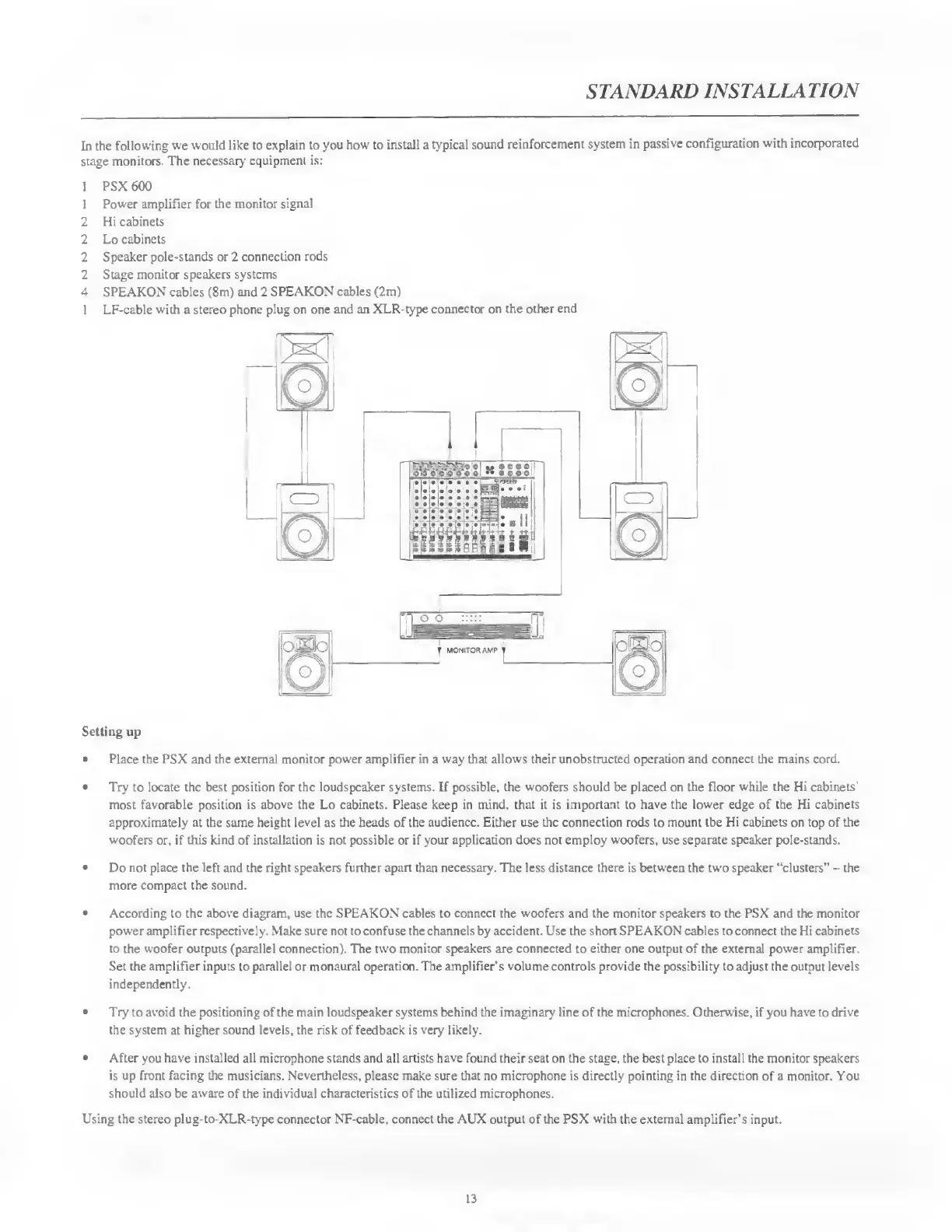
According
to
the
above
diagram,
use
the
SPEAKON
cables
to
connect
the
woofers
and
the
monitor
speakers
to
the
PSX
and
the
monitor
power
amplifier
respectively.
Make
sure
not
to
confuse
the
channels
by
accident.
Use
the
short
SPEAKON
cables
to
connect
the
Hi
cabinets
to
the
woofer
outputs
(parallel
connection).
The
two
monitor
speakers
are
connected
to
either
one
output
of
the
external
power
amplifier.
Set
the
amplifier
inputs
to
parallel
or
monaural
operation.
The
amplifier’s
volume
controls
provide
the
possibility
to
adjust
the
output
levels
independently.
Try
to
avoid
the
positioning
of
the
main
loudspeaker
systems
behind
the
imaginary
line
of
the
microphones.
Otherwise,
if
you
have
to
drive
the
system
at
higher
sound
levels,
the
risk
of
feedback
is
very
likely.
After
you
have
installed
all
microphone
stands
and
all
artists
have
found
their
seat
on
the
stage,
the
best
place
to
install
the
monitor
speakers
is
up
front
facing
the
musicians.
Nevertheless,
please
make
sure
that
no
microphone
is
directly
pointing
in
the
direction
of
a
monitor.
You
should
also
be
aware
of
the
individual
characteristics
of
the
utilized
microphones.
Using
the
stereo
plug-to-XLR-type
connector
NF-cable,
connect
the
AUX
output
of
the
PSX
with
the
external
amplifier’s
input.
13

Related product manuals