satisfactory, see the “Adjusting the coee mill” section.
menu parameters”, “Rinse” function.
will absorb too much heat.
re-pressing the previously selected icon which remains lit during
the operation.
coee in the cup, just keep pressing the previously selected icon
within 3 seconds after delivery has nished.
with water or the appliance will not deliver coee.
(It is normal for there to be a little water left in the tank).
Even if not full, the empty waste coee container message is di-
splayed 72 hours after the rst coee has been delivered. For the
72 hours to be calculated correctly, the machine must never be
turned o with the main switch in the 0 position.
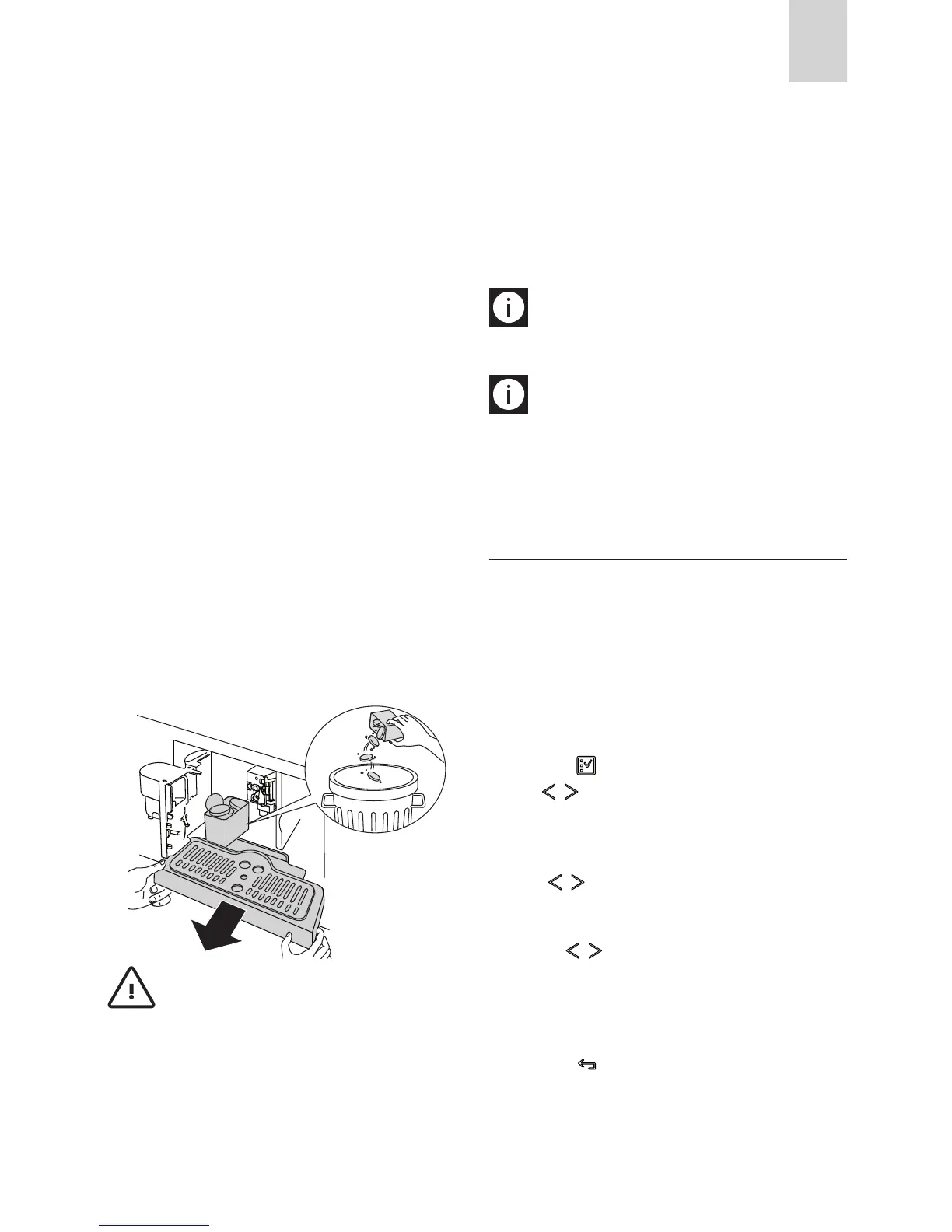
To clean, open the service door on the front of the appliance
by pulling the spout (g. 16), extract the drip tray (g. 17) and
clean.
When cleaning, always extract the drip tray completely.
Important! When extracting the drip tray, the waste
If this is not done, the machine may be clogged.
-
livering coee.
If it is removed, it will not be possible to make the coee and
tank and replace in the appliance.
To turn the appliance back on, insert the water spout if not al-
ready in place (g. 6), then press the OK icon (B9). “HOT WATER
PRESS OK” is displayed.
Press the OK icon (B9) within a few seconds and deliver water
from the spout for about 30 seconds. When delivery stops, the
basic modes are displayed again.
N.B.: The coee maker may request the operation to be
repeated a number of times until the air is completely elminated
from the hydraulic circuit.
N.B.: if this operation is not performed correctly or if the
machine is turned o, the basic modes may be displayed, althou-
gh the problem is in fact still present.
CHANGING THE QUANTITY OF COF
FEE IN THE CUP
The appliance is set by default to automatically make the fol-
lowing types of coee:
To change the quantity, proceed as follows:
icon (B2) to enter the menu (g. 15). Press
the -
FEE” is displayed.
the icons (B7) and (B8).
want to make.
icons (B7) and (B8) to change the quantity
of coee. The progress bar shows the quantity of coee se-
lected.
cancel the operation).
(B6) icon (B6) (g. 18) twice to exit the
menu.
The appliance is now reprogrammed with the new settings and
is ready.







 To Next Page