cancel the operation.
icon (B6) (g. 18) twice to exit the menu.
MAKING A NUMBER OF CUPS OF
COFFEE WITH THE JUG FUNCTION
of coee (4, 6) directly in the jug (A9) to keep the coee hot.
and remove the lid.
Rinse the jug and lid.
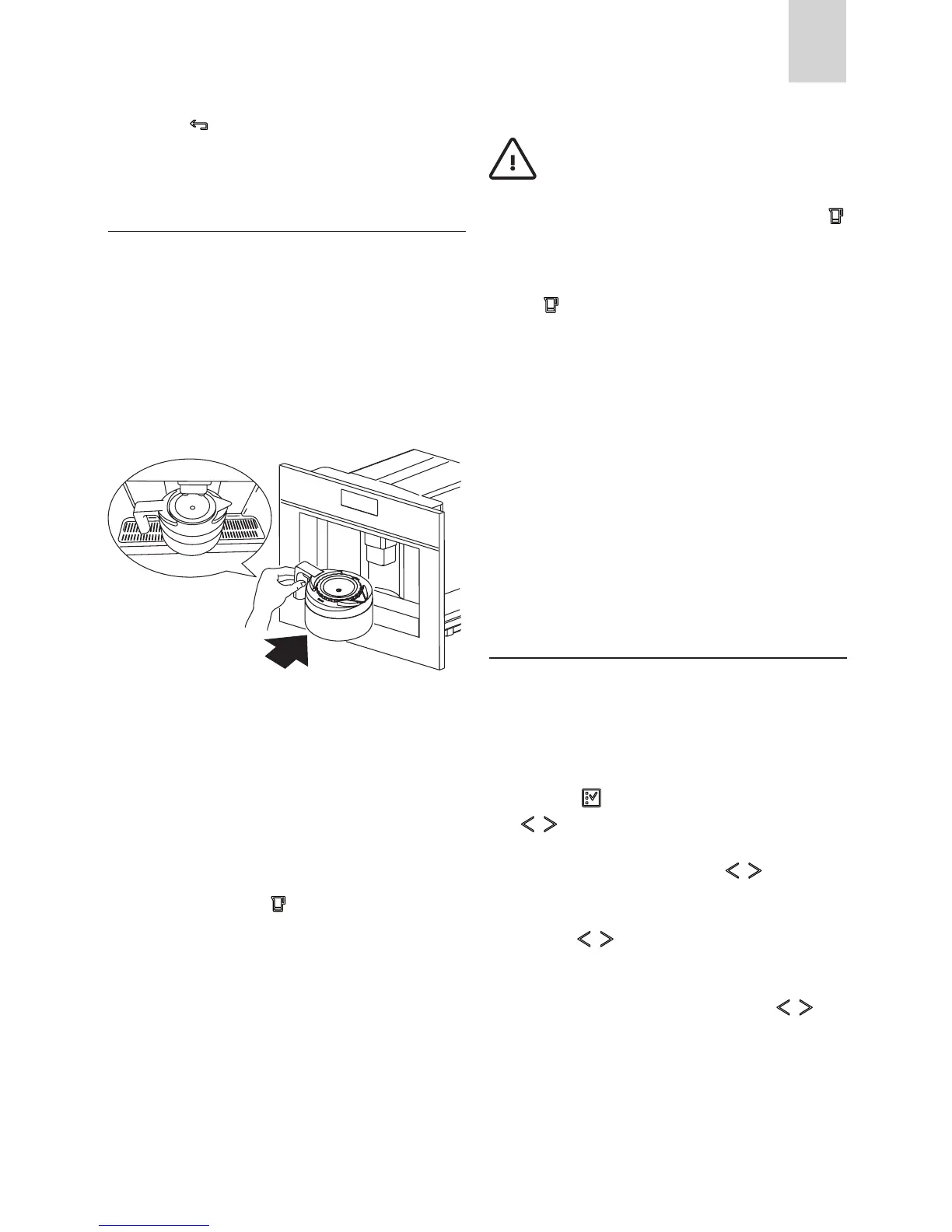
tightly closed and then place it under the coee spout.
Always position the jug with the handle facing to the right
or left as shown in the gure.
The coee spout (A13) must be fully raised to enable the
jug to be inserted.
bean container is full enough and the waste coee contai-
ner is completely empty.
and the number of cups you want to make with the jug are
icon (B14). The display shows a
progress bar which indicates coee making process.
When the progress bar is complete, the appliance nishes
the process and automatically goes back to the coee jug
function.
If on the other hand an incomplete progress bar is displa-
yed, this means that the cycle has not been completed
correctly. Remove the jug and check the message which
appears on the display, consulting the section “DISPLAYED
the coee hot.
is lined up with the spout of the jug.
Important!
complete the required function, the appliance stops the process
and waits for the bean container to be lled again and the
icon (B14) to be pressed. For example, when you want to make 4
-
kes 2 cups then stops making coee. Fill the bean container and
press the icon (B14). Once the container has been lled, the
appliance makes the 2 remaining cups only to reach the required
number of 4 cups.
If there is not enough water in the tank to complete the requi-
red function or the waste coee container is full, the appliance
interrupts the process.
To ll the water tank or empty the waste coee container, you
must remove the jug. This interrupts the programme.
After rectifying the problem, the programme must be started
again.
In this case, you must take the amount of coee already delive-
red into account to avoid the jug overowing.
CHANGING JUG FUNCTION PARA
METERS
The jug programme is factory set with default values.
These can be modied to suit your personal taste and saved.
You can select 5 dierent types of coee from extra-mild to
extra-strong and, with the aid of a graphic bar, 10 quantities of
coee.
To make these adjustments, proceed as follows:
icon (B2) to enter the menu. Press the
-
yed.
icons (B7) and
icons (B7) and (B8) to select a dierent
coee taste from extra-mild to extra-strong.
icons
cup is displayed and can be made shorter or longer. A com-
pletely full bar corresponds to the maximum quantity of
coee per cup.







 To Next Page