level (corresponding to about 750 ml) marked on the con-
tainer. You should ideally use skimmed or semi-skimmed
milk at refrigerator temperature (about 5°C).
washer (g. 24) then replace the milk container lid.
lid.
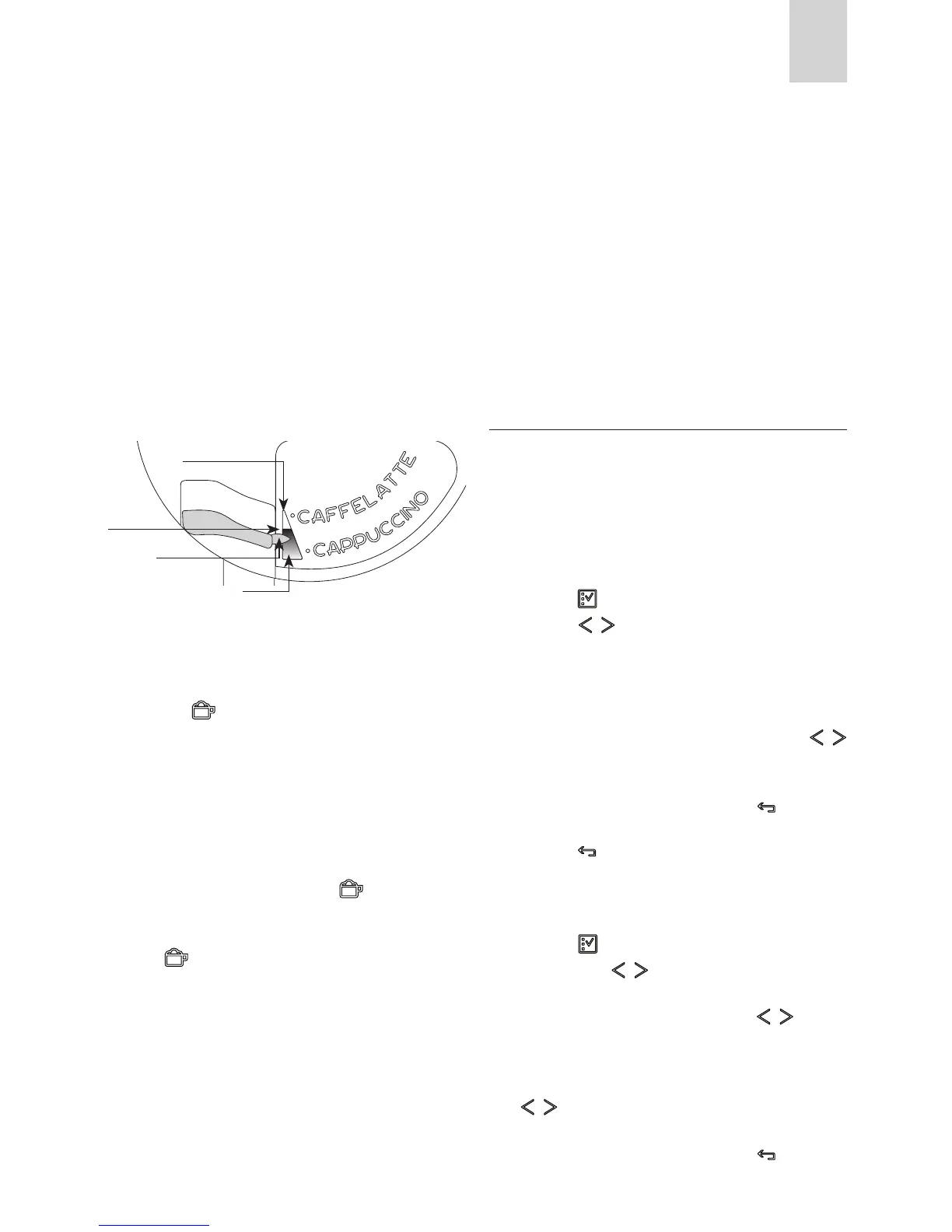
The quantity of froth can be adjusted by moving the regu-
-
froth.
container to the nozzle (g. 25).
and after a few seconds, frothed milk ows out of the milk
spout into the cup below. (La fuoriuscita del latte si inter-
rompe automaticamente). (Delivery stops automatically).
-
red, sprinkle the froth with a little cocoa powder.
coee can be interrupted by pressing the icon (B12).
-
thed milk, remove the container and add milk. Reattach and
press the (B12) to request a cappuccino again.
milk frother, always clean the circuits in the milk container lid
after making cappuccino.
least 5 seconds (g. 26) to start the cleaning function.
progressive bar.
complete indicating that cleaning is concluded.
After cleaning, remove the milk container and place in the
refrigerator.
The milk should not be left out of the refrigerator for more
than 15 minutes.
appliance delivers automatically into the cup, proceed as descri-
bed in the section “Changing the quantity of coee and milk for
cappuccino”.
CHANGING THE QUANTITY OF COF
FEE AND MILK FOR CAPPUCCINO
The appliance is set by default to automatically deliver a normal
cappuccino.
To change these quantities, proceed as follows:
Changing the quantity of milk
-
cated on the container.
icon (B2) to enter the menu (g. 15), then
press the icons (B7) and (B8) (g. 2) until “PRO-
-
splayed.
icons (B7) and (B8). The progress bar shows the quantity of
milk selected.
icon (B6) to
cancel the operation.
(B6) icon (B6) (g. 18) twice to exit the
menu.
Changing the quantity of coee
(B2) icon (B2) to enter the menu (g. 15),
then press the icons (B7) and (B8) (g. 2) until
icons (B7
icons (B7) and (B8). The progress bar shows the
quantity of coee selected.
icon (B6) to
“Denser” froth
frothed milk regulator
“Less dense” froth







 To Next Page