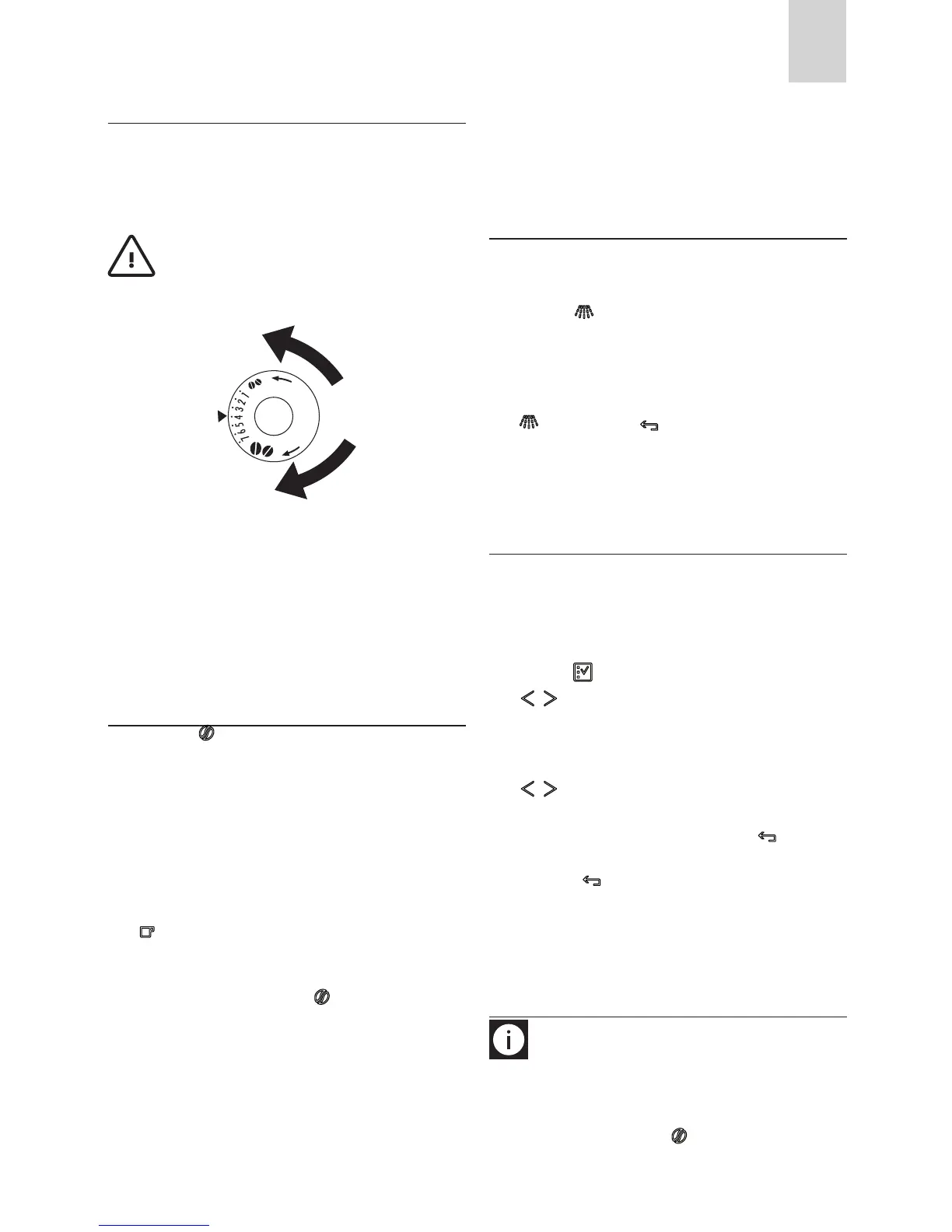
ADJUSTING THE COFFEE MILL
The coee mill is preset in the factory and should not require
adjusting. However, if after making the rst few coees you nd
that delivery is either too fast or too slow (a drop at a time), this
can be corrected by adjusting the grinding adjustment knob (g.
14).
Important! The grinding adjustment knob must only
be turned when the coee mill is in operation.
For slower delivery and creamier coee, turn one click anti-
clockwise (ner pre-ground coee).
For faster delivery (not a drop at a time), turn one click clockwise
(coarser pre-ground coee).
PREPARING COFFEE WITH PRE
GROUND COFFEE INSTEAD OF BE
ANS
(B4) icon (B4) (g. 8) and select the pre-
ground coee function.
-
dles (g. 7).
in the funnel (g. 19), push the appliance in then proceed
-
ans”.
icon (B10) (g. 12).
to making coee using beans, deactivate the pre-ground
coee function by pressing the icon (B4) (g. 8).
o or it could spread through the inside of the appliance.
-
ce will not make the coee.
machines into the funnel.
and the funnel clogs, push the coee down with a knife (g. 21)
then remove and clean the brewing unit and machine as descri-
bed in the “Cleaning the brewing unit” section.
DELIVERING HOT WATER
underneath (g. 6).
icon (B13) (g. 20). The appliance displays:
“HOT WATER PRESS OK”. Press the OK icon (B9) again and
hot water is delivered from the cappuccino maker into the
container underneath. (You should not deliver hot water
for more than 2 minutes at a time). To interrupt, press the
icon (B13) or the icon (B6). The appliance stops de-
livery once the set quantity is reached.
CHANGING THE QUANTITY OF HOT
WATER
The machine is set by default to automatically delivery 200 ml
of hot water.
To change these quantities, proceed as follows:
5).
(B2) to enter the menu (g. 15) or press the
WATER” is displayed.
icons (B7) and (B8). The progress bar shows the
quantity of water selected.
icon (B6) to
cancel the operation.
(B6) icon (B6) (g. 18) twice to exit the
menu.
and is ready.
MAKING CAPPUCCINO
N.B.: Set the quantity of coee you want to use to make
the cappuccino in the “Program cappuccino” function in the
menu.
cappuccino by pressing the icon (B4).







 To Next Page