Component Teardown and Testing
4-6
Cooling Fan Motor Removal
REMOVAL
1. Disconnect the power supply cord and then remove
outer case.
2. Open the door and block it open.
3. Discharge high voltage capacitor.
4. Disconnect the wire leads from the fan motor.
5. Remove the two (2) screws holding the fan motor to
the oven cavity back plate.
6. Remove the fan blade from the fan motor shaft ac-
cording to the following procedure.
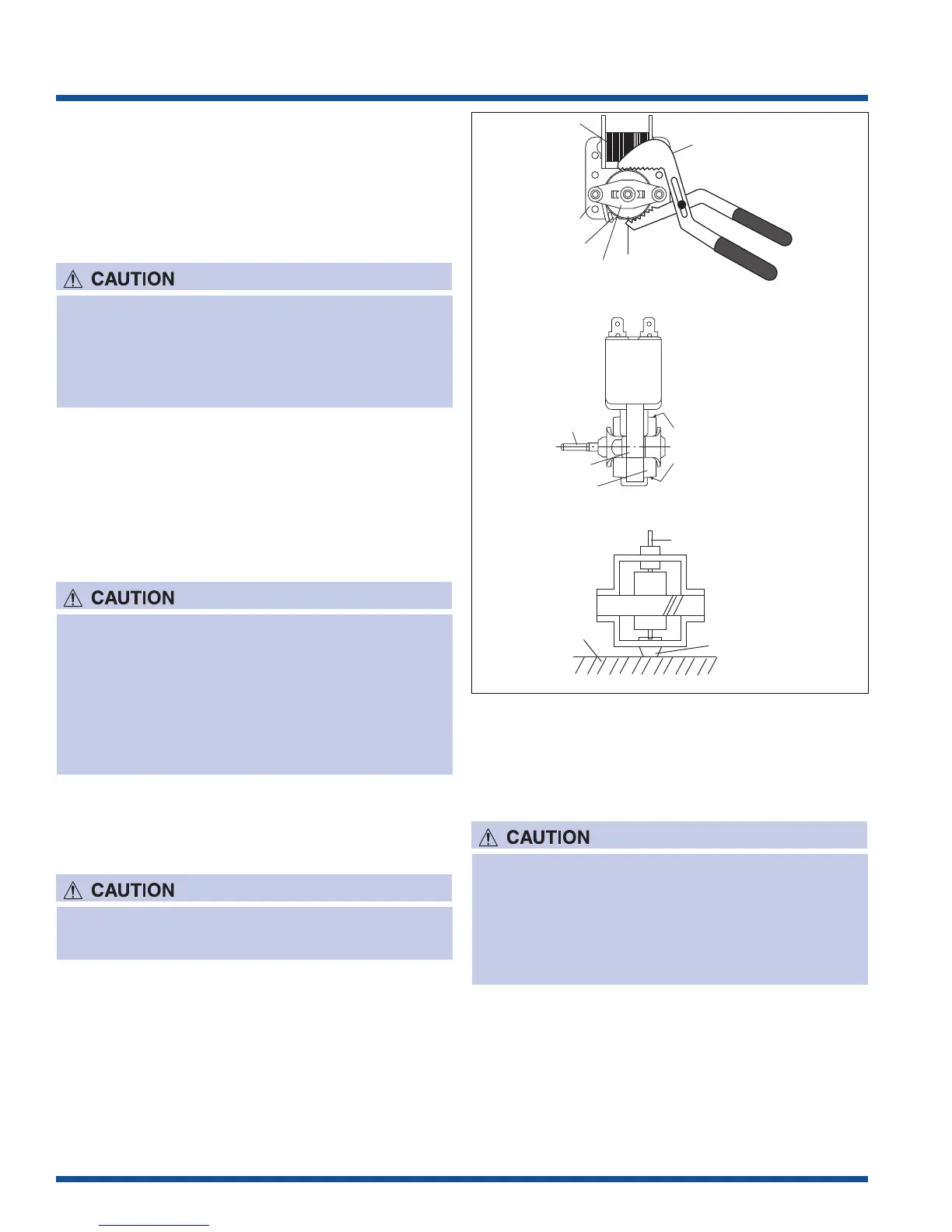
7. Hold the edge of the rotor of the fan motor by using a
pair of groove joint pliers.
8. Remove the fan blade from the shaft of the fan motor
by pulling and rotating the fan blade with your hand.
9. Now, the fan blade and the fan motor will be free.
INSTALLATION
1. Install the fan blade to the fan motor shaft according
to the following procedure.
2. Hold the center of the bracket which supports the
shaft of the fan motor on the flat table.
3. Apply the screw lock tight into the hole (for shaft) of
the fan blade.
Rear View
Side View
Gap
Rotor
Bracket
Stator
Groove joint pliers
Coil
Shaft
Axis
Stator
Rotor
These are the positions
that should be pinched
with pliers.
Shaft
Table
Center of
bracket
Figure 4-5. Cooling Fan Motor Removal
To discharge the high voltage capacitor, wait for 60
seconds and then short-circuit the connection of
the high-voltage capacitor (that is the connecting
lead of the high-voltage rectifier) against the
chassis with the use of an insulated screwdriver.
* Make sure that no metal pieces enter the gap
between the rotor and the stator of the fan motor
because the rotor is easily shaven by pliers and
metal pieces may be produced.
* Do not touch the pliers to the coil of the fan
motor because the coil may be cut or injured.
* Do not disfigure bracket by touching with pliers.
Do not reuse the removed fan blade because the
hole (for shaft) may be larger than normal.
4. Install the fan blade to the shaft of fan motor by
pushing the fan blade with a small, light weight, ball
peen hammer or rubber mallet.
5. Install the fan motor to the oven cavity back plate
with the two (2) screws.
6. Connect the wire leads to the fan motor, referring to
the pictorial diagram.
* Do not hit the fan blade strongly when installed
because the bracket may be disfigured.
* Make sure that the fan blade rotates smooth after
installation.
* Make sure that the axis of the shaft is not
slanted.




 To Next Page