12 electrolux
Countdown
To set a countdown. A signal sounds after
the time has elapsed.
This function does not affect the functioning
of the oven.
Time
To set, change or check the time
(See also section “Before Using for the First
Time”).
3 General Hints
• After a function has been selected, the
display flashes for about 5 seconds.
While it flashes, the desired time can be
set using the or buttons.
• When the desired time has been set, the
display flashes for another 5 seconds.
The set time begins to run.
• Press any of the buttons to stop the sig-
nal.
• The desired oven function and tempera-
ture can be selected before or after set-
ting the clock functions.
• When cooking is finished, turn the oven
and temperature selectors back to zero.
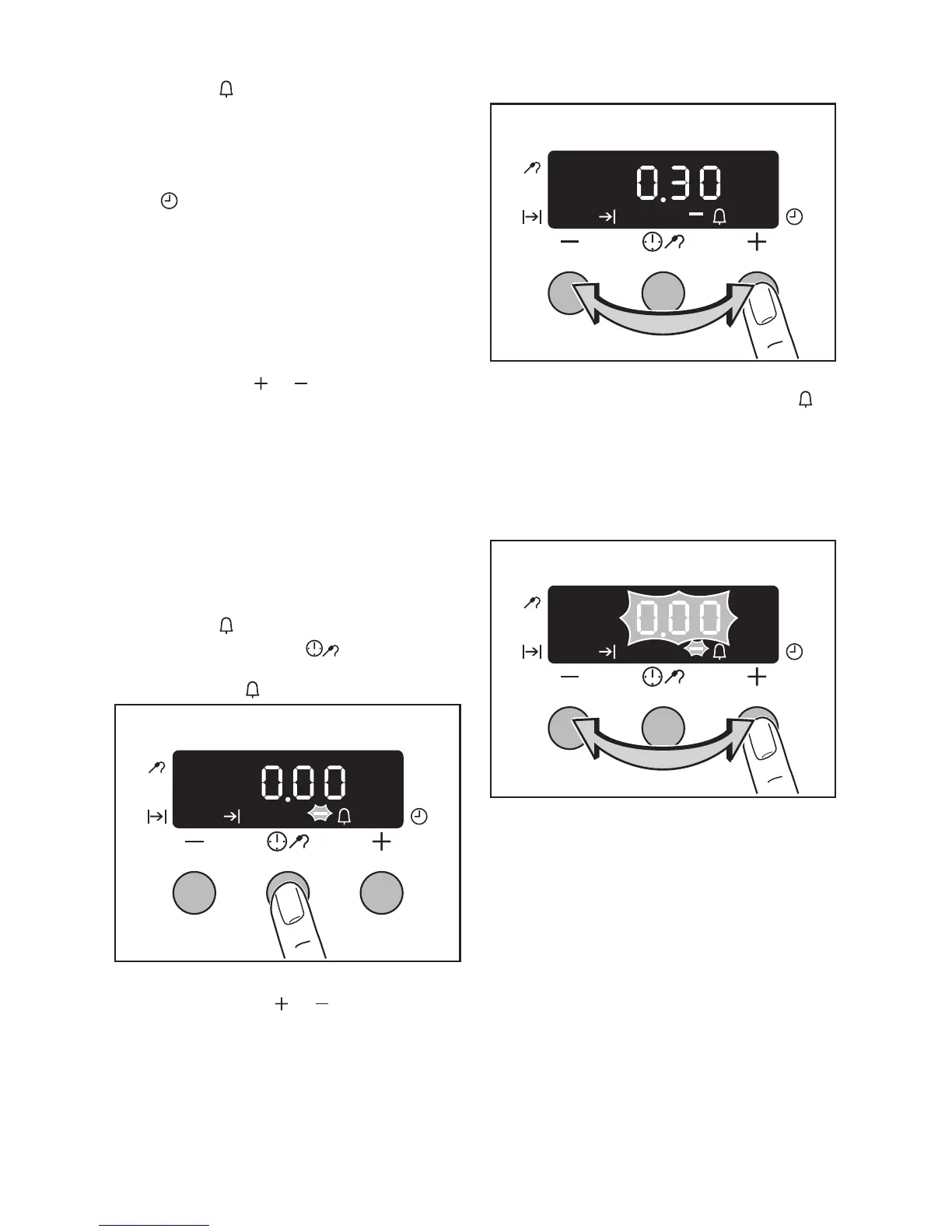
Countdown
1. Press the Selection button repeat-
edly until the function indicator
Countdown flashes.
2. Within 5 seconds set the desired count-
down using the or buttons
(max. 2 hours 30 minutes).
The function indicator Countdown
lights up.
After 5 seconds the display shows the
current time.
When the time set has elapsed, “00.00” and
the function indicator flashes. An audible sig-
nal sounds.
3. The signal can be stopped by pressing
any button.







 To Next Page