28
Other functions
3 The brightness level of the display is reduced automatically between the
hours of 22:00 and 6:00.
Switching off the time display
2 You can save power by switching off the time display.
1. If necessary, switch off by pressing the main Power button.
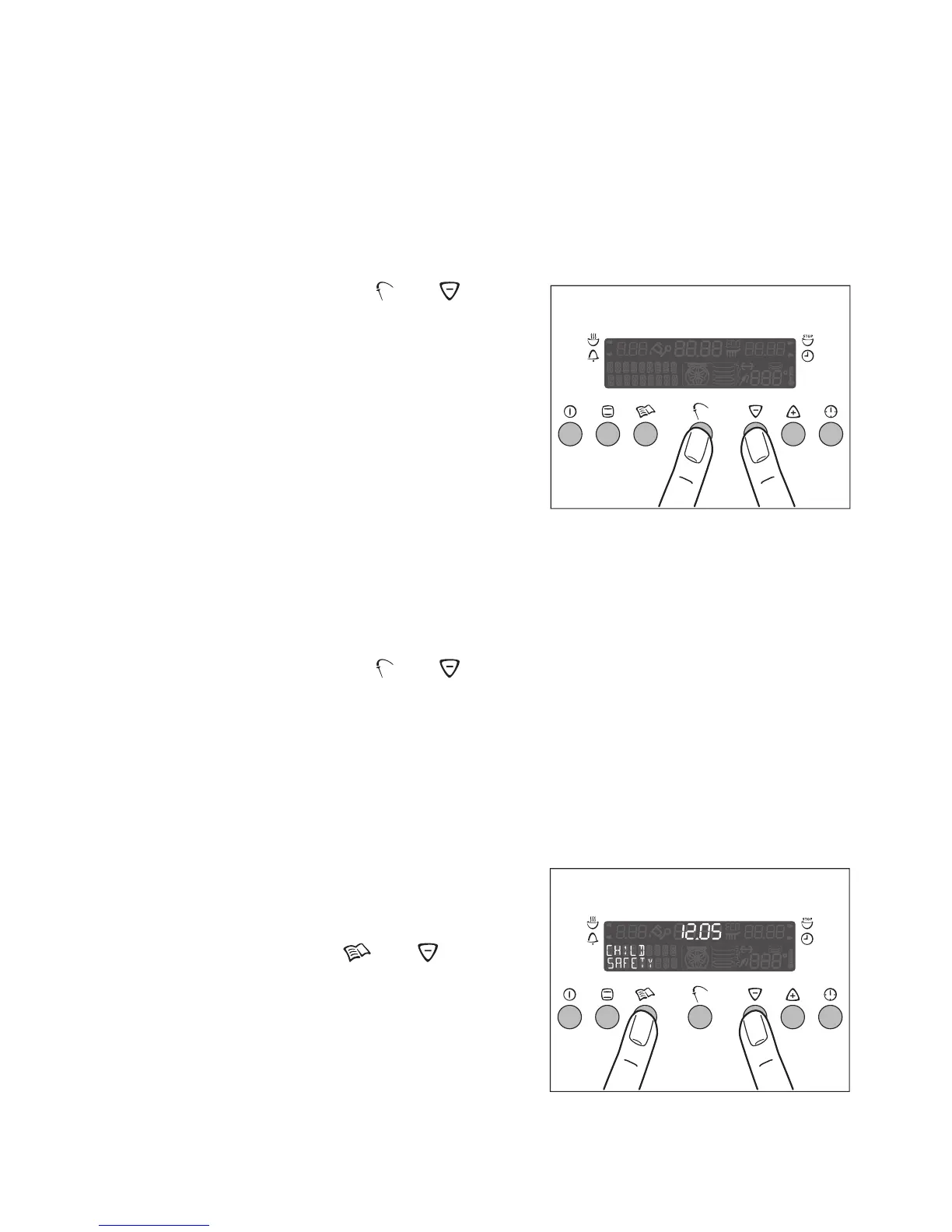
2. Press the Meat Probe and but-
tons at the same time, until the display
darkens (this will be after about
2seconds).
3 The next time the appliance is switched
on, the time display comes on again au-
tomatically.
The clock display will go off again the
next time the appliance is switched off.
To restore continuous clock display, the
time display has to be switched on again.
1. If necessary, switch off the appliance by pressing the main Power button.
2. Press the Meat Probe and buttons at the same time, until the time
display re-appears (this will be after about 2 seconds).
Child Safety device
When the Child Safety device is engaged, the oven cannot be switched on.
3 The Child Safety device is for the oven only, not the rings.
Setting the Child Safety device
1. If necessary, switch on the oven using
the main Power button. None of the
oven functions should be selected.
2. Press the Recipes and buttons
at the same time, until the the “CHILD
SAFETY” indication appears on the
display.
The Child Safety devices is now en-
gaged.
Switching on the time display







 To Next Page