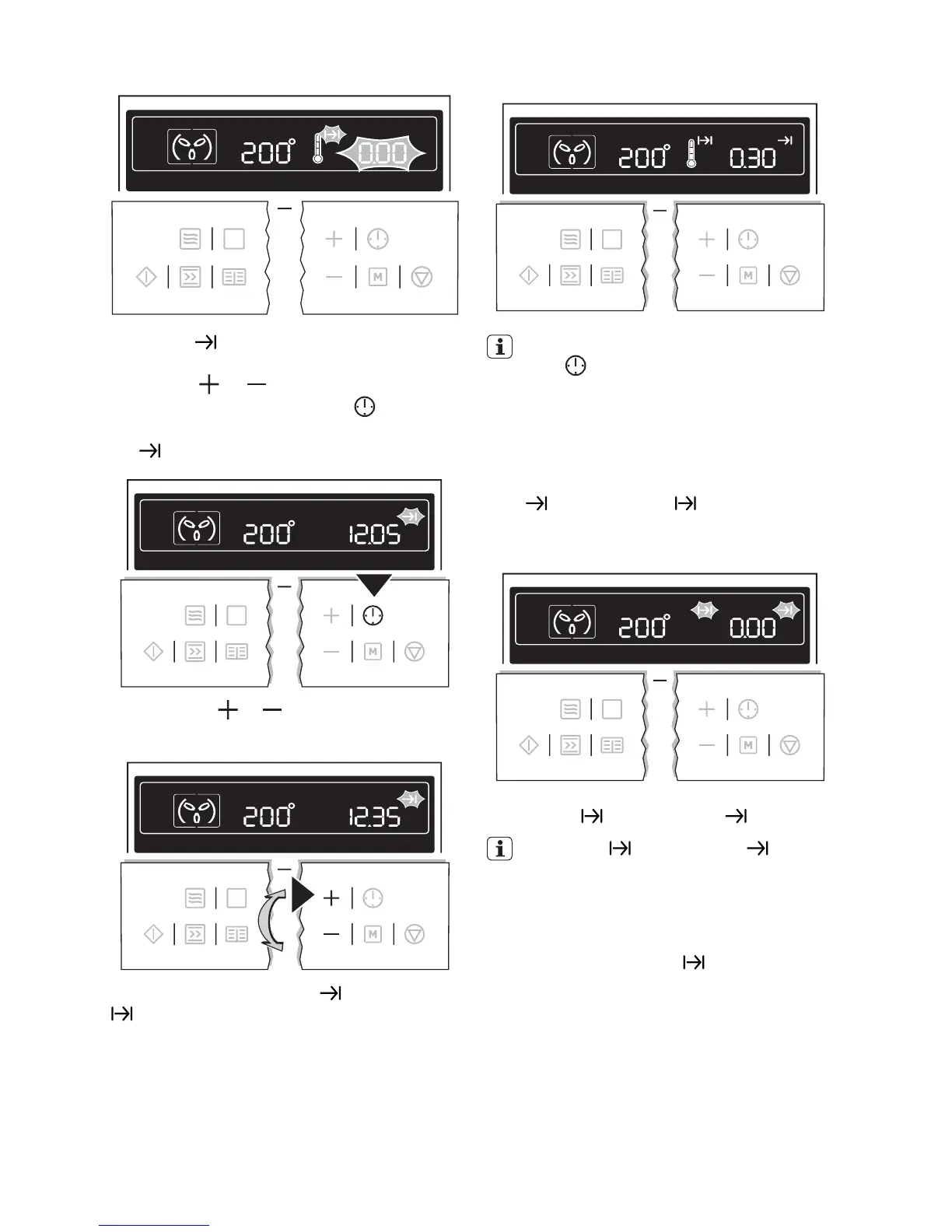
End time
1. Select oven function and temperature us-
ing the
or button.
2.
Press the Clock Functions
button re-
peatedly until the symbol for End time
flashes.
3.
Using the
or button, set the desired
switch-off time.
The symbols for End time and Cook time
light up.
The oven switches itself off automatically.
By repeatedly pressing the Clock Func-
tions
button, the current time can be
called up.
When the time has elapsed, an acoustic sig-
nal sounds for 2 minutes. The oven switches
itself off.
“0.00” is displayed and the symbols for End
time
and Cook time flash.
To turn off the acoustic signal: Press any but-
ton.
Cook time and End time combined
Cook time and End time can be
used simultaneously, if the oven is to be
switched on and off automatically at a
later time.
1. Select oven function and temperature.
2. Using the Cook time
function, set the
time required for cooking the dish.
e.g. 1 hour.
20 electrolux



 To Next Page