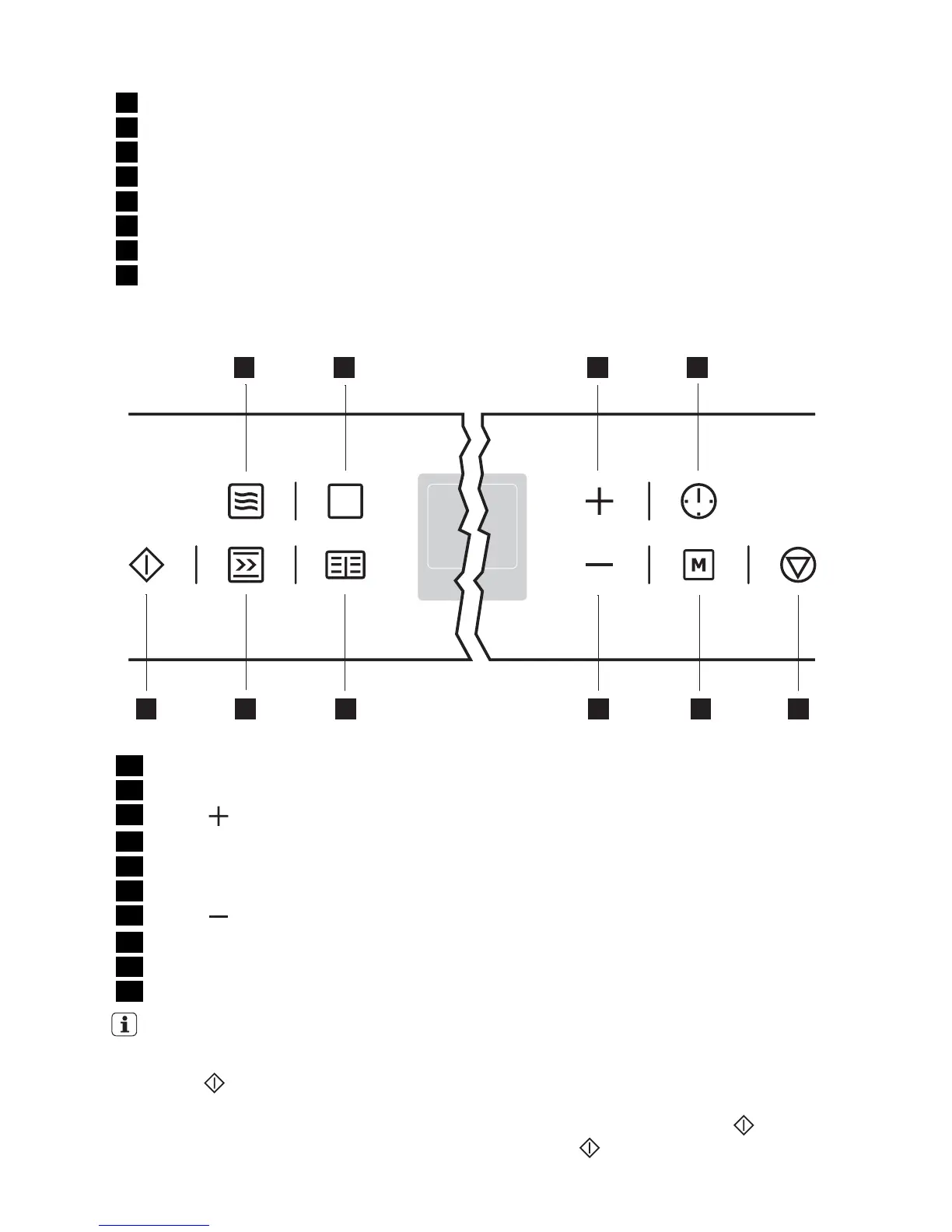
1 Memory: P / Test: d
2 Microwave function
3 Temperature/Time/Microwave Power
4 Weight display
5 Clock functions Period of operation
6 Thermometer symbol
7 Baking/roasting programmes
8 Oven Functions
The control panel
1 3 4
5
678910
2
1 Microwave button
2 Oven Functions
3
Button
4 Clock Functions
5 Stop button/ Reset
6 Memory function
7
Button
8 Baking/roasting programmes
9 Speedcook
10 Start button
General instructions
• Always confirm the selected function with
the Start
button.
If the selected function is not started within
120 seconds, the appliance switches itself
off.
• When the selected function is started, the
oven begins to heat up or the time set be-
gins to count down.
• If the oven door is opened during opera-
tion, the function stops. After closing the
door continue with the Start
button. If
the Start
button is not pressed within
120 seconds, the appliance switches off.
electrolux 9



 To Next Page