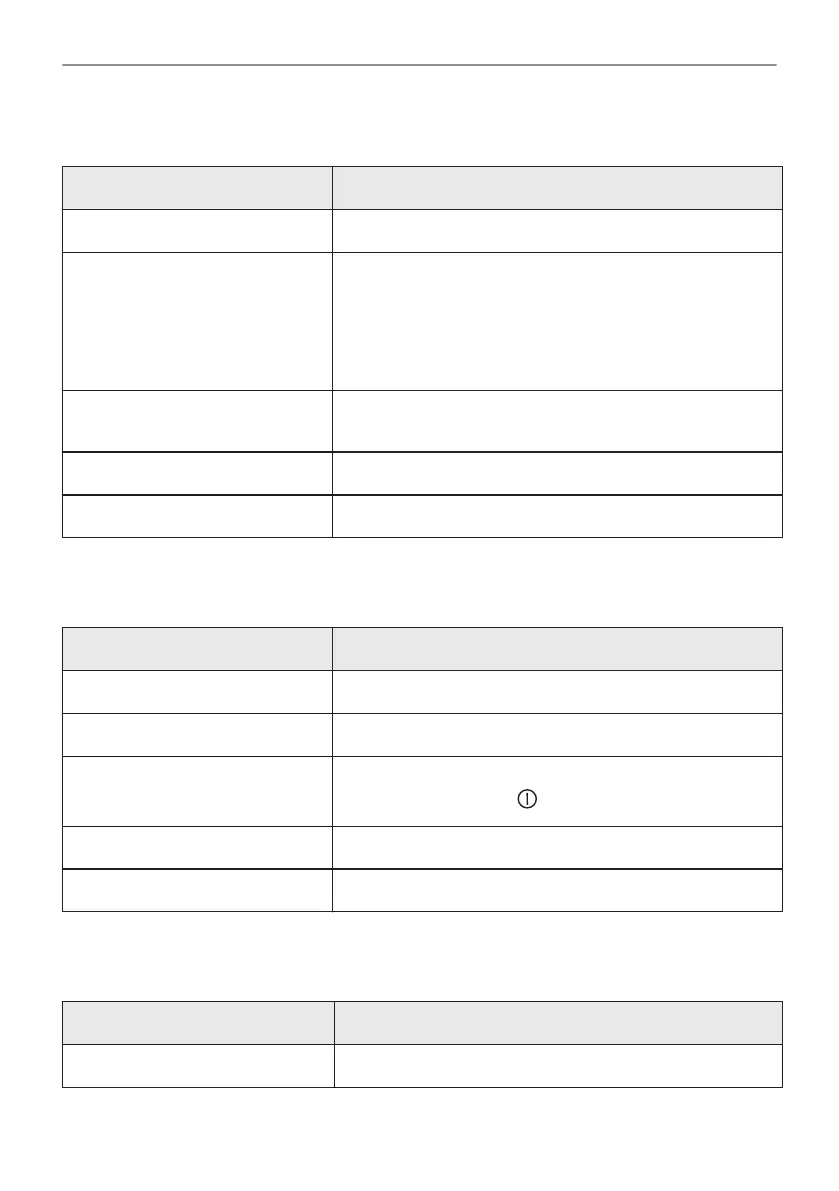
15.2 Submenu for: Options
Submenu Application
Light Turns the lamp on and off.
Child Lock Prevents accidental activation of the appliance. When the
option is on, the text "Child Lock" appears on the display
when you turn on the appliance. To enable the appliance
use, choose the code letters in the alphabetical order. Ac‐
cess to the timer, the remote operation and the lamp is
available with the Child Lock on.
Fast Heat Up Shortens heat up time. It is available only for some of the
appliance functions.
Time indication Turns the clock on and off.
Digital clock style Changes the format of the displayed time indication.
15.3 Submenu for: Setup
Submenu Description
Language Sets the oven language.
Display brightness Sets the display brightness.
Key tones Turns the tone of the touch fields on and off. It is not possi‐
ble to mute the tone for: .
Buzzer volume Sets the volume of key tones and signals.
Time of day Sets the current time and date.
15.4 Submenu for: Service
Submenu Description
Demo mode Activation / deactivation code: 2468
42/192
MENU STRUCTURE





 To Next Page