EasyManua.ls Logo

Electrolux WP4700H - Locking and Tagging Procedure

Electrolux WP4700H
56 pages
Print Icon
To Next Page IconTo Next Page
To Previous Page IconTo Previous Page
Loading...
2413 1
3
1
2
3
4
Notice
Date Page
05201053
INSTALLATION
MANUAL
3. Locking and
tagging procedure
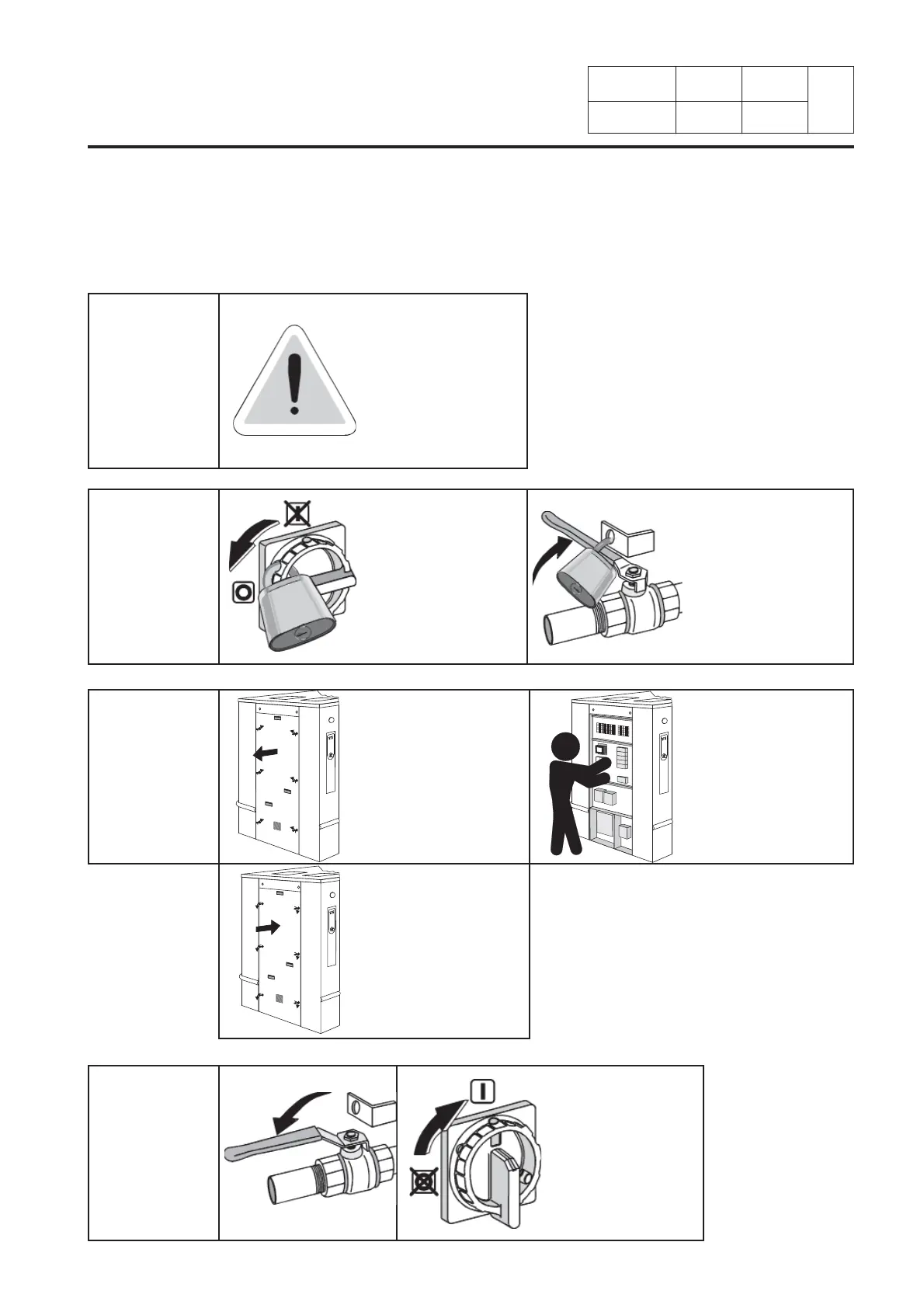
Locking and tagging procedure
Put the main switch
to Off and lock
the handle with
a padlock in one
of the three holes
provided for this
purpose.
Always respect
items 2, 3 and 4
carefully before
doing any repair or
maintenance work on
the machine.
Close the stop valves
for the other supplies
(steam, thermal uid,
compressed air)
to stop and lock
their handle with a
padlock.
Open the xed
protectors (casings,
doors) with the key
provided or a special
tool.
Close and carefully
lock the xed
protectors.
Unlock the stop
valves and the main
switch.
Do the maintenance.
A red insert at the beginning of this instruction handbook schematically shows the locking and
tagging procedure described below. If you wish, you can detach this insert and display it close to the
machine to remind maintenance personnel of the safety instructions.

Related product manuals