16
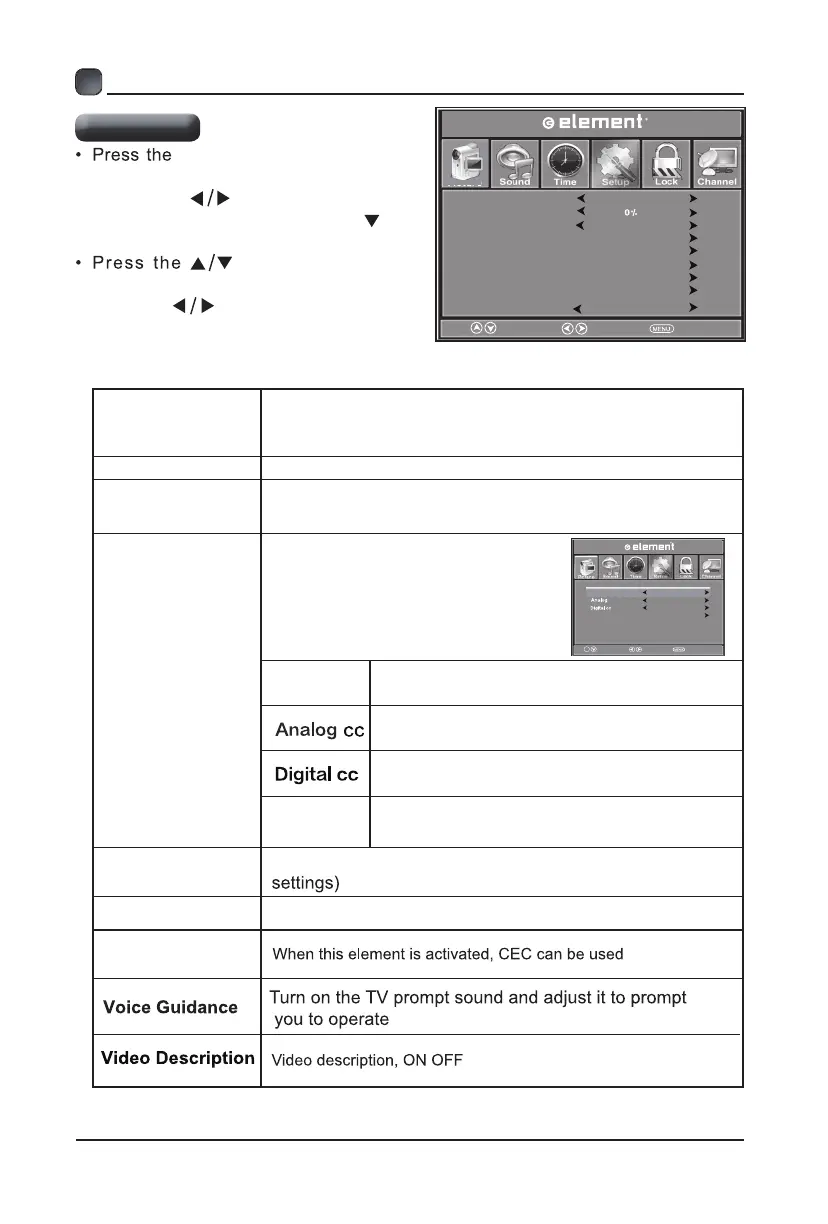
MENU button on the main
unit or on the remote control then
press the
buttons to select
menu and then press the or
the button to enter.
buttons to select
the following setup options and then
press the
buttons to adjust each
option’s setting.
CUSTOMIZING TV SETTINGS
Setup Menu
A l l o w s y ou t o t u r n c l o s e d
captioning of audio on or off,
select analog or digital modes, or
personalize the captioning style.
CC Mode
Select CC mode or
CC
on Mute.
Select analog mode among: CC1, CC2,
CC3, CC4, Text1, Text2, Text3, Text4.
Select digital mode among: Service1~6.
Option
Personalize the captioning style,such as
the size and color of the digital caption.
Restore Default
Restore the TV to factory default settings.(Except the lock
Menu Language
OSD Timeout
CIosed Caption
Restore Default
Setup Wizard
HDMI CEC
Voice Guidance
Off
English
30 S
Video Description
R
Select
Move EXIT
Transparent
CIosed Caption
u t e
e
CC Mode
Option
CC1
CC Off
Service1
Select
Move EXIT
CC
Setup Wizard
Readjust basic TV data, language, time, format, channel
Menu Language
Select menu language among: English, Français or
Español. The default on-screen menu language is
English.
Transparent
Adjust the transparency ratio of TV menu transparent function
OSD Timeout
Select and adjust the menu closing time 5s 15s 30S 45s
60s
Picture
Setup
Setup
CEC
CC On, CC off,among:
Setup
OK


 To Next Page