20
CUSTOMIZING TV SETTINGS
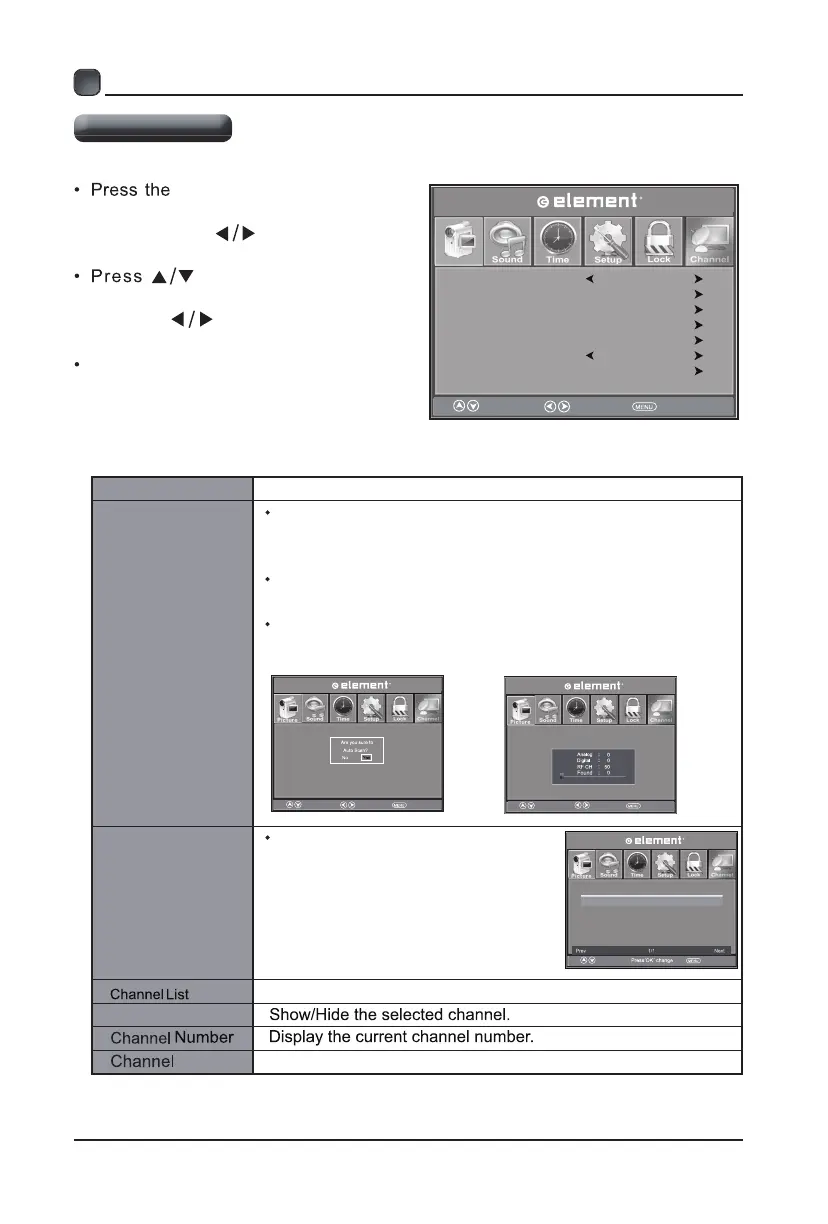
MENU button on the main
unit or on the remote control and
then press the
buttons to select
Channel menu.
buttons to select the
following channel options and then
press the
buttons to adjust each
option’s setting.
Channel Settings
Air/Cable
Select antenna between Air and Cable.
Auto Scan
Find and store all available channels automatically.
Favorite
Set the selected channel as one
of the favorite programs.
Label Display the current channel label.
Air/Cable
Auto Scan
Favorite
Select t ix Ee v o M
Show/Hide
Channel List.
Channel Label
Air
Select n
r t e R
e v o M
Return
4.1
4.2
13.0
KDFW DT
Press’OK’Change
n r t e Re v o
Channel
Channel Label
Favorite
KDFW DT
Channel Number
Select
Move EXIT
Open the channel list
Select
Move EXIT
Select
Move EXIT
Select
EXIT
Show/Hide
Picture
Channel
Channel
Channel
Channel
Enter the automatic scanning interface, select confirm
scanning, and then enter the next interface
Enter the automatic scanning interface, select confirm
scanning, and then enter the next interface
Then they scan the program, and when they're done
they can watch it
Channels can only be used in TV mode


 To Next Page